Reduce endpoint risk by combining five priorities: patch known exploited vulnerabilities first, require phishing-resistant MFA on privileged and email accounts, run centrally managed behavior-based EDR on every device, enforce secure configuration baselines with application allowlisting, and feed it all into continuous logging and monitoring. These five, pulled from current CISA, CIS, and NIST guidance, give you the prioritized checklist below.
TL;DR:
- CISA places known exploited vulnerabilities ahead of routine monthly patching, especially on internet facing systems; verify remediation with a follow up vulnerability scan.
- For privileged and email accounts, choose methods that resist phishing, such as FIDO2 keys or certificate authentication, rather than SMS codes or push prompts.
- Connect EDR telemetry to centralized logs so analysts can correlate endpoint, identity, and network alerts, and set prompt human triage for high severity detections.
- Deploy application allowlisting in audit mode, inventory current software, then enforce by device group; require scoped, reviewed exclusions to avoid undermining the policy.
- For BYOD, require MDM enrollment and device compliance before granting sensitive access; limit unmanaged devices to necessary resources or browser isolation.
Table of Contents
- 1. Prioritized Checklist: 16 Endpoint Security Best Practices
- 2. Patching and Vulnerability Management: Prioritize KEV, Then Automate
- 3. Identity, MFA, and Least-Privilege Access Controls
- 4. Endpoint Protections: EPP, EDR, and Microsoft ASR Deployment Guidance
- 5. Configuration Hardening and Application Allowlisting
- 6. Monitoring, Centralized Logging, and Incident Response Exercises
- 7. BYOD, Mobile, Remote Work, and Zero Trust Device Posture
- Priorities and Sequencing for Resource-Constrained IT Teams
- How We Help You Operationalize These Practices
- FAQ
- Sources
1. Prioritized Checklist: 16 Endpoint Security Best Practices
Most endpoint programs fail not from lacking tools, but from lacking sequence. The list below orders actions by urgency so a small team can triage instead of trying to do everything on day one.
- Patch known exploited vulnerabilities immediately. Owner: IT/security jointly. Timeline: immediate. Verify: confirm the asset no longer appears on your next vulnerability scan.
- Automate monthly OS and application patching. Owner: IT. Timeline: monthly. Verify: patch compliance report shows strong coverage across managed endpoints.
- Require phishing-resistant MFA for privileged and email accounts. Owner: security/identity admin. Timeline: immediate. Verify: conditional access logs show no legacy MFA method accepted for admin roles.
- Deploy centrally managed, behavior-based EDR on every endpoint. Owner: security/vCIO. Timeline: immediate for new devices, with backfill prioritized. Verify: EDR console shows agent health across inventory.
- Build and maintain an accurate asset inventory tied to a CMDB. Owner: IT. Timeline: weekly reconciliation. Verify: discovered assets match ticketed, managed devices with no unexplained gap.
- Roll out application allowlisting in audit mode, then enforce. Owner: security. Timeline: phased rollout. Verify: audit logs show blocked execution attempts dropping to near zero false positives.
- Deploy secure configuration baselines on every new image. Owner: IT. Timeline: immediate for new builds, quarterly review. Verify: configuration scan against your baseline standard passes without exceptions.
- Enable host-based firewalls with default-deny inbound rules. Owner: IT. Timeline: immediate. Verify: firewall policy audit shows no unauthorized inbound rule.
- Turn on anti-exploitation features (DEP, ASLR, controlled folder access). Owner: security. Timeline: immediate. Verify: endpoint configuration report confirms features are active fleet-wide.
- Restrict and monitor removable media. Owner: IT. Timeline: immediate. Verify: USB device logs show policy enforcement, not just logging.
- Disable autorun and autoplay on all endpoints. Owner: IT. Timeline: immediate. Verify: group policy or MDM report confirms the setting fleet-wide.
- Enable DNS and URL filtering at the endpoint. Owner: security. Timeline: 30 days. Verify: filtering logs show blocked connections to known malicious domains.
- Enforce least privilege and deploy privileged access management. Owner: identity admin. Timeline: prioritize implementation. Verify: standing admin rights drop to a documented, minimal list.
- Centralize logs into a SIEM or log analytics platform. Owner: security. Timeline: prioritize implementation. Verify: log source coverage report shows endpoints, identity, and network feeding one platform.
- Write and rehearse an incident response plan with tabletop exercises. Owner: security leadership. Timeline: initial plan promptly, with regular tabletop exercises. Verify: after-action report produces a documented plan update.
- Apply MDM enrollment and conditional access to BYOD and mobile devices. Owner: IT/identity admin. Timeline: prioritize implementation. Verify: unmanaged devices are blocked from sensitive resource access.
- Validate backup and recovery procedures on a regular schedule. Owner: IT. Timeline: quarterly test restore. Verify: a documented, successful restore from backup within your recovery time objective.
Pro Tip: When resources are tight, triage by exploitability and blast radius first: patch anything on the CISA KEV catalog, lock down privileged and email account MFA, and get EDR fully deployed before investing time in allowlisting or DNS filtering.
2. Patching and Vulnerability Management: Prioritize KEV, Then Automate
Patch volume overwhelms most IT teams, which is exactly why prioritization matters more than coverage percentage alone. CISA directs organizations to prioritize patching known exploited vulnerabilities listed in its KEV catalog above all other patching work, especially on internet-facing systems, and recommends standing up a cross-functional emergency patching team that includes IT, security, and relevant business units so a critical fix does not stall waiting on approvals.
CISA’s guidance puts known exploited vulnerabilities at the top of the queue, ahead of routine monthly cycles, because these are the flaws attackers are already using in the wild, not merely theoretical risks (cisa.gov).
Turning that priority into a repeatable process takes a few structural pieces:
- Run automated asset discovery and vulnerability scanning so you know what you have before you decide what to patch.
- Enrich scan results with CMDB data so every vulnerable host maps to an owner, a business function, and a criticality rating.
- Build patch deployment rings: a small test group, a staged rollout to most of the fleet, and an emergency fast-track lane for KEV-listed flaws.
- Keep a documented rollback plan for every ring so a bad patch does not become its own outage.
- Maintain out-of-band administrative access that does not depend on the same systems you are patching, in case a patch window causes an outage.
Beyond emergency patches, CIS Control 7 recommends automated operating system and application patching on a monthly or more frequent cadence, which gives you a baseline rhythm underneath the emergency process. Document every patch applied, including the date, the system, and the verification step, since that record becomes essential evidence during an audit or an incident review.
Public-facing systems deserve the first pass in any patching cycle: they are what an attacker scans for first, and a delay there carries disproportionate risk compared to an internal workstation behind several layers of network controls.
3. Identity, MFA, and Least-Privilege Access Controls
Credential theft remains one of the most common paths into a network, which is why identity controls sit near the top of any endpoint security program rather than off to the side as an afterthought. CISA recommends requiring phishing-resistant Multi-Factor Authentication for access to all privileged accounts and email service accounts as a baseline protection, calling it out specifically in its Cross-Sector Cybersecurity Performance Goals.
Phishing-resistant means the authentication method cannot be relayed or replayed by an attacker who tricks a user into entering a code on a fake site. In practice, that points to FIDO2 security keys or certificate-based authentication rather than SMS codes or push notifications alone, which remain vulnerable to prompt bombing and real-time phishing kits.
Implementing this well takes a few concrete steps:
- Inventory every privileged account, including service accounts and shared admin logins that often get missed.
- Enforce conditional access policies that require phishing-resistant MFA for any privileged or email-related sign-in.
- Deploy privileged access management with just-in-time elevation so standing admin rights are the exception, not the default.
- Schedule regular entitlement reviews to catch privilege creep before it becomes an attack path.
- Document emergency access procedures (break-glass accounts) so a lockout does not turn into an outage of its own.
Track enforcement with MFA compliance reports, a privileged account rotation cadence, and periodic review of who still needs elevated access versus who accumulated it from a project that ended months ago.
4. Endpoint Protections: EPP, EDR, and Microsoft ASR Deployment Guidance
Endpoint Protection Platforms (EPP) and Endpoint Detection and Response (EDR) solve different problems, and a mature program runs both rather than picking one. EPP focuses on prevention, blocking known malware before it executes, while EDR for continuous monitoring and response adds the detection and investigation layer that catches what prevention misses, recording process behavior, lateral movement attempts, and anomalous activity for analysts to review.
CIS Control 10 recommends behavior-based anti-malware rather than relying solely on signature matching, since modern malware frequently evades static signatures through packing, polymorphism, or fileless techniques. Its Safeguard 10.7 specifically calls for behavior-based detection capable of catching malicious activity that signature tools miss, managed centrally with automatic updates rather than left to individual device settings (Cisecurity).
Running EDR well means setting operational goals beyond simple installation:
- Target full fleet coverage, since a single unmonitored device becomes the easiest entry point for an attacker.
- Set alert triage service level agreements so a high-severity detection gets a prompt human response.
- Integrate EDR telemetry with your SIEM and any SOC or managed detection and response function so alerts correlate across identity, network, and endpoint signals instead of sitting in separate consoles.
For Windows environments, Microsoft’s Attack Surface Reduction rules and Windows Defender Exploit Guard add another layer by blocking specific behaviors malware commonly relies on, such as credential theft from the LSASS process or executable content from email clients. Microsoft’s guidance on ASR recommends a phased rollout: enable rules in audit mode first, deploy through rings rather than fleet-wide at once, and begin with a minimal set of core protection rules that typically carry low business impact before expanding further. Audit mode logs what a rule would have blocked without actually blocking it, which lets you catch false positives against legitimate line-of-business software before flipping to enforcement.
Pro Tip: When an ASR rule starts blocking a legitimate application, return that specific rule to audit mode and add a scoped exclusion rather than disabling ASR fleet-wide, since a blanket rollback erases coverage you worked to build.
5. Configuration Hardening and Application Allowlisting
A device that ships with a hardened, documented baseline is a far smaller target than one left at factory defaults, and this is where a lot of quick wins live. The CIS Controls Navigator v8.1 recommends establishing documented secure configuration standards and mapping them against your asset inventory so every device type has a known, auditable baseline rather than whatever settings happened to survive imaging.
Application allowlisting, whether through Microsoft AppLocker, Windows Defender Application Control, or a third-party tool, takes more planning than most other controls on this list but pays off by blocking unauthorized executables outright rather than hoping detection catches them later. The rollout follows a predictable sequence:
- Inventory every application currently running across your fleet before writing a single policy.
- Deploy allowlisting in audit mode first to surface what would have been blocked, catching gaps in your inventory.
- Move to phased enforcement by device group rather than flipping the entire fleet to block mode at once.
- Apply strict change control to any exclusion request, since a loosely granted exception undermines the entire control.
A handful of quick hardening actions round this out: enable a host-based firewall with default-deny inbound rules, disable autorun and autoplay everywhere, remove services and features nobody uses, and keep configuration changes under version control so you can see exactly what changed and when, the same discipline infrastructure-as-code brings to server environments.
6. Monitoring, Centralized Logging, and Incident Response Exercises
Controls you cannot see are controls you cannot trust, which is why centralized logging sits underneath every other item on this list rather than beside it; leveraging real-time AI-powered network monitoring can enhance your visibility and response capabilities. Route logs to storage outside the systems being monitored so an attacker who compromises a host cannot also erase the evidence, and feed that data into a SIEM or log analytics platform that can correlate EDR alerts with identity and network signals rather than reviewing each source in isolation.
A documented, practiced incident response plan changes outcomes during a real intrusion. CISA’s lessons learned from an incident response engagement found that delayed remediation, a lack of practiced response plans, and incomplete EDR coverage allowed malicious activity to go undetected for multiple weeks, a gap that faster patching, centralized logging, and expedited EDR deployment could have closed.
That report points to several concrete IRP essentials worth building into your own plan:
- Define roles and decision authority in advance so nobody is improvising who approves a system isolation during an incident.
- Pre-build courses of action for common scenarios: ransomware, business email compromise, and data exfiltration each demand different first moves.
- Document third-party access procedures for any incident response retainer or managed detection partner before you need them.
- Maintain out-of-band communications, since an attacker who controls your email or chat platform can watch your response unfold in real time.
- Run tabletop exercises on a regular cadence, and consider purple-team testing periodically to validate detection, not just response.
Track mean time to detect and mean time to contain across real incidents and exercises alike, and treat every tabletop as unfinished until it produces at least one documented update to the plan.
7. BYOD, Mobile, Remote Work, and Zero Trust Device Posture
Unmanaged devices connecting from unmanaged networks have become the normal operating environment for most organizations, not the exception, which is why device posture needs continuous evaluation rather than a one-time check at enrollment. NIST’s Zero Trust Architecture calls for evaluating trust continually regardless of network location, verifying device posture and making access decisions dynamically rather than assuming anything inside the corporate network perimeter is automatically trustworthy.
Applying that model to BYOD and remote endpoints means building policy around a few concrete controls:
- Enroll devices in mobile device management before granting access to any sensitive resource, managed or not.
- Enforce conditional access policies that check device compliance status, not just the user’s password, at every sign-in.
- Segment network access so an unmanaged or personal device reaches only the specific resources it needs, never the full internal network.
- Limit high-risk, unmanaged devices to browser isolation or a restricted access portal rather than direct application access.
- Apply stronger monitoring to unmanaged endpoints specifically, since they typically lack the EDR coverage your managed fleet has.
For genuinely high-risk scenarios, such as a contractor using a personal laptop to reach financial systems, browser isolation or a locked-down virtual desktop gives you a practical middle ground between full access and no access at all.
Priorities and Sequencing for Resource-Constrained IT Teams
Most small and mid-sized IT teams do not fail because they picked the wrong tool. They fail because they tried to build a mature program all at once instead of sequencing it. If you have limited headcount, start with a minimum viable control set: KEV-based patching, phishing-resistant MFA on admin and email accounts, full EDR coverage, and centralized logging. Everything else on this list matters, but those four catch the overwhelming majority of real-world intrusion paths.
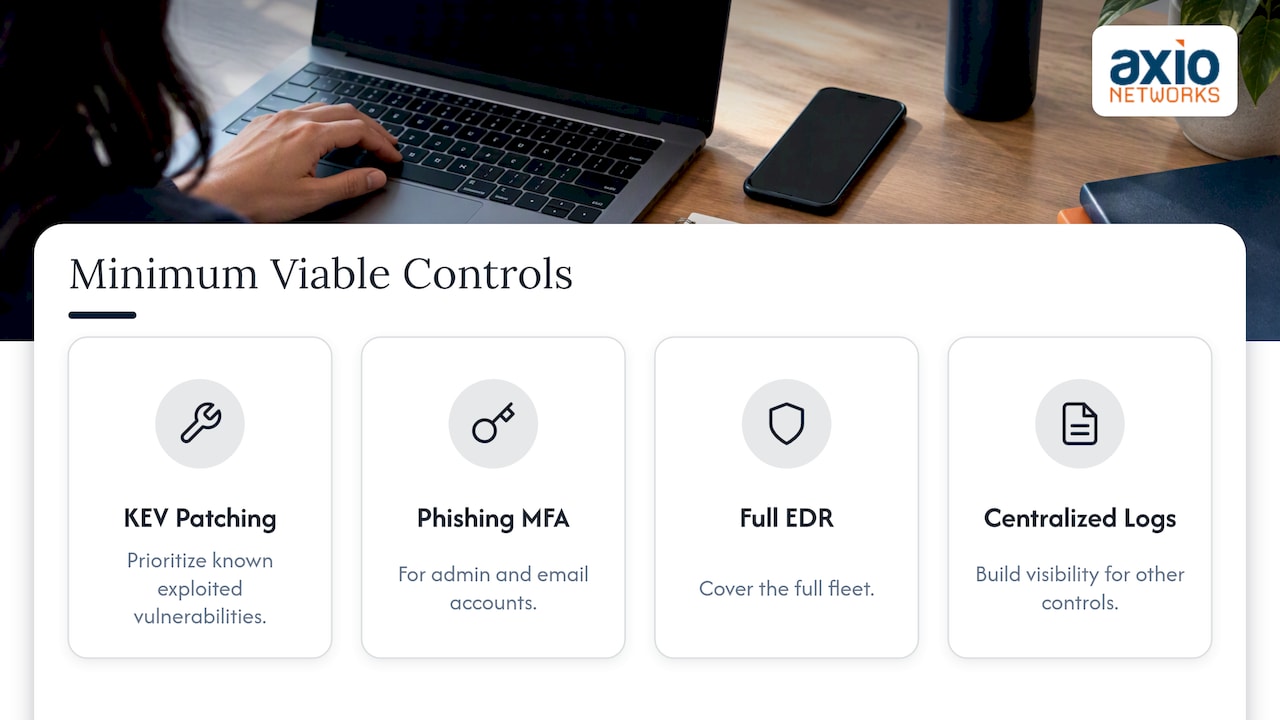
Sequence for fast wins first: MFA and KEV patching can be prioritized early and shrink your attack surface. EDR deployment and logging take sustained effort but establish the visibility everything else depends on. Allowlisting and full Zero Trust posture checks are multi-month efforts that mature over time.
Track a focused set of metrics, such as patch time to KEV remediation, EDR coverage, and open alert backlog. These indicators can help assess program health. Our team at Axio Networks has built our managed security approach around that same sequencing, which is worth considering if building this in-house is not realistic for your team.
— Jim O’Connell
How We Help You Operationalize These Practices
Building and maintaining everything in this checklist takes sustained attention most internal IT teams cannot spare on top of daily support tickets. We built our Endpoint Security & EDR service around exactly this gap: centrally managed, behavior-based detection deployed and tuned across your fleet, backed by our SOC Monitoring & MDR function.
Because we integrate security into every service we deliver rather than selling it as a bolt-on, patching, EDR tuning, logging, and incident response planning all run through the same team under our Managed IT Services engagement. That means:
- Flat-rate pricing instead of separate line items for monitoring, patching, and response.
- A dedicated team that already knows your environment when an incident happens, instead of a vendor seeing your network for the first time.
- Clear, predictable billing that avoids the surprise costs that come with reactive, break-fix IT support.
If your team is weighing how much of this checklist you can realistically build and maintain in-house, reach out to discuss a managed endpoint security engagement built around your current environment.
FAQ
What are the best practices for endpoint security?
The core best practices are prioritized patching of known exploited vulnerabilities, phishing-resistant MFA on privileged and email accounts, centrally managed behavior-based EDR, secure configuration baselines with application allowlisting, and centralized logging and monitoring. CISA and CIS both frame these as the highest-impact controls for reducing endpoint risk.
What are the three main types of endpoint security?
Endpoint security includes prevention tools like Endpoint Protection Platforms, detection and response tools like EDR, and management controls such as configuration hardening and application allowlisting. Definitions vary across vendors, and these are common technical approaches used to secure devices.
What counts as an endpoint in a security program?
An endpoint is any device that connects to your network and can run code: laptops, desktops, servers, mobile phones, and increasingly IoT and virtual machines. Any device capable of executing a process or storing credentials needs to be in your asset inventory and covered by your endpoint controls.
How quickly should known exploited vulnerabilities be patched?
CISA recommends treating known exploited vulnerabilities as the top patching priority, remediating them immediately rather than waiting for a routine monthly cycle, particularly on internet-facing systems. CISA’s directive puts KEV-listed flaws ahead of all other patching work because they represent vulnerabilities actively being exploited in the wild.
Does Axio Networks offer ongoing endpoint monitoring for small businesses?
Yes, our Endpoint Security & EDR service includes centrally managed, behavior-based detection combined with our SOC Monitoring & MDR function for continuous alert triage. Pricing is available on request through a consultation with our team.