A good MSP onboarding moves in a fixed order: discovery, a written agreement, access and documentation handover, security baseline, tool deployment, staff communication, testing, and a go-live review. Do it well and your first 30 to 60 days feel calm. Do it badly and you inherit unknown accounts, unmanaged devices and a provider who is guessing. This checklist is written from the business owner’s side of the table, so you know what to hand over, what to ask for and what to verify.
TL;DR
- Onboarding has three jobs: learn your environment, lock down access, and prove that backups, monitoring and support work before you rely on them.
- Get scope, responsibilities and security duties in writing. Federal guidance tells customers to make sure contracts spell out who owns which security role.
- Switching providers is the riskiest moment. Secure admin credentials, documentation and licensing before the old relationship ends.
- Tell your employees what changes, who to call and how to spot attacks, before the first ticket is opened.
- Judge the first 90 days by results: tickets resolved, devices covered, backups tested, MFA enforced.
Table of Contents
- What MSP onboarding actually covers
- Step 1: Gather the information your provider needs
- Step 2: Let the provider assess the environment
- Step 3: Put scope, responsibilities and service levels in writing
- Step 4: Handle the transition from your current provider
- Step 5: Build documentation that stays alive
- Step 6: Set the security baseline first
- Step 7: Deploy tools and connect your systems
- Step 8: Tell your employees before anything changes
- Step 9: Test before you trust
- Step 10: Review at 30, 60 and 90 days
- Common onboarding mistakes to prevent
- Perspective: why we build onboarding around security
- Onboarding with Axio Networks
- FAQ
- Sources
What MSP onboarding actually covers
Onboarding is the stretch between “we signed” and “the provider is running your IT with full visibility.” It is not a kickoff call and a welcome email. It is a project with an owner, a schedule and an end condition.
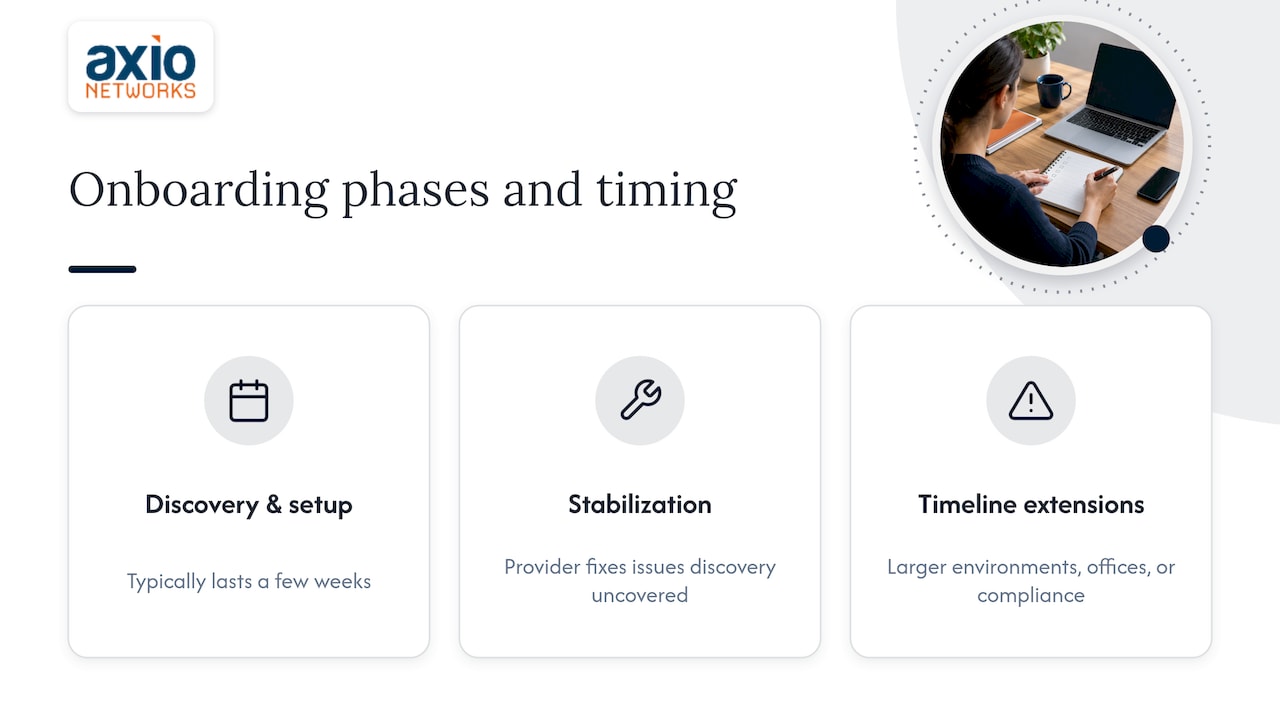
For a business with 15 to 150 employees, a sensible timeline is a few weeks of discovery and setup, followed by a stabilization period in which the provider fixes what discovery uncovered. Larger environments, multiple offices or compliance requirements stretch that. Ask any provider for a written onboarding plan with milestones before you sign. If they cannot produce one, that tells you something about how they will run your account.
The checklist below is in the order things should happen.
Step 1: Gather the information your provider needs
Most delays come from the business, not the provider, because nobody knew where the information lived. Collect this before kickoff:
- People: a current employee list with roles, who works remotely, who has admin rights, and who is leaving or joining soon.
- Contacts and authority: one executive sponsor, one day-to-day contact, and who may approve spending or access changes.
- Devices: computers, servers, printers, phones, tablets, and anything unusual such as point-of-sale terminals or lab equipment.
- Software and licenses: line-of-business applications, vendor support contacts, renewal dates and who owns each license.
- Cloud and subscriptions: Microsoft 365 or Google Workspace tenants, domain registrar, DNS host, website host, and any SaaS tools staff signed up for on their own.
- Internet and telecom: carriers, circuit IDs, static IP addresses and the phone system.
- Current pain points: the three things that most often interrupt work today.
- Obligations: contracts, cyber insurance requirements and regulations that touch your data, such as HIPAA, PCI DSS or customer security questionnaires.
That last item matters more than most owners expect. The National Institute of Standards and Technology tells small businesses to review legal, regulatory, contractual and insurance considerations as part of their cybersecurity planning, and to use the framework as a discussion prompt with whoever helps them. Bring your insurance application and any client security questionnaires to the first meeting.
Step 2: Let the provider assess the environment
A proper discovery goes beyond a spreadsheet. Expect your provider to scan or inspect:
- Network layout, IP ranges, firewalls and wireless coverage
- Every device, its operating system, patch level and age
- Servers, virtualization and where data physically lives
- Cloud services, tenant settings and license assignments
- Backup jobs: what is covered, how often, and whether anyone has ever restored from them
- User accounts, including stale ones, shared logins and admin rights that nobody remembers granting
- Email security settings, such as authentication records and filtering
The output should be a written report with findings ranked by risk, not a generic scan printout. This is where a risk and vulnerability assessment pays for itself: it gives you a prioritized fix list and a baseline to measure the provider against. If you want a structure for what to fix first, our 30/90/180 day small business cybersecurity checklist maps NIST-aligned actions to a realistic schedule.
Step 3: Put scope, responsibilities and service levels in writing
The agreement is the center of onboarding. Before you sign, make sure it answers these questions in plain language:
| Question | What a clear answer looks like |
|---|---|
| What is covered? | Named services, device and user counts, locations, and which applications are supported |
| What is not covered? | Listed exclusions, and how out-of-scope work is quoted |
| How do you reach support? | Phone, email, portal and hours, plus after-hours handling |
| How fast do they respond? | Response targets by severity, and how they are reported |
| What does it cost? | Monthly fee, what it includes, and what triggers extra charges |
| Who owns what? | Licenses, domains, documentation and data belong to you |
| How does it end? | Notice period, handover assistance and return of credentials and documentation |
Security responsibilities deserve their own line. CISA’s advisory on threats to managed service providers and their customers recommends that MSP-customer contracts transparently identify ownership of security roles and responsibilities. Its earlier guidance for MSPs and small and mid-sized businesses adds that contracts should cover monitoring and logging of managed systems and provider activity, along with notification of confirmed or suspected security events on the provider’s infrastructure and administrative networks.
In practice, ask: who responds if ransomware hits at 2 a.m., who decides whether to restore, who notifies your insurer, and who talks to your customers? Settle it now, not during an incident.
Pricing is part of scope. A flat monthly fee is easiest to budget when the contract lists exactly what it includes. Our managed IT services are built on that model, so projects and exceptions are defined up front rather than discovered on an invoice.
Step 4: Handle the transition from your current provider
If you are moving from another provider or an internal person, this step decides whether onboarding is smooth or painful. The goal is simple: you control everything before anyone loses access.
- Inventory what the old provider holds. Admin accounts for Microsoft 365, domain registrar, firewall, Wi-Fi controller, backup console, server local admin, and any vendor portals.
- Confirm ownership. Licenses, the domain and the cloud tenant should sit under your company’s name. If they are under the old provider’s reseller account, plan the transfer early.
- Request documentation. Network diagrams, password vault export, device inventory, vendor contacts, backup schedules and open ticket history.
- Create parallel access. The new provider gets its own named admin accounts while the old ones still work. Never share one login between the two.
- Schedule the cutover. Pick a date, tell the old provider in writing, and keep a short overlap period for questions.
- Revoke the old access. After cutover, remove or rotate every credential, remote management agent, VPN account and API key the previous provider used. CISA’s tactical advice for MSP customers includes identifying and disabling accounts no longer in use.
A cooperative handover is not guaranteed. Your contract with the old provider may set notice periods and handover terms, so read it before you announce the change. Keep the tone businesslike, and put every request in writing.
Step 5: Build documentation that stays alive
Documentation is the asset that makes the second year of an MSP relationship better than the first. At minimum, it should hold:
- Network diagram and IP plan
- Device and license inventory
- Account and access matrix, showing who has admin rights
- Backup and recovery procedures, with the last successful test date
- Vendor and carrier contacts with account numbers
- Standard configurations and naming conventions
- Escalation contacts on both sides
Treat it as a working record, not a one-time deliverable. If a firewall changes or an employee leaves, the record should change the same week. Good habits such as version control and clear ownership of documents keep records trustworthy as they change hands. Ask your provider where the documentation lives, who can see it, and how you get a copy if the relationship ends. The answer should be “you can have it any time.”
Step 6: Set the security baseline first
Before you add comfort features, close the doors that attackers use most. During onboarding, expect your provider to verify or deploy these:
- Multi-factor authentication on email, remote access, admin accounts and finance systems. See why MFA is critical for business security.
- Email security: filtering, authentication records and safe Microsoft 365 settings. Our Microsoft 365 email security checklist covers the three-step authentication setup.
- Endpoint protection: modern endpoint detection and response on every computer and server, not only antivirus. Patch status matters just as much; see our guide to patching known exploits first.
- Least-privilege access: most staff should not be local administrators.
- Backups: at least one copy that ransomware cannot reach, with a restore test.
- Monitoring: someone watching alerts around the clock, not a dashboard nobody opens. Learn what SOC monitoring and MDR provides.
- Admin accounts for the provider itself: named per technician, protected by MFA and logged. CISA’s advisory lists enforcing MFA on MSP accounts that access customer environments among its tactical actions.
If you suspect your current MSP leaves gaps, see the five security layers an MSP is likely missing and compare them with what your discovery report found.
Step 7: Deploy tools and connect your systems
Once the baseline plan is agreed, the provider installs management and security software. Confirm the following are covered and tested:
- Remote monitoring and management agent on every in-scope device
- Endpoint security agent reporting to the provider’s console
- Patch management policy with maintenance windows you have approved
- Backup agents or cloud backup connections
- Help desk portal, phone number and email routing for tickets
- Microsoft 365 or Google Workspace admin roles, conditional access and license assignments
- Password manager or privileged access tool
- Printers, Wi-Fi, VPN and line-of-business applications still working after the changes
Ask for an install report listing devices that are covered and devices that are not. A gap of even five percent matters, because attackers go for the machine nobody is watching. If part of the plan involves moving servers or file shares to the cloud, a structured approach such as our five-phase cloud migration checklist keeps cost and security in view.
Step 8: Tell your employees before anything changes
Employees notice onboarding when a new agent appears, a password prompt changes or a ticket goes to a different number. Surprise creates distrust, and attackers love confusion: a fake “new IT provider” email is a classic phishing setup. Send a short announcement a few days before go-live that covers:
- Who the new provider is and why you are making the change
- The single phone number, email and portal for support
- What will change on their computers and when, such as a restart or MFA enrollment
- That the provider will never ask for a password by email or chat
- How to report anything suspicious
NIST’s small business guidance says employees should be informed about policies and best practices and trained to recognize common attacks and report suspicious activity. Build that into the first month. A short orientation session plus ongoing security awareness training works better than a once-a-year lecture, and a plan for ongoing staff security communication helps it stick. If you need a program design, read how to create a cybersecurity awareness program and how to run phishing simulations that track reports, not just clicks.
Step 9: Test before you trust
Before you call onboarding finished, test the things that fail quietly:
- Restore a file from backup, then restore a full machine or server in a test.
- Open a ticket from each channel (phone, email, portal) and time the response.
- Trigger an MFA enrollment for a new hire and a password reset for a user who is locked out.
- Disable a test account and confirm access disappears everywhere.
- Check alerting: confirm that a safe test detection reaches the monitoring team.
- Review the device list against your own inventory.
Write down the results and dates. They become the first entries in your service review.
Step 10: Review at 30, 60 and 90 days
Onboarding does not end at go-live. Schedule reviews and look at facts:
- Tickets opened, closed and reopened, with response and resolution times
- Devices covered and patch compliance
- Open items from the discovery report, and what has been fixed
- Backup test results
- Phishing reports and training completion
- Any surprise charges, which on a flat-rate agreement should be none
- Your staff’s honest feedback
This is also when you plan a roadmap: hardware refresh, cloud moves, compliance work and budget for the next year. A virtual CIO or consulting relationship helps here, and our IT consulting and vCIO services are built for that planning.
Common onboarding mistakes to prevent
- No named owner on your side. Decisions stall when nobody can approve access or spending.
- Skipping discovery to “save time.” Unknown devices and accounts become the incident later.
- Letting the old provider keep admin access. Rotate credentials at cutover.
- Vague scope. If the contract says “all IT support” but lists no exclusions, expect disputes.
- Assuming backups work. A backup that has never been restored is a hope, not a control.
- Silence toward employees. Staff who do not know the new process keep calling the old number or ignore security prompts.
- Ignoring compliance. If your clients or insurer require specific controls, name them in the agreement.
Perspective: why we build onboarding around security
In our experience, the businesses that struggle after a switch were not unlucky. They onboarded around convenience, and security came later as an add-on. We do it the other way around. Our model is security-first: the discovery, the access plan and the tool deployment all start from the question of how someone could get in, and what happens if they do.
Being local matters too. Our team works with Phoenix metro businesses every day, so we know the building constraints, the carriers and the compliance pressures our clients face. When something breaks, you reach a team that understands your setup, with an average response time under 30 minutes.
We also use flat-rate pricing, because onboarding is a bad time for surprise invoices. You should know what your IT costs each month, and you should know what is covered before the first ticket arrives.
Jim O’Connell
Onboarding with Axio Networks
If you want a provider who runs this checklist for you, we handle discovery, documentation, security baseline, tool deployment and staff communication as one engagement. We support small and mid-sized businesses across the Phoenix metro area with managed IT, cybersecurity, backup and disaster recovery, Microsoft 365 management and cloud services, all under fixed monthly pricing.
To see how it works, start with our managed IT services page, or contact Axio Networks to talk through your environment and your current provider situation.
FAQ
How long does MSP onboarding take?
Expect a few weeks for a small office with straightforward systems, and longer for multiple locations, servers, or compliance work. The timeline depends mostly on how quickly access and documentation arrive. Ask your provider for milestones in writing so you can track progress.
What should I prepare before onboarding with a managed service provider?
Gather your employee list, device and software inventory, cloud accounts, domain and DNS details, internet and phone carriers, vendor contacts and any insurance or compliance requirements. Name one executive sponsor and one daily contact. The more you have ready, the faster discovery finishes.
How do I switch MSPs without losing access or data?
Inventory every account the old provider controls, confirm that licenses and the domain belong to your company, and request documentation early. Give the new provider its own named admin accounts in parallel, then rotate or remove the old credentials at cutover. Keep everything in writing.
What does the MSP transition checklist look like for employees?
Tell staff who the new provider is, how to get help, what will change on their devices and when. Remind them that the provider will never ask for passwords by email, and show them how to report suspicious messages.
Sources
- NIST Cybersecurity Framework 2.0: Small Business Quick-Start Guide
- CISA Insights: Mitigations and Hardening Guidance for MSPs and Small and Mid-sized Businesses
- CISA: Protecting Against Cyber Threats to Managed Service Providers and their Customers
- 7 Key Reasons Cybersecurity Matters for E-Commerce Success