A bring your own device (BYOD) policy is a written agreement that sets the rules for employees who use personal phones, laptops or tablets for work. A good one names which devices are allowed, what security each must meet, what the company can and cannot see or wipe, who pays for what, and what happens when someone leaves or loses a phone. This guide walks through each of those decisions for a small or mid-sized business, with the security controls, cost rules and rollout steps that make the policy work in practice.
TL;DR
- A BYOD policy should cover eligibility, approved devices, security requirements, acceptable use, privacy limits, support, reimbursement and an exit plan for company data.
- Tie access to risk: email and calendar on a personal phone is a different decision from full access to file servers and line-of-business apps.
- Use device management and multifactor authentication so you can protect company data without controlling the whole device.
- Employers can generally require personal phone use, but cost-shifting is limited by wage law and some state rules, so decide on reimbursement deliberately.
- Get every employee’s signature, train them, and review the policy at least yearly.
Table of Contents
- What a BYOD policy is and how it works
- Why businesses adopt BYOD, and what it asks of you
- Decide the scope first
- What to put in a BYOD policy
- Privacy: say what you can see and what you cannot
- Who pays: costs and reimbursement in the United States
- Support: set expectations for IT
- How to roll the policy out
- Our perspective
- Get a BYOD program that actually runs
- FAQ
- Sources
What a BYOD policy is and how it works
In a BYOD arrangement, employees use devices they own to reach company email, files and applications. The business saves on hardware, and people work on tools they already know. The tradeoff is that company data now lives on equipment the company does not own, so the policy has to do the job that ownership normally does.
The policy is also sometimes called bring your own technology, bring your own computer or bring your own phone. The name changes; the content does not. It is a contract between the company and each person on how personal equipment may touch business information.
BYOD is not all or nothing. TechTarget’s overview of BYOD describes access levels that run from Level 1, basic resources such as email and calendars, up to Level 3, full access to corporate resources. Most small businesses are best served by starting low and granting more only where a role truly needs it.
Why businesses adopt BYOD, and what it asks of you
Research on BYOD points to the same pattern. A 2024 academic review of organizational control over BYOD reports that it can reduce costs and improve convenience, flexibility, employee satisfaction and productivity, while raising security, work-life boundary and privacy concerns.
The same paper notes that control which is too tight may prompt legal challenges and distrust, while control that is too loose can lead to leakage of confidential information. That is the design brief for your policy: enough control to protect the data, not so much that employees feel their personal lives are being monitored.
For a company of 10 to 200 people, the practical benefits are real:
- Less spending on phones and laptops that go out of date.
- Faster onboarding, since people already know their devices.
- Employees who can answer an urgent message without carrying two phones.
The practical demands are equally real. Someone has to manage enrollment, patching, lost devices and departures. That is why many owners without an in-house IT team hand BYOD administration to a managed provider rather than leaving it to whoever is handiest with computers.
Decide the scope first
Before you write a word of the policy, answer four scoping questions. Guidance on creating a BYOD policy from Sprintlaw frames the first one well: is BYOD optional, required for certain roles, or limited to specific devices?
- Who is eligible? All employees, only salaried staff, or specific roles such as sales and field teams. Contractors usually need a separate agreement.
- Which devices? Phones and tablets only, or laptops too. Set minimum operating system versions, and decide whether jailbroken or rooted devices are banned (they should be).
- Which data and systems? Email and calendar only, or also file storage, accounting, the CRM and remote desktop.
- Is it voluntary? If people can choose a company-owned device instead, the privacy and reimbursement conversation gets simpler.
BYOD or choose your own device
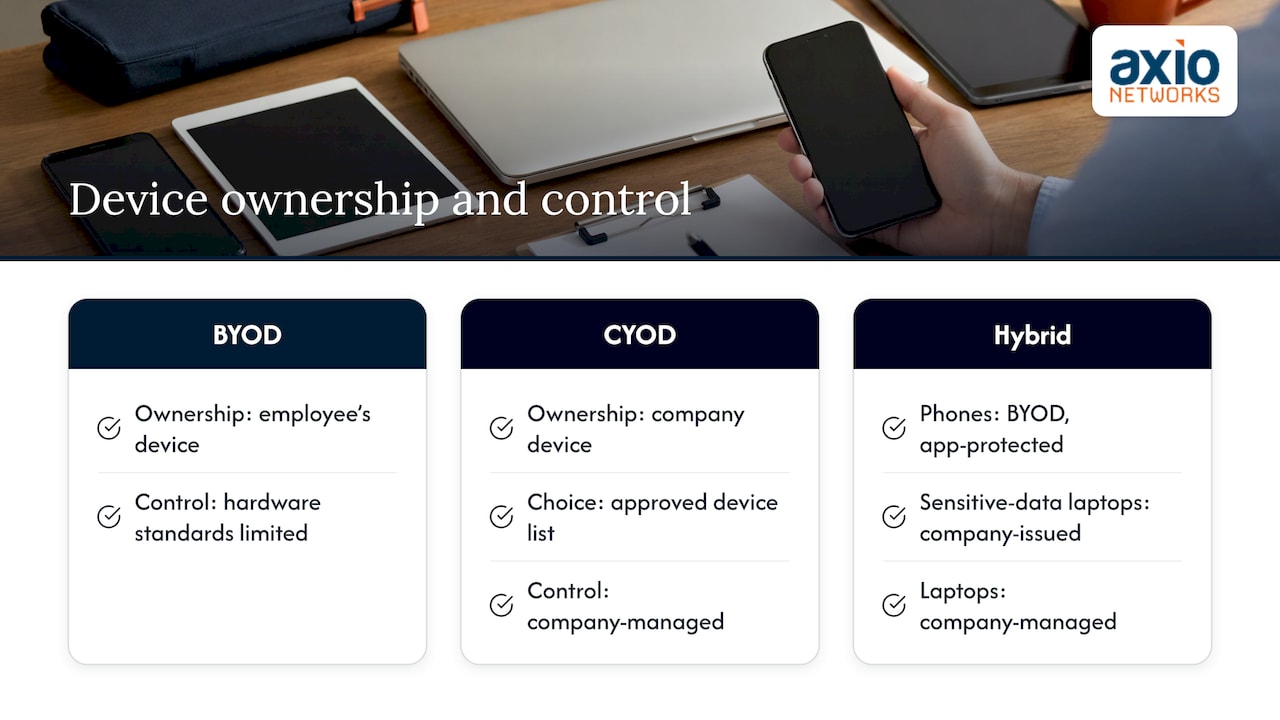
Choose your own device (CYOD) is the nearest alternative. The company buys and owns the device, but the employee picks it from an approved list. Samsung’s comparison of mobility models explains that in BYOD the personal ownership limits control over hardware standards and configuration, while CYOD keeps the organization in charge of what is offered and how it is managed.
A common small-business pattern is a hybrid. Phones are BYOD with strict app-level protection, while laptops that touch sensitive data are company-issued and managed. Your policy can describe both.
What to put in a BYOD policy
The TechTarget guidance says a policy can define acceptable use, approved devices, security measures such as passwords and mobile device management (MDM), employee responsibilities, reimbursements, IT support levels and an exit plan for company data. Turning that into a working document, these are the sections to include.
| Section | What it should say |
|---|---|
| Purpose and scope | Who the policy covers and which systems it applies to |
| Eligibility and approved devices | Roles, device types, minimum OS versions |
| Security requirements | Screen lock, encryption, updates, MFA, enrollment in management software |
| Acceptable use | What business use is allowed, rules for apps, public Wi-Fi, family sharing |
| Privacy and monitoring | What the company can see, what it cannot, and what it may wipe |
| Support | What IT will and will not fix on a personal device |
| Costs | Stipend or reimbursement, if any, and who pays for repairs |
| Lost, stolen or compromised devices | Who to call and how fast |
| Offboarding | How company data is removed when someone leaves |
| Acknowledgment | Signature and date |
Security requirements that matter most
Keep the list short enough that people will actually comply. For most small businesses, these baseline rules do the most work:
- A screen lock with a PIN, password or biometric, and automatic lock after a short idle time.
- Device encryption turned on, which is the default on current iPhones and most current Android and Windows devices.
- Operating system and app updates installed promptly.
- Multifactor authentication on every business account.
- Company data accessed only through approved apps, not by forwarding to personal email. Our note on why personal email should not be used for work covers this in detail.
- Immediate reporting of a lost or stolen device.
- Endpoint protection on laptops. Our endpoint security and EDR service is built for this layer.
If your team also works from home, pair the policy with practical habits. Our guides on keeping work and personal devices secure and security practices for remote workers give employees plain-language steps to follow.
Tie security measures to access levels
The tiered access idea is the most useful security control in a small BYOD program. A simple version looks like this:
- Level 1: email, calendar and contacts through a managed app. Minimal exposure, widest eligibility.
- Level 2: collaboration tools and cloud files, with MFA and device enrollment required.
- Level 3: full access to internal systems, only on devices that pass compliance checks, or on company-owned equipment.
The principle is the same one behind website security and customer trust: the more valuable what you protect, the stronger the controls and the narrower the access.
Separating company and personal data
A policy should explain how corporate and personal data are kept apart and how the organization manages devices and data. In practice that means using managed apps or a work profile so company information sits in a container the business can remove, while photos, messages and personal apps stay untouched. A selective wipe, which removes only company data, should be the default response to a departure. A full device wipe should be reserved for a lost device, and your policy should say so up front and obtain consent.
If you run Microsoft 365, much of this can be enforced through your tenant settings. Our managed Microsoft 365 service handles those controls for clients so they are configured once and kept current.
Privacy: say what you can see and what you cannot
Privacy is where well-meant policies go wrong. Legal commentary summarized in a University of Iowa law journal article on BYOD advises companies to balance the need to secure corporate data with respect for employee privacy, because overreaching monitoring can raise liability and invite invasion of privacy claims.
Write the privacy section so an employee can read it in a minute and know exactly where the lines are:
- What the company can see: device model, operating system version, whether the device is encrypted and enrolled, and the list of managed business apps.
- What the company does not access: personal photos, texts, personal email, browsing history and location outside of a lost-device recovery.
- What the company can remove: business apps and business data, and in defined emergencies the whole device.
Have your attorney review this section, since privacy and employment rules differ by state.
Who pays: costs and reimbursement in the United States
Can you make employees use their own phones for work? Generally yes. Nolo’s legal guidance on work phones explains that employers can generally require it, but cannot shift costs if doing so pushes pay below minimum wage or cuts into legally required overtime. State law may also require reimbursement.
California is the well-known example. In Cochran, a court there held that employers must reimburse a reasonable percentage of an employee’s cell phone bill for work-related use, as described in the Iowa law journal article. Arizona employers should confirm their own obligations with employment counsel, especially for hourly staff.
Even where reimbursement is not mandatory, a flat monthly stipend is a common and simple way to handle it. Whatever you choose, write it into the policy:
- The stipend amount and how it is paid.
- Whether it covers the device, the data plan, or both.
- Who pays for repair or replacement of a personal device damaged at work.
- What happens to the stipend when a role changes.
Support: set expectations for IT
Personal devices come in every shape, so decide how far support goes. A workable split: IT supports the work apps, email setup, authentication and enrollment, and will not repair hardware or troubleshoot personal apps. Employees should know exactly where support starts and stops, and which channel to use.
If you have no internal IT, this is where a managed provider earns its keep. Our help desk, remote and on-site support are part of managed IT services, and we aim for an average response time of under 30 minutes, so a locked-out employee is not stuck all morning.
How to roll the policy out
TechTarget advises having a written policy that employees agree to, using device management tools, training staff, and establishing lost-device and exit processes. A small business can do that in six steps.
- Draft the policy from the sections above, in plain language, ideally under three pages.
- Get legal review on privacy, wage and reimbursement language for your state.
- Choose management tools that match your platform, and test them on a small pilot group first.
- Train everyone, including managers, on the rules and on spotting phishing, since a personal phone is also where many people read email.
- Collect signatures before granting access. No signature, no access to business data.
- Review quarterly or yearly, and whenever you add a new system, a new device type or a new regulation applies to your data.
Plan for the day someone leaves
Offboarding is the moment BYOD policies are tested. Write a short checklist: disable the account, remove the user from MDM, run a selective wipe of business data, revoke app tokens and shared passwords, and confirm in writing that no company files remain. Tools that manage passwords centrally make this easier, and our guide to managing work and personal passwords helps employees keep them separate.
Regulated data needs extra care
If your business handles health, financial or client records, BYOD may expand your compliance scope. Decide which regulated data is barred from personal devices entirely, and see our advice on handling sensitive company data securely. Make sure backups cover business data in cloud services too, which our backup and disaster recovery service addresses.
Our perspective
We see the same mistake in most BYOD programs we are asked to review: the policy exists on paper, and nothing enforces it. A signed document does not stop a lost phone from exposing client email.
Our approach is security-first. Every device that touches business data should be enrolled, protected by multifactor authentication and watched by someone. That is why we build BYOD into managed IT rather than treating it as a separate project: policy, management tools, endpoint protection and monitoring work as one system, under one flat monthly price, so there are no surprise bills when a new device is added.
For Phoenix-area businesses without an in-house team, our advice is to start with a short, readable policy, protect access with MFA and managed apps, and let a team that knows your environment handle enrollment, updates and offboarding. Employees get the convenience of their own devices, and owners get a clear answer to the question, “where is our data right now?”
Jim O’Connell
Get a BYOD program that actually runs
Axio Networks provides managed IT and cybersecurity for small and mid-sized businesses in the Phoenix metro area. We design BYOD policies together with the controls behind them: endpoint protection, email security, Microsoft 365 management, and SOC monitoring and MDR that watches for suspicious activity around the clock.
If you want a policy that fits your team and is backed by real enforcement, talk to us about managed IT services or see our cybersecurity services.
FAQ
What is the difference between BYOD and CYOD?
In BYOD, employees use personally owned devices for work. In CYOD, the company owns the device but lets the employee choose from an approved list. CYOD gives the business more control over configuration, while BYOD reduces upfront hardware spending.
Can my employer make me use my own phone for work?
Generally, yes. Employers can require personal phone use, but cannot shift costs in a way that drops pay below minimum wage or cuts into required overtime. Some states, including California, require reimbursement, so check your state’s rules or ask an employment attorney.
Does a BYOD policy let the company see my personal data?
It should not. A well-written policy limits the company to business apps, business data and basic device status such as encryption and OS version. The policy should state clearly what is visible and what can be wiped, so nothing is a surprise.
What should a small business require on every personal device?
At minimum: a screen lock, encryption, current updates, multifactor authentication on business accounts, access through approved apps and immediate reporting of loss or theft. Add device enrollment in management software for anything beyond basic email.
How often should a BYOD policy be reviewed?
Review it at least once a year, and again whenever you adopt a new system, change your device mix or take on regulated data. Retrain staff after each material change and collect fresh acknowledgments.
Sources
- BYOD (bring your own device), TechTarget
- Bring Your Own Device (BYOD): Organizational Control and Employee Outcomes, Springer
- Contextualizing Bring Your Own Device Policies, University of Iowa Journal of Corporation Law
- Does My Employer Have to Pay for My Work Phone?, Nolo
- BYOD Policy Template, Sprintlaw
- BYOD vs CYOD vs COPE vs COBO, Samsung Knox
- Website Security: Safeguarding Brands and Customer Trust