A disaster recovery plan comes down to nine steps. Assign a team, inventory your systems, rank them by business impact, set recovery targets, protect your data, write the recovery procedures, plan communications, test, and then review on a schedule. This guide walks through each step in plain terms and includes a template outline, an IT checklist and the mistakes that most often leave a plan useless on the day it is needed.
It is written for owners and managers of small and mid-sized businesses, including those in the Phoenix area, who do not have a full-time IT department. Ready.gov advises developing the IT recovery plan alongside your business continuity plan, so the steps below are built to fit both.
TL;DR
- A disaster recovery (DR) plan is the IT piece of business continuity: it restores systems and data after an unplanned incident.
- Start with an inventory of hardware, software and data, then rank each item by how much the business suffers when it is down.
- Set two numbers for every critical system: how long it can be down (RTO) and how much data you can afford to lose (RPO).
- Follow the 3-2-1 backup rule, then test the plan with tabletop exercises and real restores at least once a year.
- Review the plan after any exercise, outage or major change, not just on the calendar.
Table of Contents
- What a disaster recovery plan covers (and what it does not)
- The nine disaster recovery plan steps
- Disaster recovery plan template outline
- IT disaster recovery checklist
- Common mistakes that make a plan fail
- Our perspective: recovery planning belongs inside security
- Get help building and running your plan
- FAQ
- Sources
What a disaster recovery plan covers (and what it does not)
IBM describes a disaster recovery plan as a detailed document for responding to an unplanned incident and resuming normal operations, built around two measures: recovery time objective (RTO), the downtime you can tolerate, and recovery point objective (RPO), the data loss you can tolerate.
Three related plans get confused, so here is how they divide the work:
| Plan | Main question | Scope |
|---|---|---|
| Business continuity plan | How do we keep critical operations running? | The whole organization: people, locations, suppliers, IT |
| Disaster recovery plan | How do we get systems and data back? | IT systems, applications, data, network |
| Incident response plan | How do we detect, contain and shut down an active threat? | Cybersecurity events such as ransomware or account compromise |
This split follows IBM’s explanation and TechTarget’s comparison. In practice the three overlap. A ransomware attack starts as an incident response problem and becomes a disaster recovery problem the moment you need to restore from backup. Write the plans so they point to each other.
The nine disaster recovery plan steps
Step 1: Name a recovery team and assign roles
A plan nobody owns will not be run. List the people who will act during an outage and give each a specific job. The U.S. Chamber of Commerce guide suggests assigning responsibility for recovery, communications, technical work and insurance claims.
For a company of 15 to 150 people, that usually looks like this:
- Plan owner: an owner, general manager or operations lead with authority to declare a disaster and approve spending.
- Technical lead: your internal tech-savvy employee or your managed IT provider.
- Communications lead: tells staff, customers and vendors what is happening.
- Finance or admin lead: handles insurance, vendor payments and records.
- Backups for each role: every role needs a named deputy, because disasters do not wait for people to be in the office.
The Canadian Centre for Cyber Security’s recovery-plan guidance also lists stakeholders and response roles as the first planning items, and mentions managed service providers as an optional source of support.
Step 2: Inventory hardware, software and data
You cannot restore what you have not listed. Ready.gov says the IT plan begins with an inventory of hardware, software applications and data: servers, desktops, laptops, wireless devices, and the applications and data that run on them.
For each item, record:
- What it is, where it lives (office, cloud, a staff member’s home) and who owns it
- Which business function depends on it
- How it is backed up, and where the backup is
- Licensing information and vendor support contacts
- Dependencies: the line-of-business app that needs a specific database server, a phone system that needs the internet circuit, a Microsoft 365 tenant that needs a particular admin account
CISA tells small and medium businesses to inventory information such as customer, HR, financial, email, configuration, website and operational data and to prioritize what is essential to running the business. Do not forget cloud services. An application hosted by a vendor still belongs on the list, along with the login that controls it.
Step 3: Run a business impact analysis and rank your systems
This is the step that keeps the plan affordable. Ready.gov explains that IT recovery priorities are set during the business impact analysis and aligned with the priorities of business functions. In other words, the business decides what matters first, not the IT team.
For each business function, ask three questions:
- What stops if this system is down for an hour, a day, a week?
- What does that cost in lost revenue, missed deadlines, contract penalties or customer trust?
- What does this function depend on to work?
Then sort systems into tiers. A simple version:
- Tier 1: needed within hours, such as email, the line-of-business application, phones, payment processing, core file shares.
- Tier 2: needed within a day or two, such as accounting archives, internal collaboration tools.
- Tier 3: can wait a week or more, such as old project archives, test systems.
Government planning templates ask for the same logic: the Providence, Rhode Island business continuity template has planners identify critical functions, assess the impact of disruption, set recovery objectives and analyze interdependencies.
Step 4: Set RTO and RPO for each tier
Now turn the tiers into numbers. RTO is how long a system can be down. RPO is how far back in time your restored data can be. The U.S. Chamber guide says to define both RTO and RPO as part of the plan.
Here is an illustrative example. These figures are placeholders to show the format, not recommendations. Your own numbers come from Step 3.
| Tier | Example system | Example RTO | Example RPO |
|---|---|---|---|
| 1 | Email, line-of-business app | 4 hours | 15 minutes to 1 hour |
| 2 | Accounting archive, intranet | 24 hours | 24 hours |
| 3 | Old project files | 5 business days | 1 week |
A shorter RTO and RPO means more spending on replication, redundancy and monitoring. If a target looks expensive, that is useful information: either the system is more critical than you thought, or the target is tighter than the business needs. Ready.gov also recommends comparing data-restoration times with your IT and business-function recovery-time objectives. If restoring a server from backup takes 18 hours and your RTO is 4, you have found a gap before a disaster did.
Step 5: Protect your data with a real backup strategy
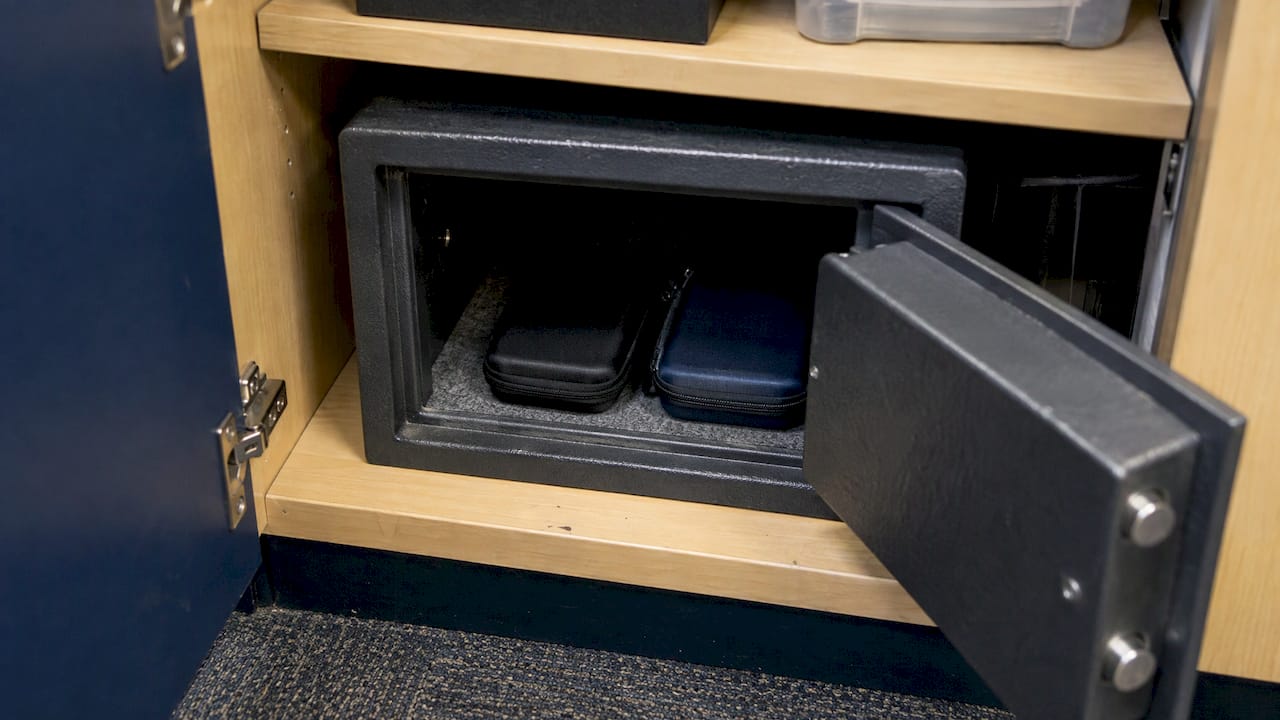
Backups are the foundation of the whole plan. Ready.gov’s guidance covers a strategy to back up critical information, scheduled backups, periodic checks that data was backed up accurately, and copies of program software so you can reinstall it.
CISA describes the 3-2-1 rule as three copies of important files, on two different storage media, with one copy off-site. CISA also recommends:
- Automatically scheduled backups
- A mix of on-site and remote copies
- Encryption of backups
- Offline copies, which matter most when ransomware could reach connected storage
- Physical security for backup media and devices
Match the backup frequency to your RPO. If Tier 1 data can only lose 15 minutes, nightly backups will not meet the target. If you use Microsoft 365, confirm what is and is not backed up independently of your tenant, because a deleted mailbox or a compromised admin account is a disaster too.
Step 6: Document recovery procedures, in order
Write the actual sequence of work. The U.S. Chamber guide says to document system-restoration steps, contact lists and vendor coordination. Write each procedure so that someone competent but unfamiliar with your environment could follow it at 2 a.m.
For each Tier 1 system include:
- The trigger: how you decide to start recovery rather than keep troubleshooting
- Prerequisites: credentials, license keys, hardware, internet access
- Numbered restore steps in dependency order, such as network and identity first, then servers, then applications, then user devices
- How you verify it works before telling staff it is back
- Who to call if a step fails
Store a copy of the plan somewhere that does not depend on the systems it is meant to restore. A plan saved only on the file server that just failed is a common and avoidable problem. Keep a printed copy and an offline copy with the plan owner and the technical lead.
Step 7: Plan communications and vendor contacts
During an outage, silence causes as much damage as downtime. The Chamber guide recommends multiple channels for reaching customers and keeping vendor contacts on hand. Decide ahead of time:
- How you will reach staff if email and phones are down (a text-message tree, a personal-email list, a group chat on a separate platform)
- What you will tell customers, and who approves the message
- Who calls your internet provider, software vendors, insurer and managed IT provider, with phone numbers and account numbers written down
- Where staff go or what they do if the office is unusable
The Ready.gov business continuity template includes incident detection and reporting, notifications, plan activation and damage assessment, which is a good model for the order of your first hour.
Step 8: Test the plan
An untested plan is a hope. Ready.gov’s template calls for a testing schedule and procedures, including orientation, tabletop and full-scale exercises. The Canadian guidance describes a progression: a checklist review, a walkthrough, a simulation, a parallel test and a cutover test. It also warns that a cutover test disconnects primary systems and needs extra planning.
A sensible path for a small business:
- Checklist review (quarterly): confirm contacts, credentials and backup jobs are current.
- Tabletop exercise (at least annually): gather the team, present a scenario such as ransomware on Friday afternoon, and talk through who does what. The Chamber guide recommends annual drills.
- Restore test (at least annually, ideally more often): restore a real server, mailbox or file set from backup into an isolated environment and time it against your RTO.
- Parallel or cutover test: only once the earlier tests go cleanly, and only with careful planning.
Write down what went wrong each time. Those notes are the most valuable output of the exercise.
Step 9: Review and update on a schedule and after changes
The Providence template says to review the plan on a stated schedule and after an exercise, a disruption or a significant business change, then update it for current risks, strategies, resources and responsibilities. Triggers worth writing into your plan:
- A new line-of-business application, server or cloud migration
- A move, office expansion or new location
- Staff turnover in any named role
- A change of internet provider, backup product or IT vendor
- Any outage, whether or not it became a full disaster
Ready.gov’s template also calls for plan-review and corrective-action processes, so that problems found in testing get an owner and a due date.
Disaster recovery plan template outline
Many readers want a template they can fill in. Use this outline, drawn from the sections that Ready.gov and TechTarget’s small-business example include:
- Purpose, scope and objectives: what the plan covers and what it is meant to achieve
- Key contacts: team members, deputies, vendors, insurer, with after-hours numbers
- Roles and responsibilities: who does what
- System inventory and dependencies: from Step 2
- Business impact results and recovery objectives: tiers, RTO and RPO from Steps 3 and 4
- Activation and escalation: who can declare a disaster, and how the team is notified
- Recovery procedures: step-by-step by system
- Communications: staff, customers, vendors, media if relevant
- Insurance, financial and legal issues: policy numbers, claim contacts, notification obligations
- Alternate work arrangements: remote work, alternate site
- Testing schedule and training
- Review log and corrective actions
If your business handles regulated data such as health, payment card or financial information, add your compliance contacts and notification duties to the legal section.
IT disaster recovery checklist
Use this as a quick audit of your current state:
- [ ] Hardware, software and data inventory is current and reviewed in the last 12 months
- [ ] Systems are ranked into tiers, with RTO and RPO written down for each
- [ ] Backups run automatically on a schedule that matches the RPO
- [ ] The 3-2-1 rule is met, including an off-site copy and an offline or immutable copy
- [ ] Backups are encrypted and physically or logically secured
- [ ] Someone verifies backup success every day or week, not just when a restore is needed
- [ ] Installation media or license keys for critical software are stored safely
- [ ] Power protection exists for servers and network equipment
- [ ] Written restore procedures exist for every Tier 1 system
- [ ] Contact lists include vendors and are stored outside your main systems
- [ ] A restore test has been completed and timed within the last year
- [ ] A tabletop exercise has been held within the last year
- [ ] The plan has a named owner and a review date
The Providence recovery template adds useful operational items: monitoring network equipment, servers, computer-room conditions, electricity and backup power, and confirming that backups occur on schedule.
Common mistakes that make a plan fail
These come from how the steps above fit together, and they are the gaps we see most often when reviewing a company’s recovery readiness:
- Backups that have never been restored. A green status light only shows the job ran. Ready.gov’s guidance calls for periodic validation that data was backed up accurately.
- Targets that do not match reality. A four-hour RTO means little if a full restore takes a day.
- Backups reachable from the same network as production. Ransomware can encrypt connected copies. This is why CISA recommends offline copies.
- A plan stored only on the failed system. Keep offline and printed copies.
- No named owner. When everyone is responsible, nobody calls the first meeting.
- Ignoring cloud and Microsoft 365 data. Hosted does not automatically mean backed up the way you need.
- One-time documents. A plan written in 2022 does not know about the server you replaced last spring.
Our perspective: recovery planning belongs inside security
We see disaster recovery and cybersecurity as one conversation. For most small and mid-sized businesses in the Phoenix area, the disaster that actually arrives is rarely a flood or a fire. It is a compromised account, a ransomware infection or a failed server, and the quality of your recovery depends on how well the environment was secured and monitored before anything went wrong.
That is why we build security into every managed and project service instead of selling it as an add-on. Backups that are encrypted, isolated and monitored recover cleanly. Backups that were never checked tend to fail at the worst moment.
We also believe a plan should be easy to live with. Flat-rate pricing means you can budget for backup, monitoring and recovery support without wondering what an emergency will add to the bill. Our local team knows Phoenix-area businesses, and our own stated average response time is under 30 minutes, so recovery starts with a person who already knows your environment.
If you take one thing from this guide: write the plan, test one restore this quarter, and put a date on the next review.
Jim O’Connell
Get help building and running your plan
If you would rather not build this alone, our Backup & Disaster Recovery service covers the technical core of Steps 5, 6 and 8: backup design, recovery procedures and restore testing. It sits alongside our managed IT services and cybersecurity services, including SOC monitoring and MDR, so detection and recovery are handled by the same team. Services are flat-rate, with no published per-plan prices, so contact us for a quote scoped to your systems.
If you are earlier in the process, start with an inventory and impact analysis, then talk with us about RTO and RPO targets that fit your budget.
FAQ
How often should a small business test its disaster recovery plan?
Run a tabletop exercise and at least one real restore test every year, and check contacts and backup jobs more often, for example quarterly. Also retest after any major change such as a migration, a new server or a change of IT provider. Guidance from Ready.gov calls for a testing schedule that includes tabletop and full-scale exercises.
What is the difference between RTO and RPO?
RTO is how long a system can be down before the business is seriously harmed. RPO is how much data, measured in time, you can afford to lose. If your RPO is one hour, your backups or replication must capture changes at least that often. IBM’s overview builds the plan around these two measures.
Is a disaster recovery plan the same as a business continuity plan?
No. Business continuity covers keeping the whole organization operating, while disaster recovery is the IT subset that restores systems and data. You need both, and Ready.gov recommends developing the IT recovery plan together with the business continuity plan.
What is the 3-2-1 backup rule?
Keep three copies of important data, on two different types of storage, with one copy off-site. CISA lists it as a core practice for small and medium businesses, along with encryption and offline copies. Match your backup frequency to your RPO.
Do I need an outside provider to write the plan?
Not necessarily, but many businesses without in-house IT find it easier to work with a managed provider for the technical steps. The Canadian Centre for Cyber Security notes managed service provider support as an option. Whoever helps, the business should still own the priorities from the impact analysis.
Sources
- IT Disaster Recovery Plan, Ready.gov
- Business Continuity Plan template, Ready.gov
- What Is a Disaster Recovery Plan?, IBM
- Business continuity vs. disaster recovery vs. incident response, TechTarget
- Example disaster recovery plan for small businesses, TechTarget
- Back Up Business Data, CISA
- Developing your IT recovery plan (ITSAP.40.004), Canadian Centre for Cyber Security
- How to Build a Disaster Recovery Plan, U.S. Chamber of Commerce
- Business Continuity Plan template, City of Providence
- Business Recovery Plan template, City of Providence