Most Phoenix small businesses pay for IT support as a fixed monthly fee, usually counted per user, and the figure that matters is the total after security, on-site visits and after-hours help are included. For fully managed support that range is roughly $100 to $250 per user per month, and the quote you can trust is the one where every service you will actually use is written into the agreement. We are Axio Networks, a managed IT and cybersecurity provider for small and mid-sized businesses in the Phoenix metro area, and our pricing guide for SMBs covers that same $100 to $250 per user range in more detail.
This article explains how IT support providers charge, what a monthly fee should include, what pushes the price up or down, and how to compare quotes without being surprised by the invoice later.
TL;DR
- Fully managed IT for a small business typically runs $100 to $250 per user per month. The wide spread comes from security, support hours and compliance needs.
- The six common pricing models are monitoring-only, per-device, per-user, tiered, all-you-can-eat and a la carte. Per-user and flat-rate plans are the easiest to budget.
- Hourly break-fix support looks cheap until something fails. A fixed monthly fee turns IT into a line you can plan.
- Compare quotes on what is included: security, help desk hours, on-site visits, backup, onboarding and projects.
- A good provider writes the scope down so the total is the same every month.
Table of Contents
- What IT support costs a Phoenix business
- How IT providers charge: the six pricing models
- Managed IT versus break-fix: the cost difference
- What a monthly IT fee should include
- What drives the price up or down
- Quoting questions that prevent surprise bills
- Putting IT support in your annual budget
- How Axio Networks prices IT support
- Our perspective
- FAQ
- Sources
What IT support costs a Phoenix business
The honest answer is a range, because two 20-person offices in Phoenix can need very different things. An accounting firm handling client tax data needs stronger security and documented controls than a small design studio. A clinic needs more than either.
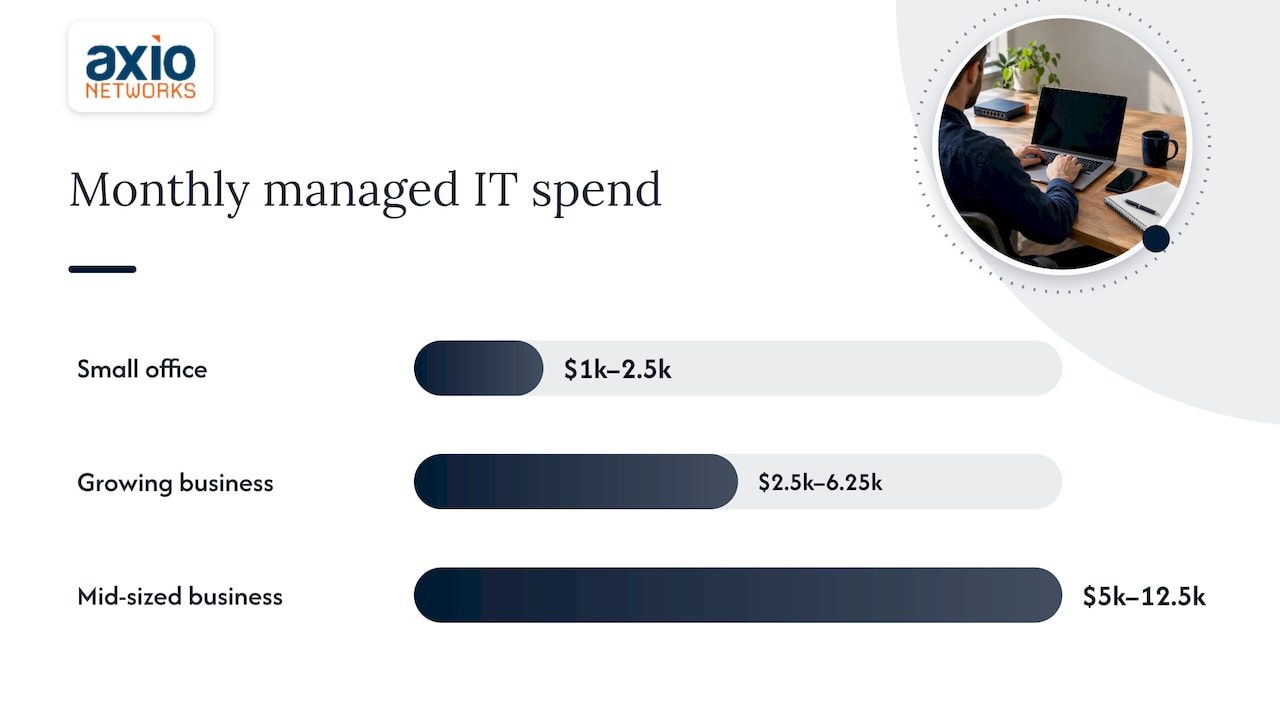
For planning, use these working numbers for fully managed IT, meaning a provider that runs your help desk, updates, monitoring, security and vendor contact for a fixed fee:
| Business size | Users | Rough monthly spend at $100 to $250 per user |
|---|---|---|
| Small office | 10 | $1,000 to $2,500 |
| Growing business | 25 | $2,500 to $6,250 |
| Mid-sized business | 50 | $5,000 to $12,500 |
The arithmetic is simple: users multiplied by the per-user rate. Where you land in the range depends on what the fee covers. The lower end generally means help desk and basic monitoring. The upper end tends to include security monitoring, compliance support and on-site visits.
Axio Networks does not publish a single price list, because the right scope depends on your users, devices and risk. What we do is quote a flat monthly rate for that scope so the number does not move from one month to the next.
How IT providers charge: the six pricing models
When you collect quotes, you will see the same few structures. A Channel Dive overview of managed services pricing lists six: monitoring-only, per-device, per-user, tiered, all-you-can-eat and a la carte. Here is what each means for a business owner.
| Model | How it is billed | Budget predictability |
|---|---|---|
| Monitoring-only | Low fee for software that watches your systems | High, but your own people fix the problems |
| Per-device | A set price per computer, server, printer or network | Medium, changes when you add equipment |
| Per-user | A set price per employee, covering their devices | High, scales with headcount |
| Tiered | Bronze, silver and gold style bundles | High within a tier |
| All-you-can-eat (flat rate) | One fee for broad support | Highest |
| A la carte | You pick and pay for individual services | Low, the total drifts |
Channel Dive notes that tiered bundles may be the most popular with providers, and that per-device pricing is the simplest. Its example figures were $69 per desktop, $299 per server, $29 per printer and $99 for a managed network. Those are illustrations of how device pricing adds up, not a Phoenix price list.
Per-user pricing
Per-user pricing charges for each employee and covers their IT needs regardless of how many devices they use, as ManageEngine’s MSP pricing guide explains. For an owner it is the easiest model to forecast: hire two people and you know the monthly change before they start. It also removes the argument over whether a phone or a second laptop counts as an extra.
Tiered pricing
Tiered plans typically climb from basic remote support and patching, to on-site support, to emergency and after-hours coverage. The risk is a tier that sounds right but leaves out the one thing you need, such as security monitoring or after-hours response. Read what sits in each tier, not only the tier name.
Flat-rate, all-inclusive pricing
Flat-rate plans aim to let you budget IT with no billing fluctuations. This is the model we use at Axio Networks: fixed monthly pricing for managed IT and cybersecurity, so there are no surprise invoices when something goes wrong. Projects such as a cloud migration, a network build or an assessment are handled as fixed-scope engagements, so those costs are known up front as well.
Managed IT versus break-fix: the cost difference
Break-fix means you call a technician when something breaks and pay for the time. Managed IT means you pay a monthly fee and the provider works to prevent problems and fixes them under the agreement.
Break-fix feels cheaper in a quiet month. The trouble is that the bill is tied to failure: the worst days cost the most, and nobody is watching your systems on the other days. Managed IT reverses the incentive. A provider paid a fixed fee gains from fewer outages, not more tickets.
For a business without in-house IT staff, the practical differences are:
- Budget: fixed monthly fee versus an invoice that varies with what breaks.
- Timing: monitoring and maintenance happen before the failure, not after it.
- Security: patching, endpoint protection and email filtering run continuously rather than when someone remembers.
- Accountability: one provider owns the whole environment, so there is no finger-pointing between a vendor, an internet carrier and a software company.
Our managed IT services are built on that model, with an average response time of under 30 minutes. If you want the basics of the model first, our page on what managed IT services are walks through it.
What a monthly IT fee should include
A low per-user number means little until you know what sits behind it. Use this list when reading any proposal. For each item, you want a clear yes or no in writing.
- Help desk: who answers, during which hours, and how fast. Ask for the response commitment, not only the phone number.
- Remote and on-site support: whether visits to your Phoenix or Scottsdale office are included or billed separately.
- Monitoring and patching: servers, workstations, firewalls and network gear kept updated.
- Security: endpoint protection, email security and, for many businesses, 24/7 security operations monitoring.
- Backup and disaster recovery: how often data is backed up, where it is stored and how fast it can be restored.
- Microsoft 365 administration: user setup, licensing, permissions and mailbox management.
- Security awareness training: because many incidents start with a person clicking a link.
- Planning and consulting: regular reviews of your technology, budget and risks.
- Onboarding: the setup cost to bring your environment under management, and whether it is part of the fee.
- Projects: whether a migration, office move or new network is covered by the fee or quoted separately.
The items most often left out of a headline price are security monitoring, on-site hours and after-hours support. They are also where businesses feel the cost when something goes wrong, so they belong in the base number. At Axio Networks, security is part of the design of every service we deliver rather than an add-on, which is why a quote from us is framed around a complete scope. You can see what sits behind the security side on our cybersecurity services page, and what the typical spend looks like in our cybersecurity cost guide.
What drives the price up or down
Six factors explain most of the gap between one Phoenix quote and another.
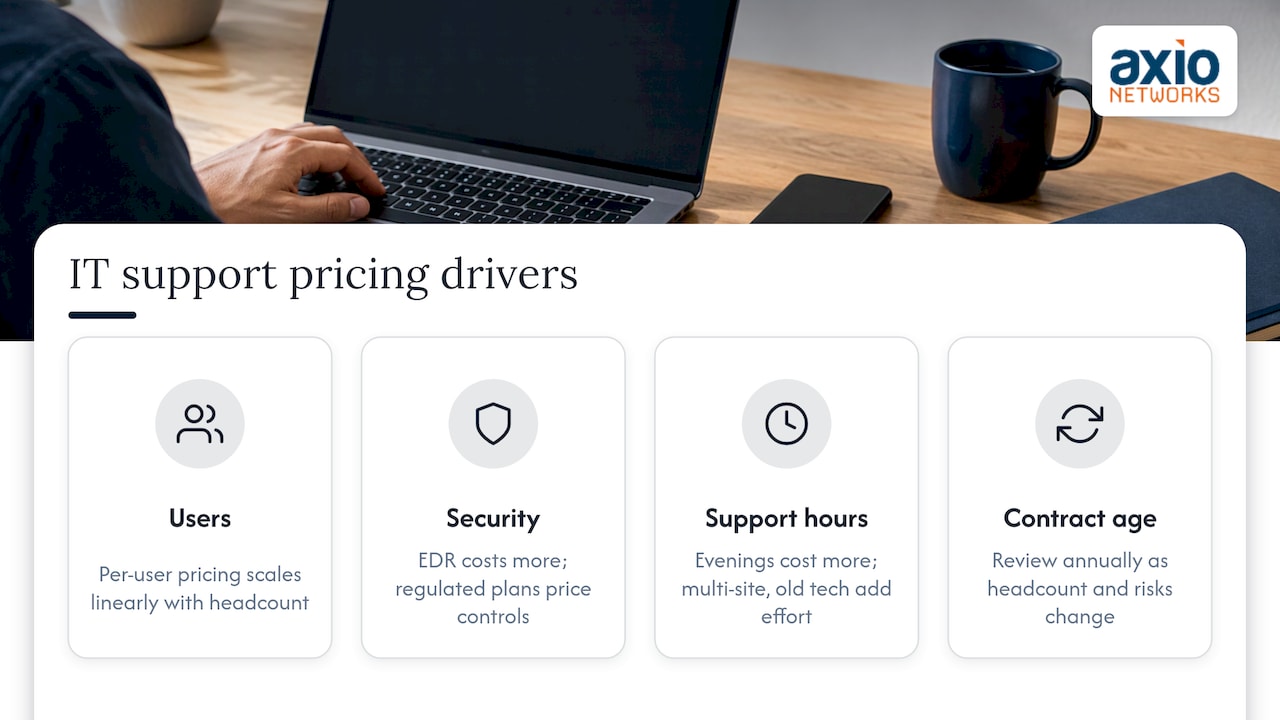
Number of users. The largest driver, and the one that scales linearly with per-user pricing.
Security depth. Basic antivirus is cheap. Endpoint detection and response, email security and round-the-clock monitoring cost more, and for most businesses are worth it. Our pages on endpoint security and EDR and SOC monitoring and MDR describe those layers.
Compliance. Businesses handling health records, payment cards, financial data or government contracts need documented controls, evidence and sometimes formal assessments. That work takes time, and it is priced into plans built for regulated industries.
Support hours. Business-hours help is one price. Evenings, weekends and emergency response are another.
Environment complexity. Multiple locations, on-premises servers, specialized software and older equipment all take more effort than a cloud-first office on Microsoft 365.
Contract age. A plan signed years ago can drift out of line with your headcount and risks. Reviewing the agreement every year keeps you paying for what you use.
Quoting questions that prevent surprise bills
Before you sign anything, ask each provider the same questions and write down the answers:
- What is the total monthly cost for my exact number of users and devices?
- Which services are included, and which are billed separately?
- Are on-site visits, after-hours calls and emergency response included?
- What does ransomware or malware recovery cost if it happens?
- What is the onboarding fee, and what does it cover?
- How are new hires, departures and new devices priced?
- What is the contract length, and what happens at renewal?
A provider who answers every one of these in a sentence has a clear pricing model. A provider who answers with “it depends” on most of them is leaving room for extra charges later. Our guide to IT expense planning for small businesses shows how to turn those answers into an annual budget.
Putting IT support in your annual budget
With a flat monthly fee, IT becomes an operating expense you can forecast by headcount. Add a line for planned projects such as hardware refreshes, a cloud migration or a new network, and a small cushion for growth. Then look at the rest of your technology spending as a whole. Your website and online visibility also depend on tools and expertise, and options such as AI-driven SEO for Phoenix companies are worth pricing in the same planning session, so your technology budget has no gaps.
A simple check: divide your total IT spend, including software, hardware, support and security, by the number of employees. If you cannot calculate it from your records, that is usually the first sign IT costs are scattered across too many invoices.
How Axio Networks prices IT support
We sell managed IT and cybersecurity as flat-rate service contracts with fixed monthly pricing, and larger one-off work as fixed-scope projects. The service list covers the help desk, remote and on-site support, network and server administration, backup and disaster recovery, Microsoft 365 management, endpoint and email security, SOC monitoring, risk and vulnerability assessments, security awareness training and compliance work. Our team is local to the Phoenix area, and we work with small and mid-sized businesses that do not have an in-house IT department.
If you want a number for your own business, start with our IT services for Phoenix page or go straight to managed IT services. Tell us your user count and what you run today, and we will put a fixed monthly figure on it.
If your main concern is protection against ransomware and phishing, the cybersecurity services page shows how security is built into the same agreement.
Our perspective
Owners tell us the same thing: they do not mind paying for IT, they mind not knowing what the bill will be. That is why we price the way we do. A flat monthly rate lets you plan the year, and it makes our interests match yours, because we are paid to keep your systems running, not to respond to the next failure.
We also think security should never be a separate, optional line. Every managed service we deliver is designed with security in it, so the protection you need is part of the work and the price. When a quote lists the help desk cheaply and leaves security for later, the real price shows up the day something goes wrong.
Being local matters too. Our team works with Phoenix area businesses every day, so we understand how the people and offices here use technology, and we can be on site when a problem needs hands on a device. Judge any provider on what the agreement says it will do, how fast it answers and whether the total stays the same month after month.
Jim O’Connell
FAQ
How much does IT support cost for a small business in Phoenix?
Fully managed IT typically runs $100 to $250 per user per month. A 10-person office therefore plans for roughly $1,000 to $2,500 a month, and the exact figure depends on security, support hours and compliance needs. A written quote for your headcount gives you the real number.
What is the difference between managed IT services and break-fix?
Break-fix means you pay for each repair when something fails. Managed IT is a monthly fee for ongoing support, monitoring, maintenance and security. Managed IT is easier to budget and focuses on preventing outages instead of billing for them.
Is per-user or per-device pricing better?
Per-user pricing covers every device an employee uses, so the cost follows your headcount and is easy to forecast. Per-device pricing can work for a fixed set of equipment but changes whenever you add a laptop, server or printer. Most small offices find per-user plans simpler.
What costs extra on an IT support plan?
Common extras are security monitoring, on-site visits, after-hours support, compliance work, onboarding and projects such as migrations. Ask for each to be marked included or excluded in writing so the monthly total is complete.
Can I get IT support without hiring an in-house team?
Yes. A managed provider acts as your IT department for a fixed monthly fee, with a help desk, monitoring and security handled for you. This is how many Phoenix small and mid-sized businesses run IT without a staff hire.
Sources
- 6 popular managed services pricing models, Channel Dive
- MSP Pricing: Which pricing model is right for you in 2026?, ManageEngine