Email encryption for a business comes down to three decisions: encrypt the connection between mail servers, encrypt the sensitive messages themselves, and make sure your staff use it without having to think about it. If you run on Microsoft 365, most of the tools already exist in your tenant. The hard part is configuring them so a customer, a bank or a vendor can open the message, and keeping the rest of your email defenses strong enough that the encryption is not the only thing standing between you and a breach. At Axio Networks, we set this up as part of managed Microsoft 365 and email security for Phoenix-area businesses, so the owner does not have to learn key management.
TL;DR
- Encryption keeps a message unreadable to anyone but the intended recipient. It does not stop phishing, malware or a stolen password.
- For most small and mid-sized businesses on Microsoft 365, the practical choice is enforced TLS for everyday mail plus Office 365 Message Encryption (OME) for sensitive messages sent outside the company.
- S/MIME gives certificate-based, peer-to-peer encryption and signatures, but needs a certificate for every user and every recipient’s public key.
- Rules that trigger encryption automatically, based on the content of the message, work better than asking every employee to remember.
- Pair encryption with SPF, DKIM and DMARC, multi-factor authentication and attachment filtering.
Table of Contents
- What email encryption protects, and what it does not
- Three layers of email protection
- Email encryption options compared
- Which option fits your business
- How to set up business email encryption in Microsoft 365
- What to check before you choose and configure
- Encryption is one layer: what else protects your email
- What recent federal guidance means for a private business
- How Axio Networks handles email encryption
- Our perspective
- FAQ
- Sources
What email encryption protects, and what it does not
An ordinary email travels through several servers and is often stored in several places. Most standard email protocols send data in the clear and default to unencrypted user authentication, according to NIST’s email security guidelines. Anyone who can read the traffic or the stored copy can read the message.
Encryption changes that. Microsoft’s security overview describes it as encoding the content so only authorized recipients can read it, which reduces the risk of leaking personal information, health records and financial data. Two techniques do the work:
- Symmetric encryption uses one key to lock and unlock the message. AES is the standard algorithm.
- Asymmetric encryption uses a public key to lock the message and a private key to unlock it. RSA is the standard algorithm. Certificate authorities vouch that a public key really belongs to the person who claims it, and digital signatures prove who sent the message and that nobody altered it.
What encryption does not do matters just as much. Microsoft notes it offers no protection against phishing, malware or a compromised identity. If an attacker signs in as your bookkeeper, they read the decrypted mailbox like the bookkeeper does. That is why the later sections cover account protection alongside encryption.
Three layers of email protection
People say “email encryption” and mean different things. NIST describes three methods: signing a message for integrity and sender identity, encrypting the message body for confidentiality, and encrypting server-to-server transmission, which can also protect headers. Think of them as layers.
- The login session. NIST’s minimum advice is to encrypt the user authentication session even if you do not encrypt the email data itself.
- The transport. Mail moving between servers is encrypted with TLS. NIST SP 800-177 Rev. 1 recommends TLS with certificate authentication for transmission security. This covers everything you send, but only while it moves.
- The message. The content is encrypted itself, so it stays protected on the recipient’s server and in their archive. This is the layer you reserve for sensitive messages.
Transport encryption is the baseline for every message. Message-level encryption is the targeted tool for the ones that carry real risk: tax documents, payroll, contracts, patient or client records, credentials.
Email encryption options compared
For a Microsoft 365 business, Microsoft Learn lays out three message-level options. The table summarizes them, with enforced TLS for context.
| Option | How it works | Recipient experience | Best fit |
|---|---|---|---|
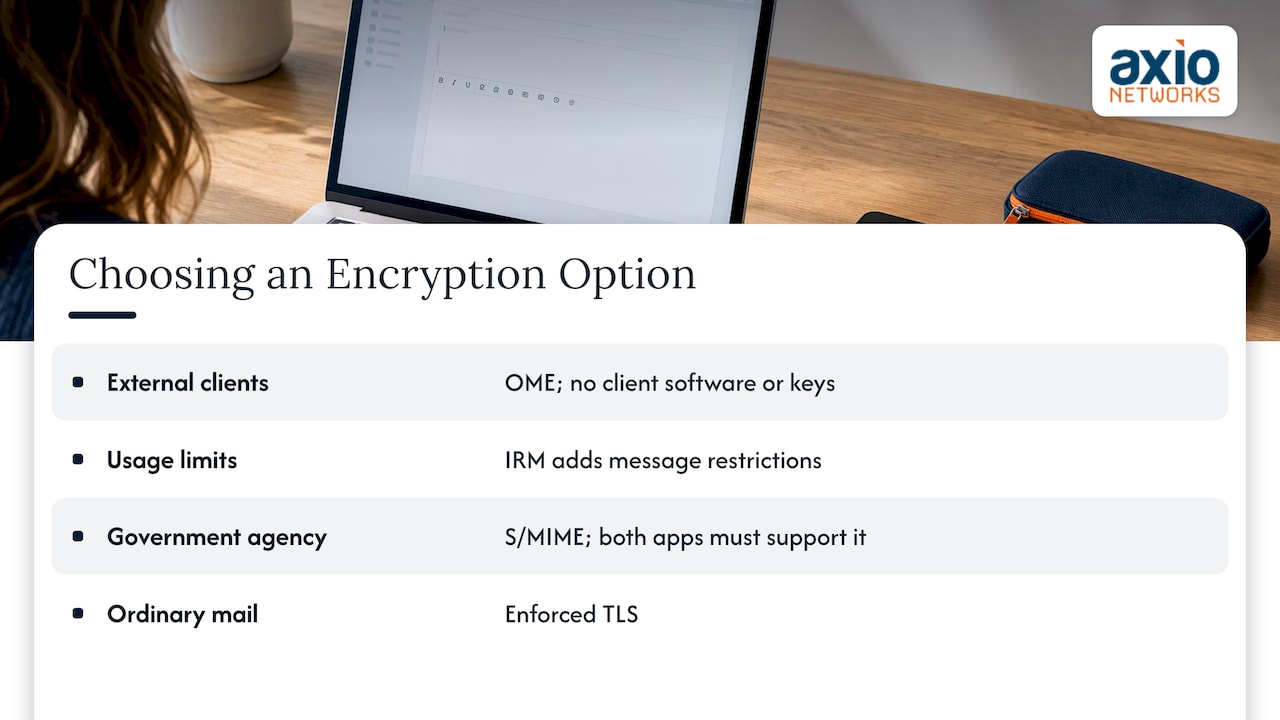
| Enforced TLS | Encrypts the connection between mail servers | Invisible; works if the receiving server supports TLS | Baseline for all business mail |
| OME (Office 365 Message Encryption) | Microsoft manages the keys; message sent to any address | Opens without special client software | Sensitive mail to customers, vendors, banks, patients |
| IRM (Information Rights Management) | Encryption plus usage restrictions | Some applications may not support IRM mail on every device | When you need to limit what the recipient can do with the message |
| S/MIME | Certificate-based encryption and digital signatures | Both sides need S/MIME-capable mail apps and exchanged public keys | Peer-to-peer encryption, typically with government agencies |
Microsoft’s own guidance is specific about when to use each. OME suits sending sensitive information outside the organization, such as a bank sending card statements or a doctor’s office sending medical records. IRM fits when you need usage restrictions alongside encryption. S/MIME fits when you need true peer-to-peer encryption, most commonly between government agencies or a business and a government agency.
Two cautions from the same page save real support time. OME cannot apply usage restrictions, and you should not stack multiple encryption technologies on one message, because some Outlook clients cannot open them.
On licensing, Microsoft Support states that Purview Message Encryption is included in the Office 365 Enterprise E3 license. Confirm which plan your business is on before you design a rollout.
OpenPGP also exists. NIST observes that its “web of trust” key management suits individuals and very small organizations but is unworkable in most medium to large ones. For a company with a team and customers, a managed, centrally administered option is the more practical path.
Which option fits your business
Start from who receives your sensitive mail, not from the technology.
You send documents to customers, patients or clients who use any email provider. OME is built for this. The recipient does not need to install anything, and you do not need to collect their keys. A law office sending settlement terms, a medical practice sending records or an accounting firm sending returns all fit this pattern. If you run a firm like that, our page on IT services for law firms shows how we approach those environments.
You need to control what the recipient does with a message. If forwarding, copying or printing is the concern, IRM adds those restrictions on top of encryption.
You exchange mail with a government agency that requires it. S/MIME is the option to plan for. It needs a digital certificate for each user, and it requires both sender and recipient to use a mail app that supports the standard.
You only want to know that ordinary mail is not exposed on the wire. Enforce TLS and stop there for that traffic, then add message-level encryption for the sensitive categories.
A worked example: a 25-person Scottsdale accounting firm sends client tax packets to hundreds of households. Enforced TLS covers day-to-day mail. A rule applies OME whenever a message contains a Social Security number pattern or the sender adds a keyword to the subject line. Clients get a link, verify themselves and read the message in a browser. No certificates, no client software, no phone calls asking how to open it.
How to set up business email encryption in Microsoft 365
The exact screens change as Microsoft updates the admin center, so treat this as the sequence rather than a click path.
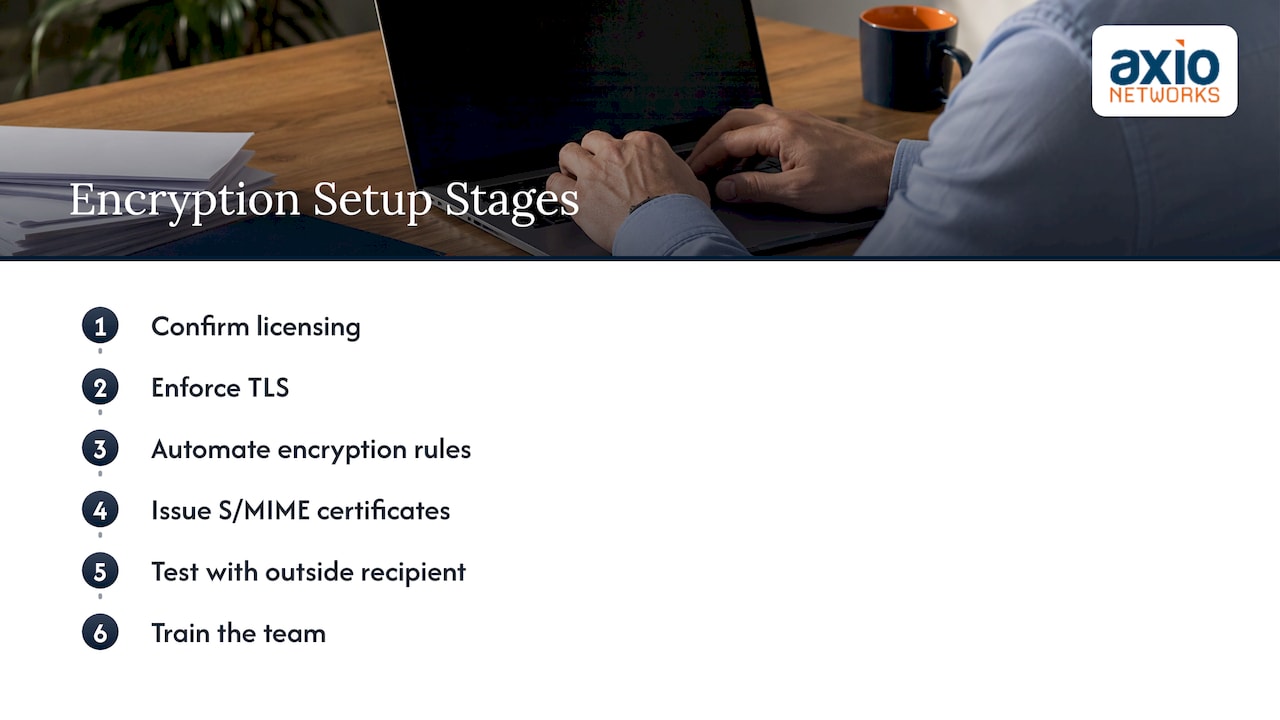
Step 1: Confirm your licensing
Check that your Microsoft 365 plan includes the encryption feature you want. As noted above, Purview Message Encryption is included in Office 365 Enterprise E3. This is where a mismatch shows up late: a feature planned for the whole company that only some licenses cover.
Step 2: Enforce TLS for mail flow
Microsoft recommends enforcing TLS and monitoring for misconfigurations, since misconfigured TLS is one of the remaining weak points. Build the connectors for the partners you exchange the most sensitive mail with, and review them when a partner changes providers.
Step 3: Decide what gets encrypted automatically
Microsoft’s recommendation is to automate encryption based on data classification so protection does not rely on every user remembering. Write down the categories: payroll, tax identifiers, bank account numbers, health information, contracts. Then create mail flow rules that apply encryption when those patterns appear. Add a manual option too, such as a subject keyword or an Outlook button, for the cases a rule cannot predict.
Step 4: If you use S/MIME, issue certificates
Per Microsoft Support, you obtain a digital certificate and add it to the computer’s keychain. In the new Outlook, you then open Settings, then Mail, then S/MIME, and select the option to encrypt the contents and attachments of all messages you send. You can also add a digital signature to all messages from the same screen, and import or export digital IDs there. Repeat for every user and every device, and plan how you will renew certificates before they expire.
Step 5: Test with a real outside recipient
Send an encrypted message to an address on a different provider, open it on a phone and on a desktop, and reply. Check that attachments open. Do this before announcing the policy to staff.
Step 6: Train the team
Show people what an encrypted message looks like to the recipient, when to use the manual option and what to do if a customer cannot open one. A five-minute walkthrough prevents most of the “I can’t read your email” calls.
What to check before you choose and configure
Encryption projects usually fail at the edges, not in the cryptography. Work through these questions.
Can every recipient open it? If your customers are non-technical, a message that requires them to install a certificate will not get opened. Choose the approach that matches the least technical person you email.
Who holds the keys? With OME, Microsoft manages its keys. With S/MIME, you manage certificates and each user’s private key. NIST warns that organization-wide encryption brings ongoing administrative overhead for key distribution, key recovery and key revocation. Decide who owns that work, and what happens when an employee leaves or loses a laptop.
What happens to security scanning? NIST points out that a mail server or firewall without a decryption method cannot read encrypted content, which complicates malware scanning and content filtering. Microsoft makes the same point about S/MIME, which prevents scanning encrypted messages for malware, spam or policy violations. Plan where inspection happens in your design.
Will it work on every device? Microsoft notes some applications may not support IRM emails on all devices. Test on the phones and mail apps your team actually uses.
Do the mail systems you send to support strong encryption? NIST cautions that messages to organizations supporting only weak encryption may be insufficiently protected, and that mail applications should notify users of weakly encrypted messages.
Is it automatic? If protection depends on memory, it will fail on the busiest day. Prefer rules over habits.
Encryption is one layer: what else protects your email
The same Microsoft guidance frames encryption as one control within a broader data security strategy, not a standalone fix. It lists man-in-the-middle attacks, compromised certificates or keys, human error and shadow IT as challenges that remain. For a deeper look at how encryption sits inside a layered email security strategy, these are the controls to pair with it:
- Sender authentication. NIST SP 800-177 Rev. 1 recommends SPF, DKIM and DMARC so that others can verify mail claiming to come from your domain. The document is written for federal systems but states it is also useful for small and medium-sized organizations.
- Attachment filtering. CISA’s Exchange Online baseline requires filtering emails by attachment file type, because malicious attachments often take the form of click-to-run files.
- Hardened mail clients. NIST notes the client side of email often represents a greater risk than the server, and recommends patching applications, disabling automatic opening of messages and enabling anti-spam and anti-phishing features.
- Multi-factor authentication and account settings. Our 3 step authentication checklist for Microsoft 365 email and our guide to the top Microsoft 365 security settings cover the account-level controls that encryption cannot replace.
- User training. Microsoft’s list of recommendations includes training users and managing keys.
If your team also shares large files rather than emailing them, see how to share files securely in Microsoft 365.
What recent federal guidance means for a private business
Executive Order 14144, signed January 16, 2025, requires the federal government to encrypt email in transport and use end-to-end encryption where practical. It sets deadlines for agencies to enforce encrypted, authenticated transport between email clients and servers, and for expanded server-to-server transport encryption.
It binds federal agencies, not your company. Two parts are worth noticing, though. First, it directs NIST to issue guidance identifying minimum cybersecurity practices for all types of businesses. Second, it directs a revision of Circular A-130 to promote zero trust architectures, endpoint detection and response, encryption, network segmentation and phishing-resistant multi-factor authentication. If you sell to government agencies or subcontract for them, expect those expectations to reach you through contracts. Either way, they match the stack described above: encrypted transport, content protection for sensitive mail and strong sign-in.
How Axio Networks handles email encryption
Email encryption is not a one-time switch. It touches licensing, mail flow rules, certificates, device testing and user habits. Our Managed Microsoft 365 service and email security services put that work in one place, under a flat monthly rate, so email protection is built into how your Microsoft 365 environment is managed rather than bolted on later. Our team is local to the Phoenix metro area, and our average response time is under 30 minutes.
If you want sensitive email protected without adding staff, start with our cybersecurity services or talk to us through the Axio Networks site. Our Microsoft 365 Business Premium security guide explains how the platform’s protections fit together, and our email encryption guide goes further into protecting sensitive information.
Our perspective
Most owners come to us after an uncomfortable moment: a customer asked how to send a document securely, an insurer asked about email controls, or someone emailed a spreadsheet of payroll data to the wrong person. They ask for encryption. What they actually need is email that is safe by design.
That is how we build it. We design security into every service we deliver, so encryption is not a separate product the team has to remember. Sensitive messages are protected by rules, sign-in is protected by multi-factor authentication, and the mail environment is monitored as part of one managed service. Encryption without those pieces protects a message from eavesdroppers while leaving the mailbox open to anyone who steals a password.
We also think the pricing model matters. A flat rate means you do not hesitate to ask for a new rule, a new certificate or a test with a vendor because someone is counting billable hours. Predictable IT cost is part of good security, because people use controls they are not afraid to ask about.
If you run a small or mid-sized business in the Phoenix area and do not have an in-house IT team, your email should be one of the least stressful parts of your day. That is the standard we hold our own work to.
Jim O’Connell
FAQ
What is the easiest way to encrypt email for a small business?
If you use Microsoft 365, the simplest route is enforced TLS for everyday mail plus OME for sensitive messages sent outside the company. Microsoft says OME sends encrypted mail to any address without special client software, so recipients do not need to set anything up. Automatic rules based on message content make it easier still for your staff.
Is AES-256 still secure for business email?
AES is the standard symmetric algorithm used in email encryption, according to Microsoft Security, and 256-bit keys are the longest standard AES size. In practice, the weak points are usually elsewhere: stolen credentials, misconfigured TLS, mishandled keys and human error. Strong algorithms matter, but so does the configuration around them.
Does encrypting email protect me from phishing?
No. Encryption protects the content of a message from being read by the wrong people. It does not stop a phishing email from reaching your inbox or an attacker from using a stolen password. Pair it with multi-factor authentication, sender authentication through SPF, DKIM and DMARC, attachment filtering and staff training.
Do my customers need special software to open an encrypted email?
Not with OME, which is designed to be opened without special client software. S/MIME is different: sender and recipient both need a mail application that supports the standard, plus the right certificates. Choose the method that matches the least technical person you email.
Can Axio Networks set up email encryption for us?
Yes. Email security and Microsoft 365 management are part of what we deliver for small and mid-sized businesses in the Phoenix metro area. Reach out through our Managed IT Services page.
Sources
- What Is Email Encryption? | Microsoft Security
- Email encryption in Microsoft 365 | Microsoft Learn
- Set up Outlook to use S/MIME encryption | Microsoft Support
- NIST SP 800-45 Version 2, Guidelines on Electronic Mail Security
- NIST Guidelines on Electronic Mail Security (SP 800-45)
- NIST SP 800-177 Rev. 1, Trustworthy Email
- CISA Exchange Online Secure Configuration Baseline
- Executive Order 14144, Presidential Documents, January 2025
- The Complete Guide to Safeguarding Your Domain, Content, and Business Email