Cybersecurity services for a small or midsize business are priced in one of four ways: per user per month, a flat monthly fee for the whole company, an hourly rate, or a fixed fee for a one-time project. The number matters less than what sits behind it. A low monthly quote that leaves out monitoring, incident response or remediation just moves the cost to the day something goes wrong. For most Phoenix-area businesses without an in-house IT team, the cleanest answer is a flat-rate agreement where security is built into the IT service rather than bought as a separate add-on. That is how we price at Axio Networks.
TL;DR
- Security costs fall into three buckets: recurring services (monitoring, endpoint and email protection, training), one-time work (assessments, setup, remediation) and a reserve for incidents. Budget for all three.
- The four common pricing models are per user, flat monthly fee, hourly and fixed-scope project. Per-user and flat-rate pricing are the easiest to forecast.
- Two quotes with the same headline price can cover very different things. Compare what is included, not the monthly figure.
- Surprise costs usually come from cleanup, onboarding fees and out-of-scope work. Ask for these in writing before you sign.
- Security delivered inside a managed IT agreement avoids paying twice for overlapping tools and support.
Table of Contents
- Why there is no single price
- The four ways cybersecurity services are priced
- What drives the price up or down
- What a security program usually includes
- Where the surprise costs hide
- A worked example: a 25-person office
- How to compare cybersecurity quotes
- Building the budget in practice
- Our perspective
- Get a quote that shows everything
- FAQ
- Sources
Why there is no single price
Search for this topic and you will find ranges from about a thousand dollars a month to well into six figures a year. They are all “right” because they describe different buyers. A 15-person accounting office and a 400-person manufacturer do not need the same program, and a business that wants only an antivirus replacement is not buying the same thing as one that wants a team watching its systems around the clock.
The scale of the problem explains why owners are asking. The FBI’s Internet Crime Complaint Center logged more than one million complaints and about $20.9 billion in reported losses in 2025, a 26% rise in losses over 2024. Those losses reach businesses of every size, and small ones tend to have the least cushion to absorb them.
So the useful question is not “what is the average?” It is “what does a program that fits my business include, and how is it priced?”
The four ways cybersecurity services are priced
| Pricing model | How it works | Best for | Main risk |
|---|---|---|---|
| Per user, per month | A set fee for each employee or mailbox covered | Teams of 10 to 200 with steady headcount | Fee grows with every hire; per-device add-ons can pile up |
| Flat monthly fee | One fixed amount for an agreed scope, regardless of small changes in headcount | Owners who want one predictable line in the budget | Scope must be clearly written so “flat” really means flat |
| Hourly | You pay for time spent, usually with a minimum block | Occasional advice or a one-off fix | No ceiling on the bill; no ongoing monitoring |
| Fixed-scope project | One price for a defined job, such as an assessment or a migration | Audits, compliance preparation, network builds | Does not cover what happens after the project ends |
Per-user pricing
Per-user pricing is the most common for small businesses because it scales simply. You multiply the rate by headcount. The question to ask is whether the rate covers only the security tools or also the people who watch alerts and respond. A tool-only rate looks cheap until someone has to act on what the tool finds.
For context on how a bundled model looks, our own guide to managed IT services pricing for SMBs frames managed IT at $100 to $250 per user, with security included in the service rather than sold as a separate layer.
Flat monthly fee
A flat fee covers a defined set of services for a fixed monthly amount. It is the model that makes budgeting easy: the number you approve in January is the number you pay in December, unless the scope changes. The detail that matters is the contract language about what counts as in scope. Our guide to flat-rate IT support clauses lists the clauses worth demanding before you sign any agreement.
Hourly rates
Hourly billing suits a specific, bounded question: reviewing a policy, fixing a misconfiguration, answering a one-time compliance question. It does not suit ongoing protection, because attackers do not work in billable blocks. If you find yourself calling for hourly help every month, the work has become recurring and a monthly agreement will almost always cost less and cover more.
Fixed-scope projects
Assessments, penetration tests, cloud migrations and network rebuilds are usually quoted as projects. They have a start, an end and a deliverable. They belong in the budget as one-time items, separate from the monthly line.
What drives the price up or down
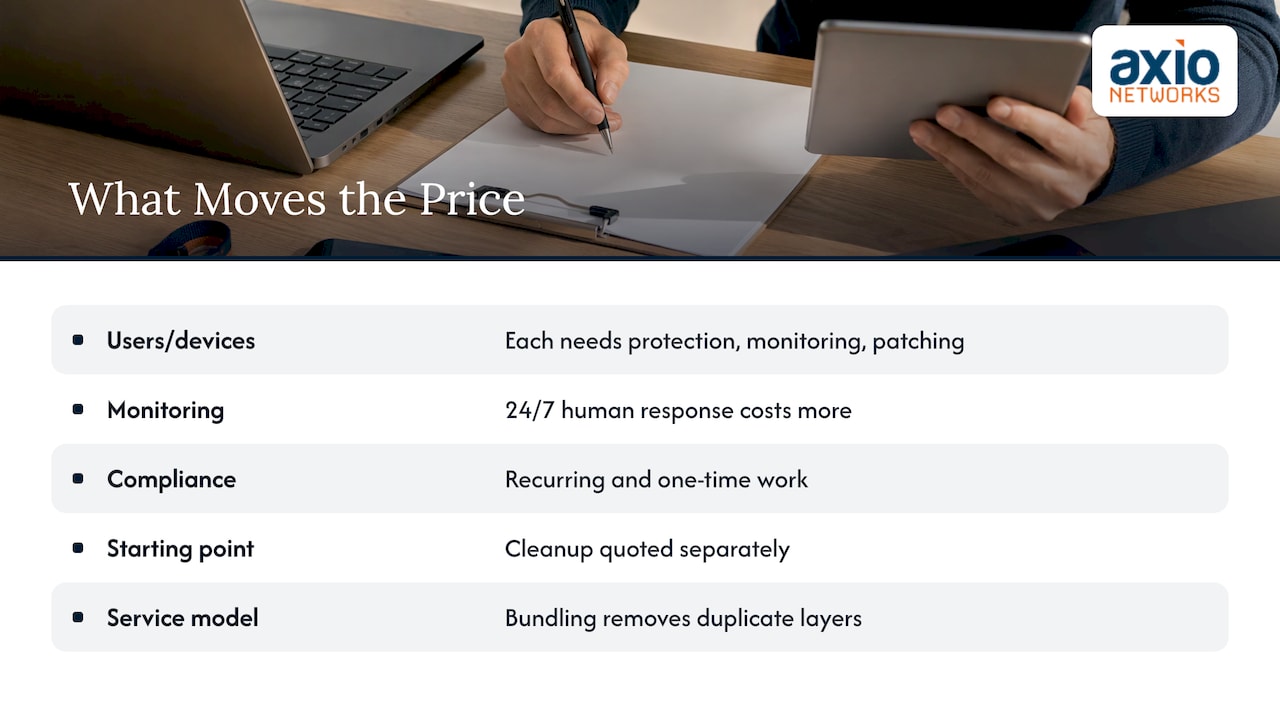
Five factors move a quote more than anything else.
1. Number of users and devices. Every person, laptop, phone and server needs protection, monitoring and patching. Headcount is the base of nearly every formula.
2. Depth of monitoring. Software that blocks known threats is the floor. Round-the-clock human monitoring of alerts, with someone investigating and acting, is a different service and costs more. It is also the part that shortens the time between a break-in and a response. If you want to understand what that includes, see our page on SOC monitoring and managed detection and response.
3. Compliance requirements. A business handling health records, payment cards, financial data or client files under contract carries extra obligations: documented policies, logging, evidence for auditors, periodic assessments. These add recurring and one-time work.
4. Your starting point. An environment with old servers, unpatched laptops, shared passwords and no backups needs remediation before it can be maintained. That cleanup is a one-time cost that should be quoted separately and clearly.
5. The service model. Buying security alone from one provider and IT support from another means two contracts, two sets of tools and often overlapping software. Buying them together typically removes duplicate layers.
What a security program usually includes
Before comparing prices, line up the components. The names vary between providers, but the building blocks are consistent.
- Endpoint protection and response (EDR). Software on every computer and server that detects and contains suspicious behavior. See how we approach endpoint security and EDR.
- Email security. Filtering for phishing, spoofing and malicious attachments, since email remains the usual way in.
- Network security. Firewalls, segmentation, secure Wi-Fi and remote access controls.
- 24/7 monitoring and response. People watching alerts and acting on them.
- Backup and disaster recovery. The safety net if something is encrypted or deleted. Our backup and disaster recovery service is built to get a business running again after a failure.
- Security awareness training. Teaching employees to spot phishing and report it.
- Risk and vulnerability management. Regular scanning and review of weaknesses, and a plan to close them.
- Compliance support. Policies, controls and documentation for the regulations that apply to you.
A quote that lists only two or three of these is not necessarily wrong, but it is not comparable to one that lists all eight. Put the components side by side before looking at any figure.
Where the surprise costs hide
The monthly figure is rarely the whole bill. These are the line items that most often appear after the contract is signed.
- Onboarding and setup fees. Deploying tools, documenting the environment and migrating accounts.
- Remediation of existing problems. Replacing unsupported hardware or fixing misconfigurations found in the first assessment.
- Incident response. Some agreements cover investigation and cleanup; others bill it hourly on top of the monthly fee, often at premium rates.
- Out-of-scope projects. Moving offices, adding locations or migrating to the cloud may be billed separately.
- Add-on licenses. Extra mailboxes, extra devices or advanced features priced individually.
- Contract terms. Auto-renewal, long minimum terms and penalties for leaving.
One practical way to avoid them is to budget in three parts rather than one. Recurring services go in the monthly line. Assessments, setup and remediation go in a one-time line. And a contingency reserve covers recovery work and downtime if an incident happens anyway. A quote that hides the second and third categories inside a low monthly price only postpones them.
A worked example: a 25-person office
Take a professional services firm in Scottsdale with 25 employees, a mix of office and remote staff, a file server and Microsoft 365.
Option A, assembling it piece by piece. The owner buys antivirus from one vendor, an email filter from another, backup from a third and calls an hourly technician when something breaks. Each line looks small. But nobody is watching the alerts, nobody owns the whole picture, and the hourly bills arrive unpredictably. The total cannot be forecast, and it covers less than it appears to.
Option B, a flat-rate managed agreement. One provider handles help desk, endpoint protection, email security, monitoring, backup and patching under a single monthly fee. Headcount of 25 sets the base. A one-time assessment and setup covers the cleanup. The owner approves one number and knows what it covers.
The second option is the one we build at Axio. Our agreements are flat-rate and security is integrated into every managed and project service, so the protection is part of the service rather than an extra line. You can see the shape of that in our managed IT services and cybersecurity services pages.
For firms with client data under confidentiality obligations, such as bookkeeping and tax practices, the same logic applies with added compliance work. See how that looks for accounting and CPA firms.
How to compare cybersecurity quotes
Use the same checklist on every proposal.
- List what is included. Match each quote against the eight components above. Mark what is missing.
- Ask who responds. Is there a person who investigates an alert at 2 a.m., or does the tool only send you an email?
- Ask how fast. Look for a stated response time in the agreement, not a general promise. Ours averages under 30 minutes.
- Get one-time costs in writing. Onboarding, assessment and remediation should each have a number.
- Read the incident clause. Find out whether investigation, containment and recovery are covered or billed separately.
- Check the exit terms. Term length, renewal and what happens to your data and documentation if you leave.
- Ask for the scope in plain language. What counts as a new project and what is part of the monthly service.
- Confirm local availability. On-site help matters when hardware fails or a network needs to be rebuilt. A provider that knows the Phoenix metro area can be at your door the same day.
If you are unsure what your current exposure looks like, a cybersecurity assessment turns the unknowns into a priced list of fixes. And if you need to understand the difference between a scan and a deeper test, our comparison of vulnerability assessments and penetration tests explains what each one finds.
Building the budget in practice
Start from what you have, not from a benchmark.
- Inventory. Count users, devices, servers, cloud apps and locations.
- Identify obligations. Note any regulation, cyber insurance requirement or client contract that sets minimum controls.
- Assess the gaps. Compare your current protections to the components list.
- Sort into three buckets. Recurring services, one-time work and the incident reserve.
- Phase the work. A 30/90/180 day cybersecurity checklist aligned to NIST helps you sequence the fixes so the most important controls come first without a single large outlay.
Phasing is how a tight budget still produces real protection: multi-factor authentication, backups and email filtering first, then monitoring, then training and compliance work.
Our perspective
We hear the same question from owners every month: “What should I be paying for security?” The honest answer is that the question is slightly wrong. The right question is what you are getting for the money, and who is accountable when something happens.
Security sold as a separate product tends to produce a shelf of tools that nobody owns. We build it the other way around. Security is part of how we deliver every managed service and every project, from the help desk to a network build, so that protection is not a line item someone forgets to renew.
That is also why we price flat-rate. Surprise bills teach owners to avoid calling for help, and that is the opposite of what keeps a business safe. When the monthly fee is fixed and the scope is written down, your team calls early, and our local Phoenix-area team can respond fast.
If you take one thing from this article, take the three-bucket budget: recurring, one-time and reserve. It makes every quote easier to read, ours included.
Jim O’Connell
Get a quote that shows everything
If you want a number built on your actual headcount, devices and obligations, we will scope it with you. Axio Networks provides flat-rate managed IT and cybersecurity to small and midsize businesses across the Phoenix metro area, with security integrated into every service and a dedicated local team. Our cybersecurity services cover endpoint and email security, SOC monitoring, vulnerability management, compliance and security awareness training.
Talk to us through the Axio Networks site and we will map your current setup to a fixed monthly price and a clear list of one-time work.
FAQ
How much does cybersecurity cost for a small business?
It depends on headcount, how deep the monitoring goes and which regulations apply. Most providers quote per user per month, or a flat monthly fee for a defined scope. Add one-time assessment and setup costs plus a reserve for incidents to get the real annual figure.
How are managed security services priced?
The common models are per user, flat monthly fee, hourly and fixed-scope project. Per-user and flat-fee agreements fit ongoing protection because they are predictable. Hourly billing suits short, specific questions, and projects suit audits and migrations.
What is usually included in a managed security plan?
Expect endpoint protection, email security, network security, monitoring and response, backup, awareness training and vulnerability management. Compliance support and incident response are the two items most often priced separately, so confirm them in writing.
Why do two quotes for “cybersecurity” differ so much?
They often cover different things. One may include human monitoring, response and backup, while the other supplies only software licenses. Compare the component list first and the price second.
Can I fold security into my existing IT support?
Yes, and it is often the cheapest route, because tools, support and responsibility sit with one provider instead of two. This is how our managed IT agreements work, with security built into the flat monthly service.