A good IT response time depends on how serious the problem is. For a business-stopping outage, the common standard is a human response within 15 to 30 minutes. For a routine request, it is a few business hours up to the next business day. The number only means something when it is tied to a priority level, a clock (24/7 or business hours) and a definition of “response”. At Axio Networks, our average response time is under 30 minutes, and the rest of this guide shows you how to judge any provider’s standard against the same yardstick.
TL;DR
- Response time is how long it takes a person to acknowledge your ticket and start work. Resolution time is how long it takes to fix it. You need a standard for both.
- Typical benchmarks by priority: critical 15 to 30 minutes, high 1 to 2 hours, standard 4 to 8 business hours, low next business day.
- Ask whether the clock runs 24/7 or only during business hours. It changes what the same number means.
- A response should be a real person starting work, not an automatic receipt.
- Track compliance monthly. Most help desks aim to meet targets on 90 to 95 percent of tickets.
Table of Contents
- What response time actually measures
- Typical benchmarks by priority
- What is a good response time for a small or midsized business?
- Business hours or 24/7: the clock changes the number
- Response versus resolution: write down both
- What a solid SLA specifies
- How to track whether the standard is being met
- Help desk or service desk: what answers the phone
- How we approach it
- What this looks like with Axio Networks
- FAQ
- Sources
What response time actually measures
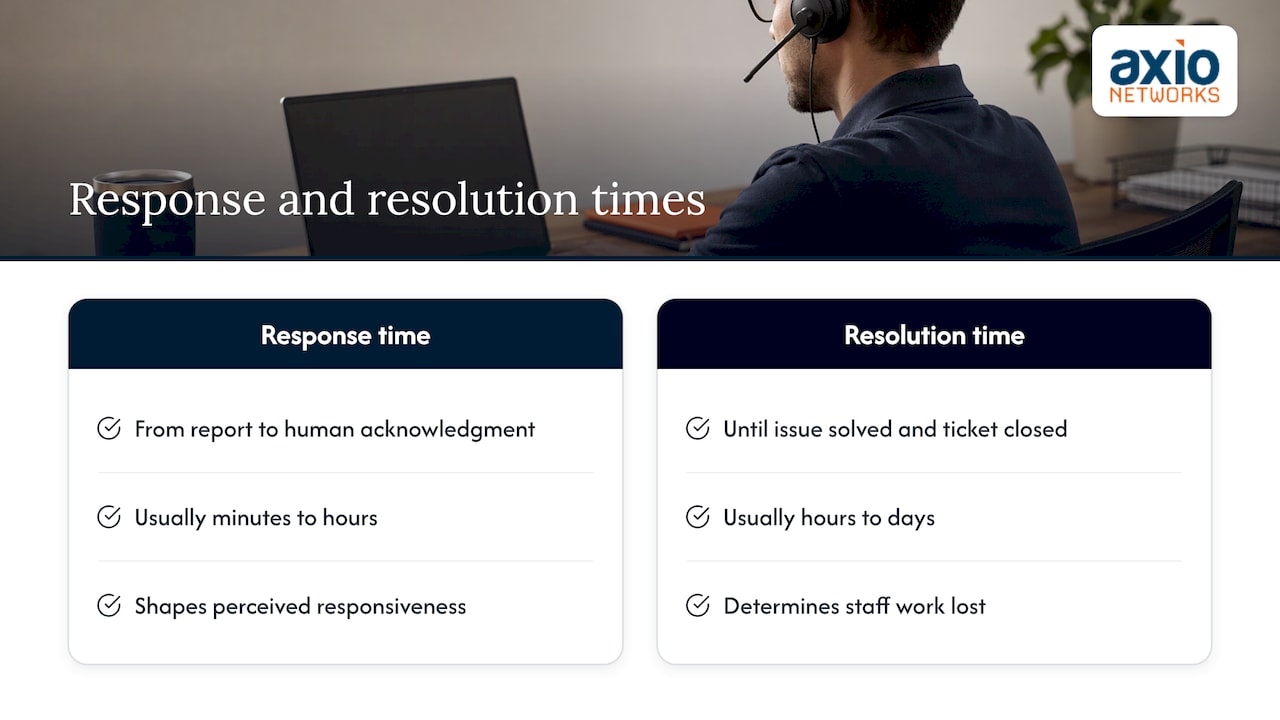
Response time is the stretch between the moment you report a problem and the moment the IT team formally acknowledges it and begins taking action. Freshworks’ SLA guide describes it exactly that way, and notes that it covers initial acknowledgment, not the full fix. An SLA (service level agreement) is the written contract section that sets these targets.
Resolution time is the other half. It runs until the issue is solved and the ticket is closed. Response usually runs minutes to hours, while resolution runs hours to days, according to the same guide. The first shapes how responsive the provider feels. The second decides how much work your staff loses.
There is one detail that trips up many owners: what counts as a response. An auto-generated email saying “we got your ticket” is a receipt. customerexperience.io draws the same line, counting the clock as stopped only by a real human touch. When you read any standard, find the definition and make sure it says a technician, not a robot.
Typical benchmarks by priority
Most support organizations sort tickets into four priority levels, usually called P1 to P4. Published targets cluster tightly, whether they come from software vendors or from large institutions.
| Priority | What it means | Typical response target | Typical resolution target |
|---|---|---|---|
| P1 Critical | Business or a whole site is down | 15 to 30 minutes | About 4 to 8 hours |
| P2 High | Major function or a group of users impaired | 1 to 2 hours | Same day to 2 business days |
| P3 Medium | One user or a workaround exists | 4 to 8 business hours | 3 to 5 business days |
| P4 Low | Requests, questions, minor changes | Next business day | 5 or more business days |
The ranges come from Suptask’s June 2026 benchmark table, which lists 15 to 30 minutes for critical, 1 to 2 hours for high, 4 to 8 hours for medium and 24 hours or the next business day for low, each during business hours. Gain.io gives a similar picture, with critical issues often answered in 15 to 30 minutes and routine requests resolved in 5 to 10 business days.
What large organizations commit to
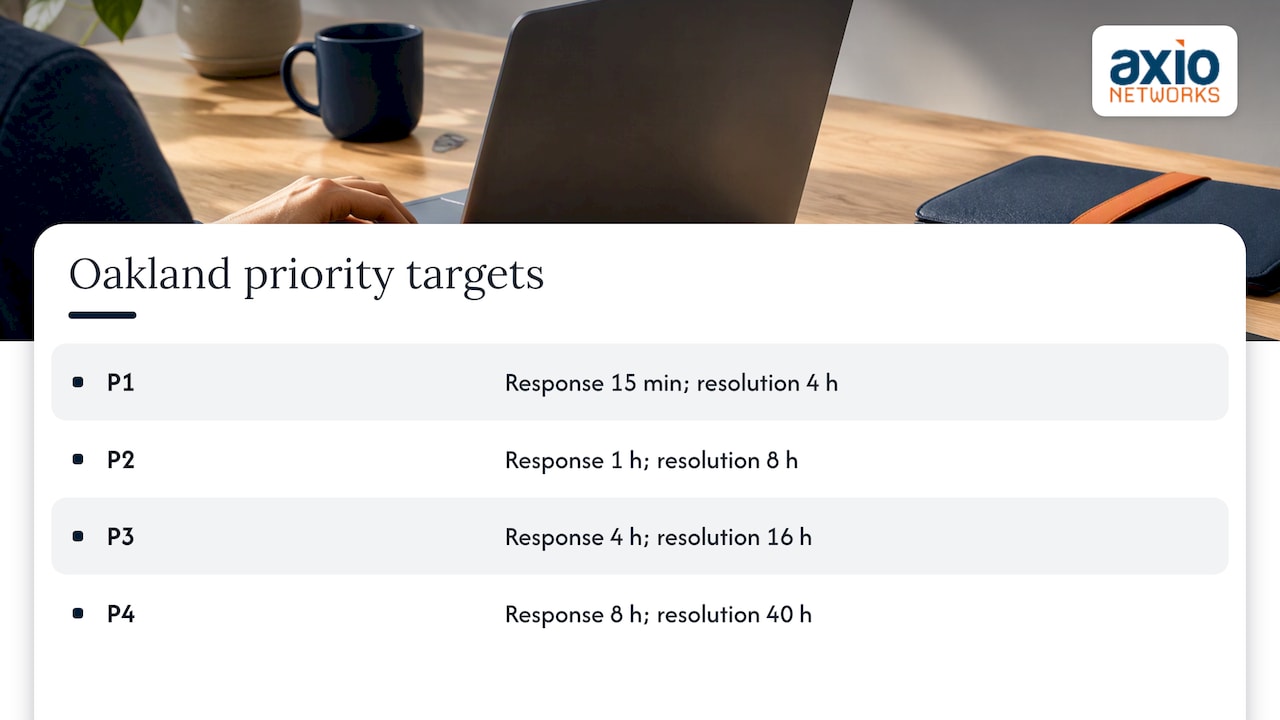
The most useful evidence comes from institutions that publish their own targets. Oakland University’s technology service lists a service-center chart: Priority 1 gets a response within 15 minutes and a resolve target of 4 hours, Priority 2 gets 1 hour and 8 hours, Priority 3 gets 4 hours and 16 hours, and Priority 4 gets 8 hours and 40 hours.
UCSF IT’s enterprise SLA is stricter in some places. It provides 24/7 support for patient-critical and business-critical systems, with critical outages answered within 15 minutes and system-wide issues within 1 hour. Its global targets add that 80 percent of phone calls should be answered in under 60 seconds, and that P3 issues get a response in 2 business hours.
A small business does not need a hospital’s staffing, but the shape is a good template: a fast, near-universal 15-minute standard for true emergencies, and slower, scaled targets as impact drops.
What is a good response time for a small or midsized business?
For a company of 10 to 250 people, a sensible standard looks like this:
- Anything that stops work for the whole office (server down, internet out, ransomware suspected): a technician engaged within 15 to 30 minutes, at any hour if your operations or customers depend on it.
- A department or key person blocked: within one to two hours during business hours.
- One person with an annoying problem: the same business day is a fair expectation, and 4 to 8 business hours is the published norm.
- New-hire setup, access changes, how-to questions: next business day, scheduled ahead when possible.
Our own average response time is under 30 minutes, across the support we deliver to Phoenix-area small and mid-sized businesses. We mention it not to hand you a number to take on faith but to give you a reference point: if a proposal quotes “within 8 hours” for everything, the ticket that matters most is waiting in the same line as a printer question.
Business hours or 24/7: the clock changes the number
Two providers can promise “15 minutes” and mean very different things. One counts every minute of every day. The other counts only 8 a.m. to 5 p.m., Monday through Friday, excluding holidays. UCSF’s SLA spells out its standard business hours that way, and separately promises round-the-clock coverage for its critical systems.
The Freshworks sample matrix handles the same problem with a split: critical issues at 15 minutes, with 30 minutes after hours. JITBIT’s help desk SLA guide recommends business-hours clocks for normal and low tickets and a 24/7 clock for critical ones.
For your own situation, ask these questions:
- When does a failure cost you money? A medical office, a warehouse with night shifts or an e-commerce store has a different answer from a 9-to-5 law firm.
- Which systems justify the 24/7 clock? Usually the network, servers, email, line-of-business software and security alerts.
- Who answers at 11 p.m.? Security events are the clearest case. Our SOC monitoring and MDR service watches for threats around the clock so that a suspicious login at night is not waiting for the morning.
Response versus resolution: write down both
A fast response with no resolution target is a promise that someone will look at the problem, not that it will be fixed. That is why a complete standard has two columns, as in the table above. Suptask’s advice is to put weight on resolution time when reading an SLA, since a quick acknowledgment is easy to hit.
Also check what pauses the clock. Gain.io notes that clocks commonly stop while the provider waits on you for information or on a third-party vendor. That is reasonable, as long as the pause rules are written down.
What a solid SLA specifies
Whatever provider you choose, the written standard should cover:
- Priority definitions in plain business terms. “Critical” should be described by impact (“the whole office cannot work”), not by who is shouting.
- Response and resolution targets for each level.
- The clock. 24/7 or business hours, and which holidays are excluded.
- What counts as a response. A human who begins work.
- Escalation. Who gets pulled in when a target is about to be missed. JITBIT lists the escalation path among its core rules of thumb, so alerts reach the right person.
- Reporting. Monthly numbers for response, resolution and compliance.
We have laid out what to demand and measure in more detail in our guide to the IT service level agreement.
How to track whether the standard is being met
JITBIT defines four numbers worth watching: first response time (the first human reply, with auto-acknowledgements excluded), mean time to acknowledge, mean time to resolve, and SLA compliance rate. It notes that most teams aim for 90 to 95 percent compliance across all priorities, and suggests reviewing targets every quarter so they tighten as the team improves.
A simple monthly routine works for a small business:
- Pull the ticket report: count of tickets by priority, median first response, median resolution.
- Compare each priority against its target and note the percentage met.
- Look at the misses, not just the average. One P1 handled in three hours matters more than fifty P4s handled early.
- Discuss patterns. Repeated tickets about the same problem point to a root cause worth fixing, which is what proactive management is for.
With a flat monthly fee, this is also the way to see the value you are getting, because the report shows the support that is included without any per-ticket billing.
Help desk or service desk: what answers the phone
Response standards apply to the front door of your IT support. Some teams run a help desk focused on fixing incidents, while others run a broader service desk that also handles requests and changes. If you are unsure which model fits your staff, our short explainer on help desk versus service desk covers the difference, and our IT help desk page shows how that front line works for Phoenix-area businesses.
How we approach it
Most owners come to us after a bad stretch: a slow answer during an outage, or a bill that jumped after a bad month. The honest lesson is that response time is only one line in a good agreement, and it should never sit apart from security and cost.
We build security into every managed and project service we deliver, so a ticket about a strange email or a locked account is treated as part of protecting your business, not as an interruption. Our average response time is under 30 minutes, and our team is local to the Phoenix area, which means we know the businesses, the buildings and the networks we are supporting.
Pricing is flat-rate, so you do not have to hesitate before calling about a problem because of what the call might cost. That changes behavior: people report issues earlier, issues stay small, and your response targets are measured on real tickets instead of workarounds.
If you take one thing from this article, take the table. Ask for priorities, clocks and reports in writing, whoever you choose.
Jim O’Connell
What this looks like with Axio Networks
If you are a small or mid-sized business in the Phoenix metro area without an in-house team, our managed IT services cover help desk, remote and on-site support, network and server administration, Microsoft 365 management, backup and disaster recovery, and cybersecurity under one flat-rate agreement. We answer to an average of under 30 minutes, and security is part of every service we deliver.
To see how that applies to your office, start from our managed IT page or remote IT support, and tell us how many people depend on which systems. Common questions are answered in the managed IT FAQ.
FAQ
What is a good IT support response time?
For critical issues that stop your business, 15 to 30 minutes is the usual benchmark. High-priority issues typically get one to two hours, standard issues four to eight business hours, and low-priority requests the next business day. Our average response time is under 30 minutes.
What is the difference between response time and resolution time?
Response time is how long until a technician acknowledges your ticket and starts working. Resolution time is how long until the problem is fixed and the ticket closed. Response is typically minutes to hours; resolution can take hours to days, so a good agreement sets a target for each.
Does the response clock run on nights and weekends?
It depends on the agreement. Many standards run 24/7 for critical issues and only during business hours for everything else. Look for the clock definition in writing, along with the holidays that are excluded.
What compliance rate should an IT team hit?
JITBIT reports that most teams aim to meet targets on 90 to 95 percent of tickets across all priorities. Review it monthly and revisit the targets quarterly as performance improves.
Does an automatic ticket confirmation count as a response?
No. A proper standard counts the first response as a real person acknowledging the ticket and beginning work. An automated receipt only confirms the ticket was received.
Sources
- Freshworks: What is SLA response time?
- customerexperience.io: Response Time vs Resolution Time as SLA Metrics
- Suptask: SLA Times and Metrics: IT Support Benchmarks
- Gain.io: Response Time vs Resolution Time in SLAs
- Oakland University: UTS Service Level Agreement Standards
- UCSF IT: IT Enterprise Service Level Agreement
- JITBIT: Help Desk SLA Best Practices