Microsoft 365 email protection works as a ladder: built-in Exchange Online Protection catches the obvious threats, and Defender for Office 365 adds layered defenses against phishing, impersonation, and targeted attacks. The single highest-priority action right now is implementing SPF, then DKIM, then DMARC, alongside Safe Links, Safe Attachments, and anti-phishing policies. Organizations without in-house security staff should weigh Plan 2 or a managed service for the monitoring that follows.
TL;DR:
- Setting up SPF, DKIM, and DMARC correctly is crucial, with DMARC policy escalation from monitoring to rejection over several weeks.
- External mail routing through non-Microsoft gateways can weaken protection unless connectors and permissions are carefully reviewed and configured.
- Implementing Safe Links, Safe Attachments, and strict policies reduces attack surfaces, but regular review of quarantine release permissions is necessary.
- Native protections are often insufficient without continuous monitoring, automated alerts, and integrated threat hunting, especially for high-value targets.
- Managed security services ensure consistent policy tuning, round-the-clock monitoring, and faster incident response, complementing Microsoft’s layered defenses.
Table of Contents
- The protection ladder: built-in features vs. Defender Plan 1 and Plan 2
- What secure-by-default actually covers, and where it breaks down
- Rolling out SPF, DKIM, and DMARC without breaking mail flow
- Hardening checklist: policies, permissions, and data loss prevention
- Monitoring, alerting, and getting telemetry into a SIEM
- When native controls aren’t enough: supplemental protection and managed services
- What field experience with Microsoft 365 hardening actually shows
- How Axio Networks implements this checklist for you
- FAQ
- Sources
The protection ladder: built-in features vs. Defender Plan 1 and Plan 2
Every cloud mailbox gets Exchange Online Protection by default: anti-spam, anti-malware, basic anti-phishing, quarantine, and zero-hour auto purge. Defender for Office 365 Plan 1 builds on that baseline with Safe Links, Safe Attachments, impersonation protection, and mailbox intelligence, aimed at stopping malicious URLs and attachments before a user ever clicks. Plan 2 adds automated investigation and response, advanced hunting, attack simulation training, and threat trackers, tools built for teams that need to move from detection to action without manual triage.
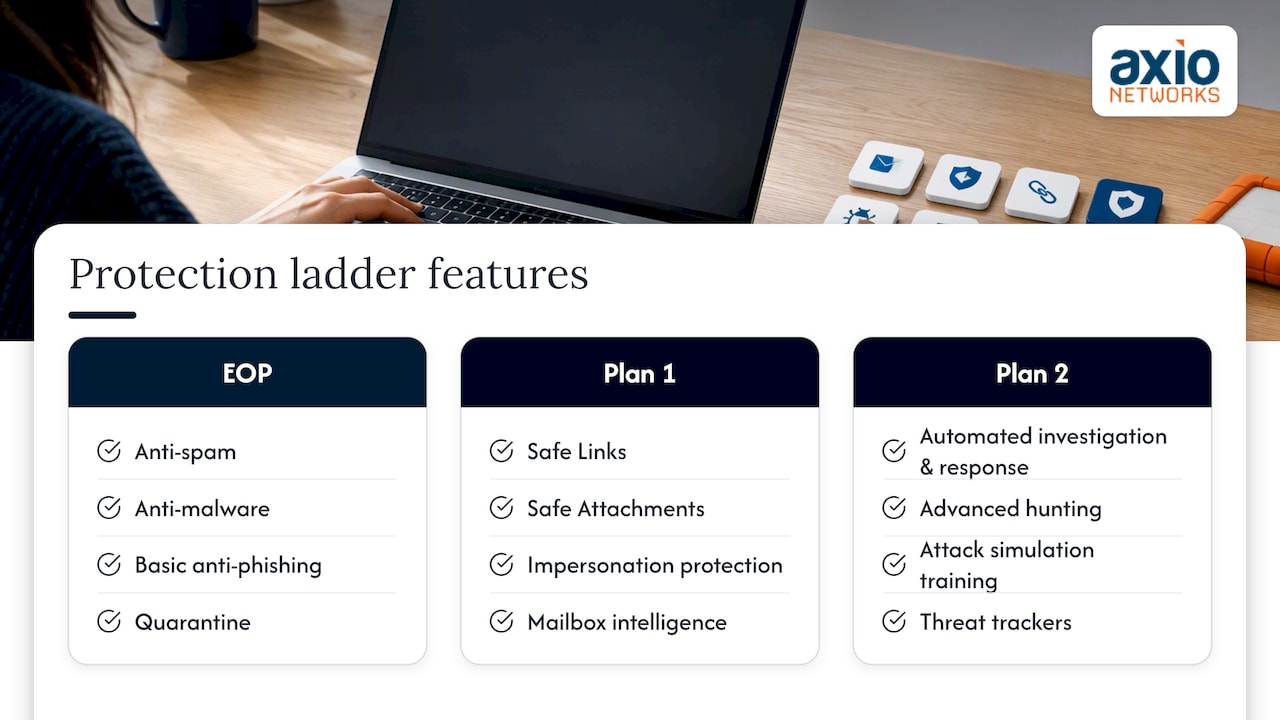
Choose Plan 1 if you have basic IT support and moderate risk exposure. Choose Plan 2, or pair Plan 1 with a managed SOC, when you handle regulated data or lack staff to investigate alerts around the clock.
What secure-by-default actually covers, and where it breaks down
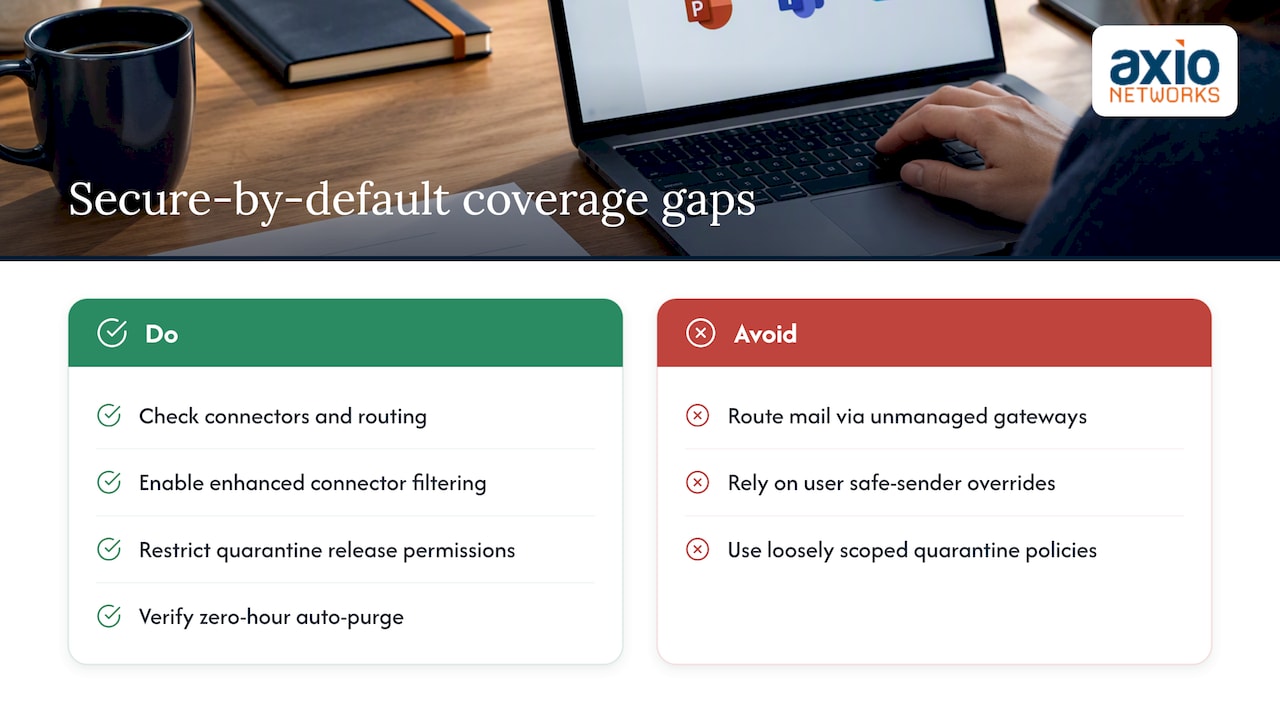
Microsoft’s secure-by-default model quarantines high-confidence phishing and malware automatically, and it ignores certain user-level overrides, including some safe-sender lists, specifically for that high-confidence category. Zero-hour auto purge reaches back into inboxes to pull messages that looked clean on delivery but were reclassified minutes later.
The gap most admins miss is routing. If internet mail flows through a non-Microsoft gateway or an upstream filter before reaching Exchange Online, some native Microsoft protections can be reduced or bypassed entirely, because the connection filtering and sender reputation checks rely on direct visibility into the originating connection. If you route mail externally, check your connectors, confirm enhanced filtering for connectors is enabled, and verify who has permission to release quarantined messages. A loosely scoped quarantine policy is a common, quiet way attackers get a second chance at delivery.
Rolling out SPF, DKIM, and DMARC without breaking mail flow
Email authentication works as a chain. SPF tells receiving servers which IP addresses may send mail for your domain. DKIM adds a cryptographic signature proving a message wasn’t altered in transit. DMARC ties both together and tells receivers what to do when a message fails, and where to send reports. CISA’s Exchange Online Secure Configuration Baseline recommends publishing all three for every second-level domain you own, not just your primary one.
The rollout, in order:
- Publish your SPF record and list every legitimate sending source; watch your lookup count since SPF caps out at 10 DNS lookups, and replace
include:entries with hard IP ranges where a vendor publishes stable addresses. - Configure DKIM by publishing the two CNAME records Microsoft generates, then enable signing and rotate keys periodically.
- Deploy DMARC starting in monitoring mode (
p=none), collect aggregate reports for a few weeks, then escalate top=quarantineand finallyp=rejectonce legitimate senders are accounted for.
Common failure points include forwarded mail that breaks SPF alignment, third-party senders using your domain without being in your SPF record, and DKIM CNAMEs sitting behind a proxied DNS service like Cloudflare’s orange-cloud setting, which prevents the CNAME from resolving correctly. Set those records to DNS-only. For high-volume third-party senders, move them to a subdomain like marketing.yourdomain.com instead of weakening your primary domain’s policy.
Pro Tip: Use a free DMARC reporting service while you’re in p=none so you can see every sending source before you lock the policy down, surprises show up fast once aggregate reports start arriving.
Hardening checklist: policies, permissions, and data loss prevention
Once authentication is in place, systematically work through policy configuration:
- Enable preset security policies (Standard, then Strict for high-value accounts), and manually add executives and finance staff to the strict protection group rather than relying on presets alone.
- Turn on Safe Links and Safe Attachments across Outlook, Teams, and Office apps, and configure click tracking so you can see who interacted with a flagged link.
- Disable SMTP AUTH tenant-wide except where a specific legacy application requires it, and block automatic external forwarding at the transport rule level.
- Avoid broad allowlists; use scoped allow entries tied to specific senders or domains, and route exceptions through admin submission rather than permanent bypass rules.
- Apply data loss prevention policies across Exchange, SharePoint, OneDrive, and Teams, with rules that flag or block Social Security numbers, credit card numbers, and other sensitive identifiers based on your risk tolerance.
Pro Tip: Review quarantine release permissions quarterly. It’s common to find former employees or overly broad security groups still holding release rights months after a role change.
Monitoring, alerting, and getting telemetry into a SIEM
Turn on unified audit logging and confirm retention matches your compliance needs. Default retention is often shorter than regulators require, so offload logs to external storage if you need a longer window. At minimum, enable alerts for suspicious sending patterns, suspicious connector activity, suspicious forwarding rule creation, clicks on known malicious URLs, and unusual message delay patterns.
Use Email & Collaboration reports and Threat Explorer for day-to-day visibility, and feed Defender alerts into a SIEM or a managed SOC for triage if you don’t have staff watching consoles continuously. Where Plan 2 is in place, automated investigation and response and advanced hunting cut down the manual work of chasing every alert individually, letting a small team focus on the ones that matter.
When native controls aren’t enough: supplemental protection and managed services
Native Microsoft 365 protections cover a lot, but gaps show up fast without 24/7 monitoring, complex mail flows, high-value targets, or compliance requirements around retention and forensics. Moving MX records to a third-party gateway can add specialized filtering, but it also means giving up some native Microsoft visibility and protection, a tradeoff worth weighing carefully rather than assuming more layers always means more safety.
A managed provider earns its keep through consistent policy tuning, round-the-clock monitoring, faster incident response, and active threat hunting, work that’s hard to staff internally at SMB scale. We cover how Axio Networks approaches this in the next section.
What field experience with Microsoft 365 hardening actually shows
Business email compromise rarely succeeds through a technical exploit. It succeeds because authentication wasn’t enforced, a forwarding rule went unnoticed, or an alert sat unread. Layered correctly, SPF, DKIM, DMARC enforcement, and Safe Links consistently cut off the easiest paths attackers use, and organizations that pair those controls with real monitoring see incidents caught in minutes instead of discovered weeks later through a customer complaint.
A security-first design, where protection is built into every managed service rather than bolted on afterward, tends to catch problems a checklist alone misses, because someone is actually watching the alerts fire.
— Jim O’Connell
How Axio Networks implements this checklist for you
We build Microsoft 365 email security into every Managed Microsoft 365 engagement rather than treating it as a separate add-on, which means the authentication, policy, and monitoring work covered above gets configured and maintained as part of the relationship, not left for you to revisit quarterly.
- Pricing means the cost of hardening your email environment doesn’t show up as a surprise invoice later.
- Our team targets response times when something needs attention.
- Local staff handle configuration and monitoring directly, rather than routing you through an offshore queue.
If you want this checklist implemented and monitored rather than managed in-house, explore our cybersecurity services or reach out about Managed Microsoft 365 to get started.
FAQ
Is Microsoft account security email real?
Microsoft does send legitimate security notification emails about sign-ins, password changes, and account activity, but attackers also spoof these messages convincingly. Verify any security alert by checking your account directly at a known Microsoft URL rather than clicking links in the email itself.
Will I lose my emails if I cancel Microsoft 365?
Canceling a subscription typically triggers a grace period before data deletion, though the exact retention window depends on your specific plan and licensing agreement. Export or back up mailbox data before cancellation rather than relying on the grace period, since backup and disaster recovery planning should happen well before any cancellation date.
Which email security service is best for Microsoft 365?
The right choice depends on your risk profile and staffing: Defender for Office 365 Plan 1 or Plan 2 covers most organizations when properly configured, while businesses without in-house security staff often benefit from pairing native protections with a managed SOC for continuous monitoring. There’s no single universal answer, since mail flow complexity and compliance needs vary widely between organizations.
Is Microsoft email safer than Gmail?
Both platforms offer strong built-in protections, and relative safety depends more on configuration, authentication enforcement, and monitoring than on the platform itself. An unhardened Microsoft 365 tenant with no DMARC enforcement is less secure than a well-configured alternative, and the reverse holds true as well.
How do I handle legacy email protocols and mobile access securely?
Legacy protocols like POP and IMAP often bypass modern authentication controls and should be disabled tenant-wide unless a specific application requires them. For mobile access, enforce conditional access policies and require modern authentication so devices can’t connect through outdated, less secure pathways.
Sources
Start with the CISA Exchange Online baseline and Microsoft’s configuration documentation for SPF, DKIM, and DMARC for step-by-step guidance.
- Why do I need Microsoft Defender for Office 365? – Microsoft Defender for Office 365 | Microsoft Learn
- Exchange Online Secure Configuration Baseline (SCB) – CISA