The NIST Cybersecurity Framework (CSF) is free, voluntary guidance that a business of any size can use to understand, assess and improve its cybersecurity. For a small or mid-sized business, the practical path is simple: use the six CSF 2.0 functions as a checklist, write down where you stand today, pick a realistic target, and close the gaps in order of risk. You do not need a certification, a security team or a big budget to begin.
This guide walks through what CSF 2.0 is, what each function means for a company with a handful of employees or a few dozen, a working checklist, the four tiers in plain language, and how to keep the work current.
TL;DR
- NIST CSF 2.0 is voluntary guidance, not a certification. NIST describes it as useful to organizations of any size, sector or maturity.
- It has six functions: Govern, Identify, Protect, Detect, Respond and Recover. Govern is the new one, and it starts with leadership, not technology.
- Start with a Current Profile (where you are) and a Target Profile (where you need to be), then work through the gaps.
- Tiers are not a grade. Leadership chooses the tier that fits the business’s risks and resources.
- Review the profile on a regular schedule so it reflects changes in your people, vendors and technology.
Table of Contents
- What NIST CSF 2.0 is, and why it fits a small business
- The six functions in plain language
- Govern: the function that costs the least and matters most
- A NIST CSF checklist for a small business
- Current and Target Profiles: your gap analysis
- NIST CSF tiers explained
- Where to start when you have little time or money
- Keeping your CSF work current
- Our perspective
- Where outside help makes the framework easier
- FAQ
- Sources
What NIST CSF 2.0 is, and why it fits a small business
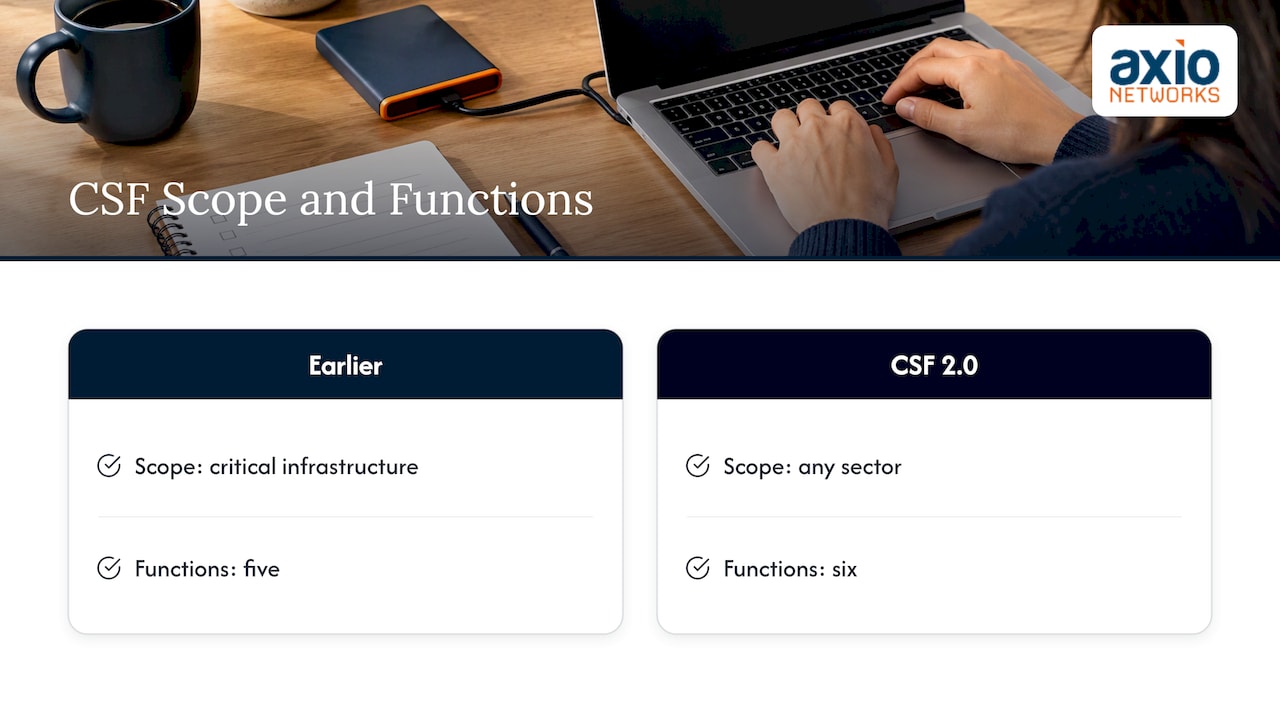
The framework comes from the U.S. National Institute of Standards and Technology. Version 2.0 was released in February 2024. It widened the scope beyond critical infrastructure to organizations in any sector, and it added a sixth function, Govern, next to the original five.
Two things make it useful for a small company. First, it describes outcomes rather than products. It tells you what good looks like (for example, knowing which systems and data matter most) without telling you to buy a specific tool. Second, NIST publishes material written for smaller firms. NIST SP 1300 is a small business quick-start for organizations with modest or no cybersecurity plans. It supplements the full framework and does not replace it.
NIST also keeps a small business page for CSF 2.0 that points to its resource library, with quick-start guides, mapping tools, implementation examples and FAQs. It also lists a separate guide for firms with no employees and minimal IT complexity.
The framework also connects to other standards. According to NIST, CSF 2.0 cross-references more than 50 other cybersecurity documents, including SP 800-53 Rev. 5. If a customer, insurer or regulator later asks for a specific standard, the work you did under CSF is rarely wasted.
The six functions in plain language
The CSF Core is a hierarchy of Functions, Categories and Subcategories. NIST’s CSF 2.0 document says the functions are concurrent and continuous. The order does not imply a sequence or a ranking of importance, so you do not finish one and move to the next.
| Function | What it means | What it looks like in a small business |
|---|---|---|
| Govern | Strategy, roles and policy | An owner for security, a short policy, a list of legal and contract duties |
| Identify | Understand your risks | An inventory of devices, software, cloud services and data |
| Protect | Safeguards that reduce risk | MFA, patching, backups, least-privilege access, staff training |
| Detect | Find and analyze attacks | Endpoint protection, alerting, someone watching the alerts |
| Respond | Act on a detected incident | A written plan with contacts and reporting duties |
| Recover | Restore operations | Tested backups, a priority order for restoring systems |
Govern: the function that costs the least and matters most
Govern is new in 2.0, and it is where small businesses most often have nothing written down. It asks the owner or leadership to make cybersecurity a business decision: who is responsible, which risks you accept, and which rules apply to you.
For a small business, NIST’s small business guide frames Govern as a set of practical actions:
- Understand the legal, regulatory and contractual requirements that apply to you.
- Identify the people responsible for cybersecurity.
- Assess insurance and supplier risks.
- Weigh cybersecurity risks alongside your other business risks.
- Show leadership support and keep your policies current.
None of this needs software. A one-page policy, a named person and a list of the contracts that carry security obligations is a real start. If you want a plain-language primer on the leadership side, these cybersecurity basics for small business cover the habits that support it.
Contract and regulatory duties deserve a careful look. A medical practice faces HIPAA, a company that takes cards faces PCI DSS, and a defense subcontractor may face CMMC. Our regulatory compliance services are built to help map those duties onto the controls you already run.
A NIST CSF checklist for a small business
Below is a working checklist drawn from NIST’s small business guide and from NIST’s guide for firms with no employees. Give every line a named owner, and keep a piece of evidence for it, such as a policy, a report or a screenshot of a setting.
Govern
- Write down the legal, regulatory and contractual requirements that apply to you.
- Name who is responsible for cybersecurity decisions.
- Review cyber insurance and the risks that come from suppliers.
- Keep a short, approved security policy and have leadership revisit it.
Identify
- Inventory hardware, software, systems and services, including cloud accounts.
- Classify your business data so you know what is sensitive.
- Look for vulnerabilities in what you inventoried.
- Record threats and your planned responses in a simple risk register.
Protect
- Limit sensitive information to the people who need it.
- Turn on multi-factor authentication for every account that offers it. NIST’s guide for the smallest firms specifically recommends phishing-resistant MFA.
- Change default passwords. NIST’s guide for non-employer firms recommends strong, unique passphrases of at least 15 characters.
- Use standard user accounts for daily work, not administrator accounts.
- Keep software updated on all devices.
- Back up your data and test the backups.
- Train staff to spot phishing and report it.
Detect
- Know what the signs of an incident look like.
- Watch your services for unusual behavior.
- Run antivirus or anti-malware software on business devices.
- If you lack the time or skill to monitor internally, use a service provider.
Respond
- Keep an incident response plan with contacts and reporting duties.
- Assess each incident, then contain and eradicate it.
- Communicate with the people who must be told, as the law or your contracts require.
NIST’s small business guidance also suggests a list of internal and external contacts for reporting attacks, including law enforcement and legal counsel. Our incident response plan steps guide shows how to turn that into a one-page plan.
Recover
- Assign recovery responsibilities.
- Decide which systems come back first.
- Check the integrity of backups before you restore from them.
- Communicate securely during recovery, and document when the incident is closed.
We also keep a 30/90/180 day small business cybersecurity checklist that lays these items out on a timeline.
Current and Target Profiles: your gap analysis
The profile is where the framework becomes a plan. NIST’s guidance defines two pieces:
- A Current Profile records which outcomes you achieve today, or are working toward, and how well.
- A Target Profile records the outcomes you have chosen and prioritized to meet your risk goals.
NIST SP 1301 describes the process: compare an assessed Current Profile to an aspirational Target Profile, run a gap analysis, then build and carry out an action plan. Each round feeds the next Target Profile.
In practice, a small business can do this in a spreadsheet:
- List the Subcategories that matter to you, or use the checklist above as your list.
- Mark each one as not started, partly done or done, with a note on the evidence.
- Choose your target for each line. Not everything needs to be at the top level.
- Sort the gaps by the damage they could do and the effort to fix them.
- Turn the top gaps into an action plan with owners and dates.
Be honest in step 2. A plan that has never been rehearsed is still only a plan on paper. Before you mark Detect, Respond or Recover as done, run a short tabletop exercise: walk the team through a made-up ransomware incident and see who does what.
NIST CSF tiers explained
The four tiers are Partial (Tier 1), Risk Informed (Tier 2), Repeatable (Tier 3) and Adaptive (Tier 4). They describe a progression from informal, ad hoc responses to approaches that are agile, risk-informed and continuously improving.
The tiers are not a score you must reach and not a certification level. NIST’s tiers guide says leadership generally selects them, weighing current practices, threats, requirements, objectives, supply chain needs and resources. They help shape a profile and describe how your organization manages risk.
| Tier | In plain terms |
|---|---|
| 1, Partial | Security happens case by case. Few written rules, little awareness of risk. |
| 2, Risk Informed | Management has approved practices, but they are not yet applied the same way everywhere. |
| 3, Repeatable | Policies are formal, applied consistently and updated as the business changes. |
| 4, Adaptive | The organization adjusts quickly using lessons learned and current threat information. |
For most small firms, a sensible aim is to be consistent where the stakes are highest, such as access to financial systems, customer data and backups, rather than to push everything to the top tier. Your leadership makes that call, which is exactly the point of Govern.
Where to start when you have little time or money
The constraint most small businesses name is not knowledge but limited resources. NIST’s guide for the smallest firms says the biggest concern is usually how to prioritize limited resources, and that a program balanced against the needs of the business is both possible and necessary.
A sequence that works for most companies:
- Weeks 1 to 2: Govern and Identify. Name an owner, write the one-page policy, list your legal and contract duties, and inventory devices, software and data. This costs leadership time, not tooling.
- Next: the Protect baseline. MFA everywhere, a password manager, patching, standard user accounts, tested backups and email protections.
- Then Detect. Put endpoint protection on every device and decide who watches the alerts, day and night.
- Then Respond and Recover. Write the incident plan, set restore priorities and rehearse them once.
This order puts the cheapest, highest-leverage steps first. It also tends to reveal quickly which items you cannot staff internally, which is the natural moment to bring in outside help.
Keeping your CSF work current
CSF is a framework, not a certification, so nothing expires and nobody passes. What matters is that the profile stays honest. NIST’s CSWP 50 says risk management is continuous: leaders should revisit the strategy as the business, technology, threats, employees, service providers and legal requirements change.
NIST SP 1301 adds that as you implement the plan, you can use the Organizational Profile to track status and watch controls and risks with key performance and key risk indicators. If a risk goes beyond your stated tolerance, update the action plan, the profile or the tolerance statement.
A light rhythm that fits a small team:
- Quarterly: re-score Current against Target, review new vendors and cloud accounts, and report to leadership.
- Twice a year: restore a real backup and walk through the incident plan.
- Annually: revisit the Target Profile, the tier you aim for and your legal and contractual duties.
- After any incident or near miss: record what you learned and change the plan.
Our perspective
We see the same pattern in small and mid-sized Phoenix-area businesses. The owner knows security matters, but there is no one whose job it is, so the framework stays on a shelf. CSF 2.0 helps because it starts with Govern: decide who owns the problem, then build the controls.
Our approach is security-first by design. We do not treat security as an add-on sold separately. It runs through managed IT, cloud, networking and projects, so the controls in your Protect and Detect functions are part of how your environment is run day to day.
We also think predictable cost is part of good governance. A flat-rate model means you can budget for the Protect, Detect and Recover work rather than hold back on it for fear of a surprise bill. And a dedicated local team means you are working with people who know the businesses and compliance pressures of the Valley.
Our advice: do not wait for a perfect assessment. Write your first Current Profile this month, pick three gaps, and close them. A working baseline beats a thorough plan that never starts.
Jim O’Connell
Where outside help makes the framework easier
Most of Govern and Identify you can do yourself. Detect, Respond and Recover are where owners usually run out of hours: someone has to watch alerts, patch on schedule, and own backups that actually restore.
We built our services around those functions. Our managed IT services cover day-to-day support and administration, and our cybersecurity services include endpoint security and EDR, SOC monitoring and MDR and backup and disaster recovery. Our average response time is under 30 minutes, and pricing is flat-rate.
If you want a Current Profile built against CSF with a clear action plan, talk to our team through Axio Networks.
For a deeper look at the framework’s changes, see our simple guide to NIST 2.0 and our page on NIST compliance support.
FAQ
Is NIST CSF required for small businesses?
No. NIST describes the framework as voluntary guidance. Some customers, insurers or contracts may ask you to follow it or a related standard, so check your agreements. Using CSF still gives you a recognized way to organize your security work.
Can a small business get NIST CSF certified?
No. CSF is a framework, not a certification, so there is no pass or fail. You document where you are, set a target and show progress over time. If a contract demands a certifiable standard, such as CMMC, that is a separate program.
What is the difference between Current and Target Profiles?
A Current Profile shows the outcomes you achieve today and how well. A Target Profile shows the outcomes you have chosen to reach. The gap between the two becomes your action plan.
Which tier should my business aim for?
There is no required tier. Leadership selects tiers based on threats, requirements, objectives and resources. Many small firms aim for consistent, repeatable practice in the areas that protect money and customer data first.
Where should I begin if I have no IT staff?
Begin with Govern and Identify: name an owner, write a short policy and inventory your systems and data. Then turn on MFA, keep software updated and test your backups. A managed IT provider can take on the monitoring and recovery work you cannot staff.
Sources
- NIST Cybersecurity Framework 2.0: Small Business Quick-Start Guide (SP 1300)
- NIST Releases Version 2.0 of Landmark Cybersecurity Framework
- The NIST Cybersecurity Framework (CSF) 2.0 (CSWP 29)
- NIST CSF 2.0 Organizational Profiles Quick-Start Guide (SP 1301)
- NIST CSF 2.0 Tiers Quick-Start Guide (SP 1302)
- Small Business Cybersecurity: Non-Employer Firms (CSWP 50)
- NIST Cybersecurity Framework 2.0 for Small Business
- Complete Guide to Cybersecurity Basics for Small Business