A phishing simulation program is a controlled exercise that sends realistic fake phishing emails to employees to measure how they recognize and respond to real threats. The core benefit isn’t a low click rate: it’s a rising reporting rate and a clear picture of which teams need targeted coaching. Start by running role-targeted simulations segmented by job family, then track both click and reporting rates before drawing conclusions about risk.
TL;DR:
- Compare campaigns only within the same NIST Phish Scale difficulty tier, which accounts for visible cues and how closely a lure matches employees’ actual work.
- Treat reporting rate as the clearest culture signal, and route recurring lure patterns to email security teams so filters can catch similar real attacks.
- Give employees who click repeatedly individual coaching rather than another generic module, and consider account specific technical controls when the pattern continues.
- Run monthly simulations for finance and executives, but quarterly campaigns for general staff; repetitive tests can lower reporting through fatigue.
- Tell employees beforehand that simulations are part of ongoing training, make responses to clicks instructional and nonpunitive, and stagger launches to prevent help desk overload.
Table of Contents
- What a phishing simulation program is and why it matters
- Key metrics and the NIST Phish Scale: what to measure and why
- Step-by-step: design and run an effective phishing simulation
- How to analyze results and act on them
- Best practices and governance for a sustainable program
- How a managed provider operationalizes phishing simulation
- Employee communication and consent best practices before launching simulations
- Common challenges and pitfalls in running phishing simulations and how to overcome them
- Integration of phishing simulation outcomes with broader security awareness training programs
- Case studies or examples showcasing the impact of phishing simulations on reducing phishing incidents
- Tools and platforms comparison for implementing phishing simulation programs
- Author perspective: realistic expectations and measuring success
- Get help building a phishing simulation program that fits your team
- FAQ
- Sources
What a phishing simulation program is and why it matters
A phishing simulation program sends employees a realistic but harmless fake phishing message, then records who clicked, who entered credentials, and who reported it. Most programs use one of three formats: a link that leads to a fake login page, a benign attachment that mimics malware, or a credential harvesting page that captures (but discards) what employees type.
These exercises sit inside a layered defense, not instead of one. Technical controls like multi-factor authentication, spam filtering, and DMARC catch a large share of phishing before it reaches an inbox, but no filter catches everything. Simulations measure the layer those tools can’t replace: human judgment at the moment of decision.
Phishing and credential-related attacks remain a persistent factor in breaches, which is part of why security teams justify budget for ongoing simulation and training rather than a one-time exercise. Guidance from CISA, NSA, FBI, and MS-ISAC recommends pairing awareness exercises with layered counter-phishing capabilities rather than treating either alone as sufficient.
A common mistake is using click rate as the only scorecard. A falling click rate can mean employees are getting sharper, or it can mean the simulations got easier. Without context, the number tells you nothing useful.
- Email link simulations test recognition of suspicious URLs and sender domains.
- Attachment simulations test caution around unexpected files, even from known contacts.
- Credential capture simulations test whether employees verify a login page before entering a password.
Key metrics and the NIST Phish Scale: what to measure and why
Four numbers matter most in a mature program: click rate (who interacted with the lure), reporting rate (who flagged it to security), repeat-clicker rate (who falls for multiple simulations over time), and time-to-report (how fast the first report arrives after launch). Reporting rate deserves more weight than most programs give it, because it’s the number that predicts how fast your team hears about a real attack.
Raw click rates are nearly meaningless without context on how hard the simulation was to spot. That’s the gap the NIST Phish Scale closes. It rates each simulation on two factors: observable cues (grammar errors, mismatched sender addresses, urgency language) and premise alignment (how closely the pretext matches an employee’s actual workflow, like a fake invoice sent to someone in accounts payable). A finance employee who clicks a highly aligned, low-cue phish aimed squarely at their job function is a different signal than a random employee clicking an obvious, poorly written lure.
A phishing campaign rated as “high difficulty” under the Phish Scale’s observable cues and premise alignment criteria should never be benchmarked against a “low difficulty” campaign run the month before, according to NIST’s Phish Scale research. Doing so risks crediting a training win that didn’t happen, or flagging a false failure.
Separate your metrics by difficulty tier before comparing results across quarters. A drop in click rate on a high-alignment campaign targeting finance staff means more than a drop on a generic, easy-to-spot lure sent company-wide. NIST’s own research notes that premise alignment explains much of the variance in click rates between campaigns, which is exactly why a scale that accounts for it produces more honest comparisons over time.
What you show leadership and what your security operations team tracks day to day should differ:
- Leadership needs trend lines: reporting rate over time, difficulty-weighted click rate, and repeat-clicker count by department.
- Operational teams need granular detail: which specific employees clicked, how fast reports came in, and which lure types are most effective against which roles.
Step-by-step: design and run an effective phishing simulation
Running a simulation well means making deliberate choices at each stage rather than defaulting to whatever template ships with your tool.
- Define objectives and audience segments. Decide whether this run tests general awareness, a specific department’s resistance to invoice fraud, or executive susceptibility to business email compromise. The objective determines everything that follows.
- Name the simulation clearly in your admin console. A naming convention like “Q1-Finance-WireFraud-HighAlignment” keeps results traceable when you’re running several campaigns a quarter.
- Select the payload type and landing page. Decide between a link to a fake login page, a mock attachment, or a credential harvesting form. Microsoft’s Attack simulation training documentation walks through this exact configuration sequence: pick the technique, name the simulation, choose the payload and login page, then move to targeting.
- Account for OAuth and modern authentication flows where relevant. If your organization uses single sign-on, build the fake login page to mimic that flow convincingly, since attackers increasingly target OAuth consent screens rather than plain password forms.
- Target and exclude users by job family and risk profile. Segment finance, HR, and executives separately from general staff, and exclude employees in active disciplinary processes or those who just completed remediation training for the same scenario.
- Schedule the launch and configure notifications. Stagger send times to avoid a flood of simultaneous reports that overwhelms your help desk, and set up automated notifications for anyone who clicks.
- Assign training automatically to anyone who fails. Configure your platform to trigger a short training module the moment someone clicks a link or opens the attachment, while the mistake is fresh.
- Log everything and retain records for compliance. Keep timestamps, click data, reporting data, and training completion records in case an auditor or regulator asks for evidence of your awareness program.
Pro Tip: Run your first few simulations against a small pilot group with high premise alignment before expanding company-wide, so you catch configuration mistakes before thousands of employees see them.
Post-run administration is where many programs fall short. Export logs promptly, tag results with the correct Phish Scale difficulty rating, and store records somewhere your compliance team can retrieve them without asking IT for a special pull. If your organization is subject to a framework like HIPAA or PCI DSS, your simulation records can double as evidence of an active security awareness control during an audit.
How to analyze results and act on them
Raw numbers without context lead to bad decisions. Always segment results by Phish Scale difficulty tier before judging whether a team improved or declined. A finance team’s slight increase in clicks on a high-alignment wire fraud simulation may represent steady performance against a harder test, not a regression.
Reporting rate works best as a culture metric rather than a compliance checkbox. Departments with consistently high reporting rates, even on well-crafted lures, often have informal “protective stewards”: employees who flag suspicious messages and influence coworkers to do the same. Identifying and recognizing these people, through badges or simple acknowledgment, tends to raise reporting rates across a team faster than another round of generic training.
Repeat clickers deserve individual attention rather than being lumped into a department average. Someone who clicks three consecutive simulations over six months needs one-on-one coaching, not another automated module, and in some cases may need a technical control like restricted email forwarding or stricter attachment policies applied to their account specifically.
- Segment every result by difficulty tier before comparing it to a prior run.
- Treat reporting rate trends as your clearest signal of security culture health.
- Flag repeat clickers for individual coaching rather than group retraining.
- Route recurring lure themes (like invoice fraud) back to your email security and incident response processes so technical filters catch similar real attacks faster.
The feedback loop matters as much as the test itself. When a simulation reveals that a specific pretext fools a large share of one department, that’s a prompt to tighten filtering rules for that pattern, not just a note for next quarter’s training deck.
Best practices and governance for a sustainable program
A sustainable program runs on a predictable cadence, reports clearly to leadership, and respects the line between testing and harassment.
- Vary cadence by risk group. High-risk roles like finance and executives can handle monthly simulations; general staff often do better with quarterly runs to avoid fatigue and cynicism toward the program.
- Build a simple executive dashboard. Show trend lines for reporting rate, difficulty-weighted click rate, and repeat-clicker count rather than a wall of raw numbers that obscures the story.
- Document legal and ethical guardrails in your program charter. Clarify data handling, retention, and disciplinary boundaries up front, and consult legal counsel such as the compliance guidance available through Chief Legal Office when questions arise about employee monitoring rules in your jurisdiction.
- Scale gradually when resources are limited. A small IT team can run a mature program by automating training assignment, using templated pretexts by role, and reserving custom lure design for high-risk segments only.
Pro Tip: Rotate your hardest, highest-alignment simulations so the same department never faces the identical pretext twice in a row, which keeps results honest and avoids employees simply memorizing one scenario.
User fatigue is real and measurable: reporting rates often dip when simulations run too frequently or feel repetitive. Watching that trend closely matters as much as watching click rates.
How a managed provider operationalizes phishing simulation
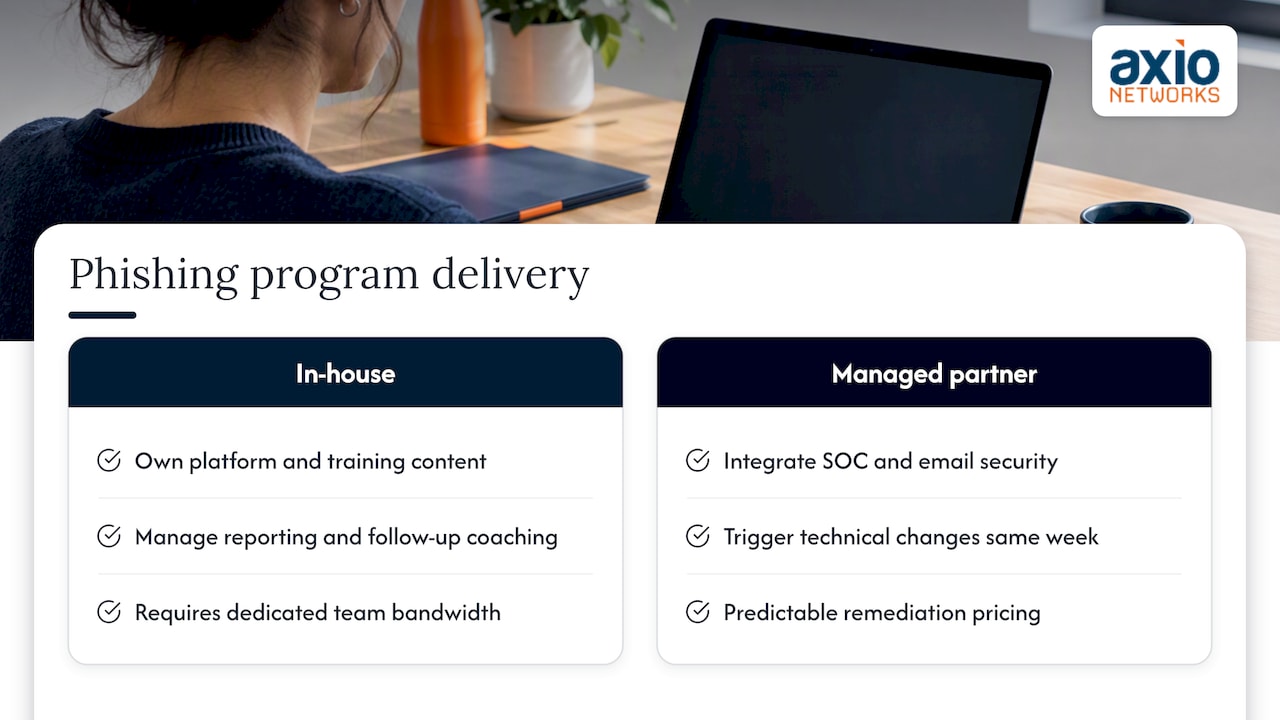
Running a mature program in house means owning the simulation platform, the training content, the reporting pipeline, and the follow-up coaching, often with the same small team that’s already handling help desk tickets and patching. That’s where a managed services relationship changes the math.
A phishing simulation program works best when it’s connected to the rest of a security stack rather than run as an isolated exercise. When simulation results feed directly into SOC monitoring and email security tuning, a repeat-clicker pattern can trigger a technical control change the same week it’s identified, not at the next quarterly review. We build that connection into how we deliver cybersecurity services for small and mid-sized businesses in the Phoenix metro area, integrating security measures into every service we deliver rather than treating awareness training as a separate line item.
Our pricing model means a client running simulations with us doesn’t face a surprise invoice when a campaign reveals a problem that needs fast remediation. That predictability matters for budgeting an ongoing program rather than a one-time test. Guidance for managed providers on operationalizing remote remediation points to the same pattern: the value comes from connecting detection to response quickly, not from running isolated point tools.
The decision between building a program in house or partnering usually comes down to available staff time. A dedicated security team with bandwidth to manage a platform, write role-specific pretexts, and track difficulty-weighted metrics can run this internally. A lean IT team juggling daily support tickets alongside strategic security work often gets more consistent results handing the operational load to a managed partner.
Employee communication and consent best practices before launching simulations
Employees should know a phishing simulation program exists before the first campaign launches, even if they don’t know the exact timing or content of individual tests. A short all-hands announcement or policy document explaining that simulated phishing emails are part of ongoing security training sets expectations and reduces the chance that a clicked simulation feels like entrapment.
Most organizations build simulation consent into existing IT acceptable-use policies or employee handbooks rather than asking for a separate signature before every campaign. That approach satisfies transparency without tipping off employees to specific test dates.
Communication after a simulation matters just as much as the notice before one. When someone clicks, the follow-up message should frame the moment as a learning opportunity, explain exactly what cues gave the lure away, and avoid language that feels punitive. Programs that handle this well see steadier reporting rates over time, because employees trust that flagging a suspicious email, even their own mistake, won’t lead to public callouts or discipline for a first occurrence.
Common challenges and pitfalls in running phishing simulations and how to overcome them
The most common pitfall is treating click rate as the only measure of success, which rewards easy campaigns and punishes well-designed ones. Weighting results by difficulty tier, as described earlier, fixes this directly.
A second pitfall is running simulations too frequently or with repetitive pretexts, which breeds resentment and can push employees to game the system rather than genuinely improve. Spacing campaigns appropriately by risk group and rotating lure types addresses this.
A third challenge is help desk overload immediately after a launch, when dozens of employees call or email at once asking whether a message is real. Staggering send times and pre-briefing the help desk on launch windows prevents this bottleneck.
Finally, programs sometimes stall because results never reach the people who can act on them. A repeat-clicker list that sits in a spreadsheet nobody reviews doesn’t improve anything. Building the reporting pipeline into regular security reviews, rather than treating it as a one-off quarterly task, keeps the data working.
Integration of phishing simulation outcomes with broader security awareness training programs
Simulation results work best as an input to training content, not a standalone activity. When a specific pretext, like a fake invoice or a shipping notification, fools a meaningful share of one department, that scenario becomes the next training module’s centerpiece rather than a generic slide deck everyone sits through regardless of relevance.
Training assignment should trigger automatically from simulation results rather than running on a fixed annual schedule disconnected from actual performance. Someone who clicks a high-alignment lure gets a short, targeted module within days, while someone who reports accurately might see a lighter-touch refresher months later.
Connecting the two systems also closes a reporting gap. A reporting-rate dashboard that doesn’t know who already completed remediation training can’t tell whether a department is actually improving or simply hasn’t been tested on the same scenario twice. Linking awareness training completion data to simulation history gives a fuller picture of whether coaching is translating into better real-world decisions.
Case studies or examples showcasing the impact of phishing simulations on reducing phishing incidents
Specific, named case studies with verified figures are scarce in public reporting, since most organizations don’t publish their internal simulation results. What’s consistently observed across practitioner reports is a pattern rather than a single benchmark: organizations that pair role-targeted simulations with fast, non-punitive feedback tend to see reporting rates climb over successive campaigns, while organizations that run generic, infrequent tests see reporting rates stay flat.
The pattern that shows up most often involves “protective stewards,” the employees who consistently report suspicious messages and influence their teams to do the same. Recognizing these employees publicly, through simple acknowledgment or small rewards, correlates with broader reporting rate increases in the departments where they work.
Rather than pointing to one dramatic before-and-after number, the more reliable takeaway from available guidance is directional: programs that measure reporting rate as carefully as click rate, and that act quickly on repeat-clicker data, show steadier improvement over multiple quarters than programs that run simulations as an isolated annual compliance exercise.
Tools and platforms comparison for implementing phishing simulation programs
Platforms in this space generally fall into a few categories rather than a single best option for every organization. Built-in email security suites, like Microsoft’s Attack simulation training, integrate directly with an organization’s existing email platform and license, which simplifies deployment for organizations already running that ecosystem. Dedicated phishing simulation vendors offer broader template libraries and more granular reporting dashboards, often at an added licensing cost. Managed security providers bundle simulation, training assignment, and remediation into a single service, which removes the platform selection decision entirely for organizations that prefer to outsource the operational work.
The right fit depends less on feature lists and more on who will run the program day to day. An organization with a dedicated security analyst benefits from the granular control a dedicated platform offers. An organization without that headcount typically gets more consistent results from a managed service that already connects simulation outcomes to email security tuning and incident response, since the value of any platform depends on whether someone actually acts on what it reports.
Author perspective: realistic expectations and measuring success
Most organizations set the wrong goal for their first year of a phishing simulation program. Chasing a lower click rate as the headline metric sets teams up for a false sense of progress, since an easier campaign produces a lower click rate without any real improvement in judgment. Reporting rate is the better near-term target: it’s harder to game, and it directly shortens how long a real attack sits undetected in an inbox.
For small and mid-sized organizations, reachable KPIs look different than the benchmarks vendors sometimes advertise. A realistic first-year goal is a measurable increase in reporting rate among high-risk departments, paired with a shrinking list of repeat clickers, rather than an organization-wide click rate near zero.
User fatigue is the quiet program killer. Running simulations too often, especially against the same groups with similar pretexts, breeds resentment faster than it builds skill. Prioritizing frequency for finance, HR, and executive teams while easing off for lower-risk departments keeps the program credible and the data honest.
— Jim O’Connell
Get help building a phishing simulation program that fits your team
Running a phishing simulation program well takes ongoing attention: scheduling campaigns, tailoring pretexts by role, tracking difficulty-weighted results, and connecting repeat-clicker data to real technical fixes. We handle that full loop as part of our cybersecurity services, built into the same flat-rate contract that covers your broader managed IT needs, so there’s no surprise invoice when a campaign reveals a gap that needs fast remediation.
Our local team in the Phoenix metro area pairs simulation and training with SOC monitoring and MDR, email security, and endpoint protection, so a lesson from a simulated campaign can turn into a real filtering rule within days rather than sitting in a report nobody reads. If your organization is weighing whether to build this in house or hand it to a team that already connects the dots between training and technical defense, reach out through our managed IT services page to talk through what a program would look like for your team.
FAQ
What is a phishing simulation program?
A phishing simulation program is a controlled exercise where an organization sends realistic fake phishing messages to employees to measure how they recognize and respond to threats. Results typically track click rate, reporting rate, and repeat-clicker rate to identify where additional training or technical controls are needed.
How often should a company run phishing simulations?
Cadence depends on risk level: high-risk groups like finance and executives often benefit from monthly simulations, while general staff typically do well with quarterly campaigns. Running simulations too frequently against the same group tends to lower reporting rates due to fatigue rather than improve awareness.
What is the NIST Phish Scale used for?
The NIST Phish Scale rates how difficult a phishing simulation is to detect, based on observable cues and how closely the pretext aligns with an employee’s actual job. It helps security teams compare results fairly across campaigns instead of judging all click rates equally regardless of difficulty.
Is click rate the best way to measure a phishing simulation program?
Click rate alone is not a reliable measure because an easier simulation naturally produces a lower click rate without reflecting real improvement. Reporting rate, repeat-clicker trends, and difficulty-weighted click rate together give a more accurate picture of program success.
Do employees need to consent before a phishing simulation?
Employees typically don’t need to approve each individual campaign, but organizations should disclose that simulated phishing is part of ongoing security training through a policy or handbook before the first test runs. Clear, non-punitive follow-up after someone clicks tends to keep trust and reporting rates high.
Sources
- Phishing Guidance: Stopping the Attack Cycle at Phase One (CISA et al.)
- Simulate a phishing attack with Attack simulation training (Microsoft)