RPO (recovery point objective) is how much data you can afford to lose, measured backward in time from the moment of an outage. RTO (recovery time objective) is how long you can afford to be offline, measured forward from that same moment. AWS defines RTO as the maximum acceptable delay between an interruption and restoration of service, and RPO as the maximum acceptable time since the last recoverable data point. One number limits data loss. The other limits downtime. You need both, and they rarely have the same answer.
TL;DR
- RPO answers “how far back can we go?” It decides how often you back up or replicate.
- RTO answers “how soon must we be working again?” It decides how your recovery is built and staffed.
- RTO can be longer than RPO, shorter, or equal. They are independent limits, so set each one on its own.
- Set targets per system, not one number for the whole company. Tighter targets cost more.
- A target you have never tested is a guess. Run recovery tests and record the real numbers.
Table of Contents
- What RPO and RTO each measure
- RPO vs RTO side by side
- RPO and RTO examples
- Can RTO be greater than RPO?
- How to set RPO and RTO targets
- What tighter targets cost
- From targets to a backup and disaster recovery plan
- Test the plan against the numbers
- Our perspective
- Put your RPO and RTO into practice with Axio Networks
- FAQ
- Sources
What RPO and RTO each measure
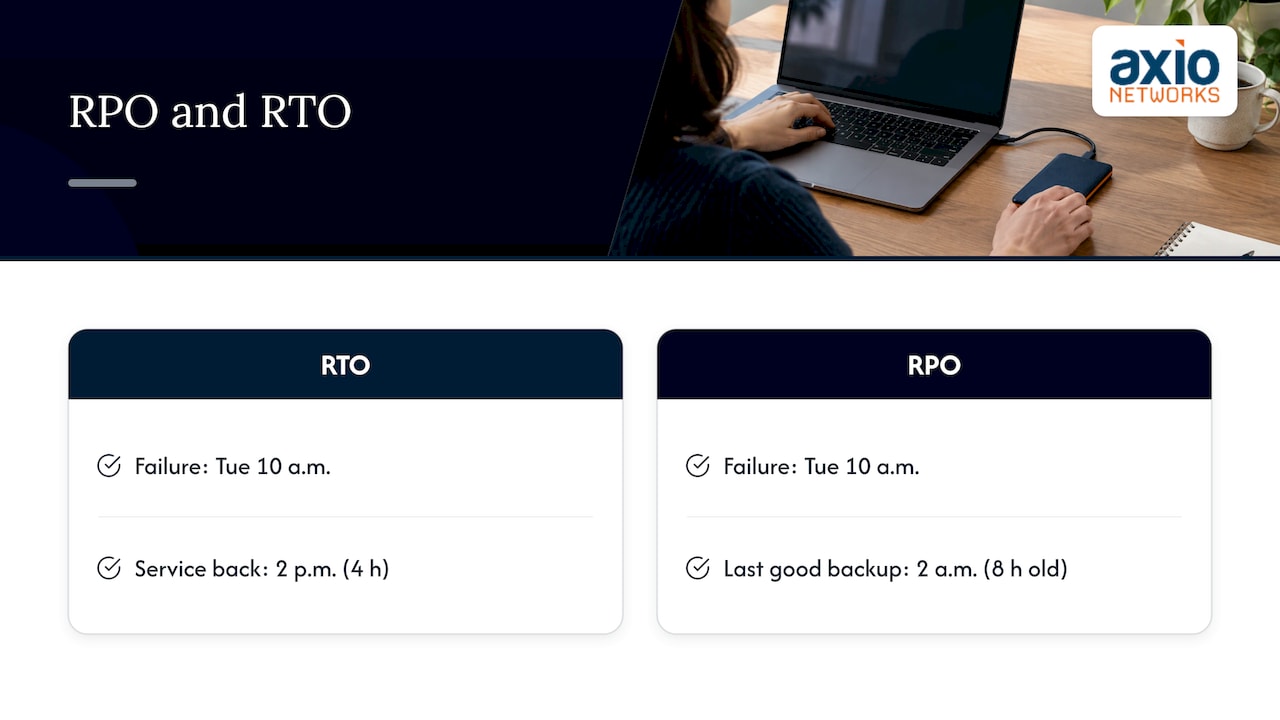
Picture a Tuesday at 10:00 a.m. when your file server fails. Two questions follow right away.
The first is when people can work again. That is RTO. If your RTO for the server is four hours, the goal is to be back in business by 2:00 p.m.
The second is how old the restored data will be. That is RPO. If your last good backup ran at 2:00 a.m., the restored files are eight hours old and everything saved since then has to be recreated. If your RPO is one hour, a nightly backup does not meet it.
TechTarget notes that both can be expressed in seconds, minutes, hours or days, depending on the system and the business need.
RTO is a target, not an average
RTO is a maximum for a single outage. AWS points out that this differs from MTTR (mean time to recover), which averages recovery across many incidents. A great average does not help you on the day one outage runs long.
RPO is about data, not systems
RPO says nothing about how fast the server comes back. A system can return in 20 minutes with data that is a full day old, and that still meets a 30-minute RTO while failing a one-hour RPO.
RPO vs RTO side by side
| RPO | RTO | |
|---|---|---|
| Question it answers | How much data can we lose? | How long can we be down? |
| Measured | Backward from the outage to the last good copy | Forward from the outage to restored service |
| Unit | Time of data loss (minutes, hours, days) | Time of downtime (minutes, hours, days) |
| Main driver of | Backup or replication frequency | Recovery design, automation, staffing |
| Cost pressure | Shorter RPO means more frequent copies and more storage | Shorter RTO means standby systems, automation and rehearsal |
| Business pain if missed | Lost orders, re-keyed work, missing records | Idle staff, missed deadlines, lost sales |
A simple way to remember it: RPO looks back, RTO looks ahead.
RPO and RTO examples
The right numbers depend on what the system does. A few reference points:
- Transaction and financial systems. TechTarget’s RTO guide gives examples ranging from as close to zero as possible for transaction or financial services, to up to 4 hours for email and up to 24 hours for print servers.
- Very short RPO. TechTarget also notes that an RPO of 10 to 30 seconds may call for frequent backups, data mirroring or continuous replication, extra storage and possibly geographically separate resources.
- A cloud application. AWS describes a 15-minute RTO with an RPO under one minute as technically possible, but appropriate only where the business need justifies the added cost and complexity.
A worked example for a small business
Take a 40-person Phoenix-area business with four main systems. These figures are an illustration, not a recommendation for your company.
| System | If it is down | Example RTO | Example RPO |
|---|---|---|---|
| Accounting and invoicing | Billing and payroll stall | 4 hours | 1 hour |
| Email and calendar | Customers cannot reach you | 4 hours | 1 hour |
| Shared file server | Project work stops | 8 hours | 4 hours |
| Internal wiki and archives | Inconvenient, not urgent | 48 hours | 24 hours |
Notice that the numbers are not the same everywhere. The business paid for tight protection only where an hour of loss hurts.
Backup frequency maps to RPO
The link between backup method and RPO is direct. A nightly backup implies up to 24 hours of possible data loss. Snapshots every hour imply roughly one hour. Continuous replication can bring the figure down to seconds. If you want a one-hour RPO, a nightly job cannot deliver it, however good the software is.
Can RTO be greater than RPO?
Yes. The two are separate limits. A business may protect data to within five minutes (RPO) and still need three hours to rebuild servers, reconnect users and validate the application (RTO). The reverse also happens: a system comes back in minutes but from a copy that is a day old.
So a plan that says only “we back up every night” or only “we recover within a day” is incomplete. Write down both numbers for each system: the age of the data you will accept and the deadline for service to be usable.
How to set RPO and RTO targets
Targets should come from business impact, not from what a tool happens to offer. TechTarget describes a business impact analysis (BIA) in which business-unit leaders and senior management assign numeric RTO and RPO values, then research and test solutions to see whether the targets can be met and at what cost.
- List your systems and the work that depends on them. Include email, line-of-business software, file storage, phones, identity (your sign-in system) and the network.
- Estimate the cost of an hour offline. Count idle payroll, missed orders and contractual penalties. AWS suggests asking about outage impact, financial and reputational cost, service-level commitments, regulatory requirements, dependencies, whether lost data can be recreated and how often the data changes.
- Decide how much lost data you can live with. Work that can be re-entered in minutes supports a looser RPO than a day of customer orders.
- Set RTO with margin. One planning approach, summarized from NIST-based guidance, sets RTO below the maximum tolerable downtime so there is room for detection, mobilization, validation and post-recovery work, not just the restore step.
- Map dependencies. An application cannot return faster than the database, identity service or network it relies on.
- Match each target to technology and price it. Then decide whether the cost is justified by the risk.
- Test and adjust. More on that below.
Group systems into tiers
You do not need a different design for every app. AWS recommends grouping applications with similar RTO needs into recovery tiers, with the lowest-numbered tier getting the most urgent treatment. A small business might use three: restore first, restore same day, restore when convenient.
Why one company-wide target usually fails
Oracle’s disaster recovery guidance explains that RTO and RPO may differ by application, business operation, recovery phase or service level. It even gives an example of restoring 80% of production capability within 30 minutes after a long outage. A single number either overspends on unimportant systems or underprotects critical ones.
What tighter targets cost
The closer to zero you push either number, the more you pay. Oracle states that an RPO nearer to the moment of disaster requires greater fault tolerance and cost, and that planning must confirm the desired RPO is feasible alongside the chosen RTO, current data, qualified staff and the complexity of manual recovery steps. AWS adds that lower targets generally require more resources, configuration and operational complexity.
That is why the answer to “what is a reasonable RTO?” is “it depends on what an hour of downtime costs you.” A reasonable RTO is one the business can defend and afford.
From targets to a backup and disaster recovery plan
RPO and RTO are the bridge between a backup and a recovery plan. Backup copies your data. Disaster recovery brings systems and people back to work. A backup can be perfect and your RTO can still be blown if nobody knows the order to rebuild servers. Our guide on the difference between backup and disaster recovery goes deeper, and how to build a data backup and disaster recovery plan walks through the plan itself.
In practice the targets translate into choices like these:
- Short RPO: more frequent backups, snapshots or replication, and storage to hold them.
- Short RTO: pre-built recovery procedures, automation, a place to restore to (on-site, cloud or both) and people who have done it before.
- Ransomware resilience: copies kept off-site and out of reach of the attacker, so your RPO still holds after an attack. See our ransomware recovery plan for the first hour of response.
- Retention: how long to keep older copies is a separate decision from RPO. Our piece on business data backup and retention covers it.
If the question is a lost or damaged drive rather than a full outage, that is a data recovery job, a different tool from a disaster recovery plan.
Test the plan against the numbers
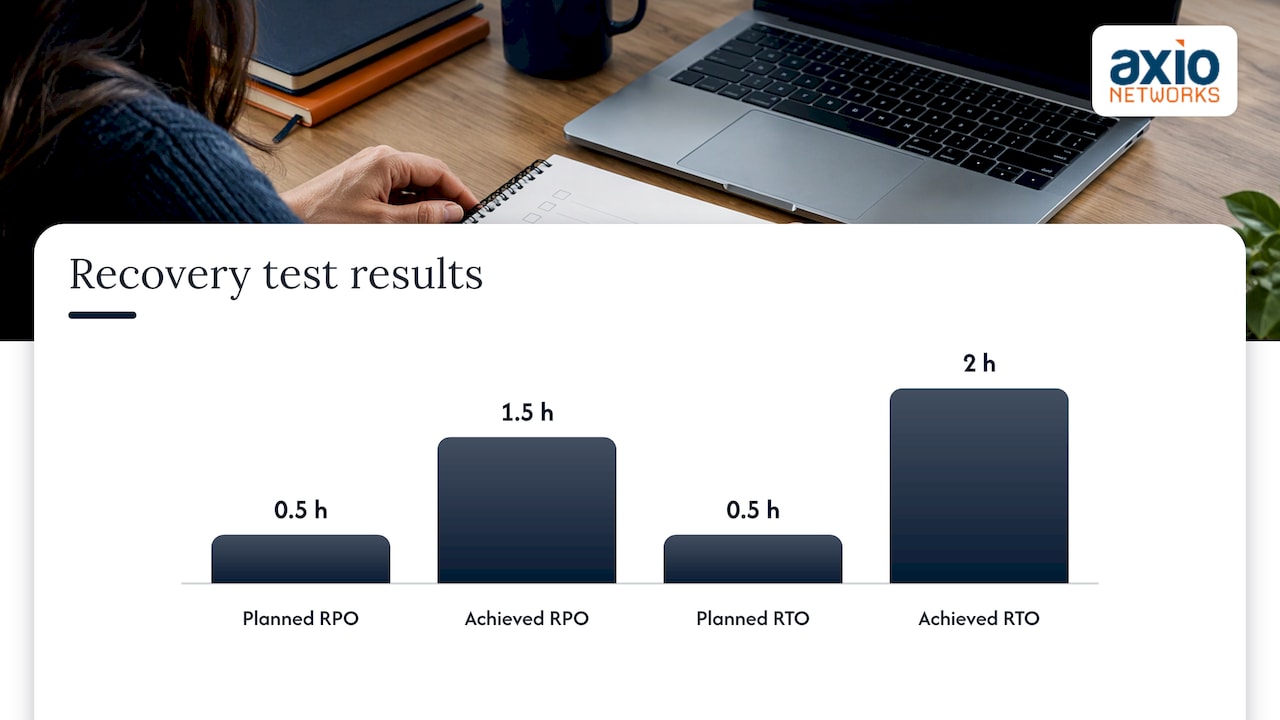
Targets on paper prove nothing. TechTarget’s own example shows a mission-critical application planned for a 0.5-hour RPO and RTO that actually achieved a 1.5-hour RPO and a 2-hour RTO, which is exactly why testing matters. The usual causes are slow restores, missing credentials, forgotten dependencies and untested steps.
A workable test routine:
- Restore a real system from backup into a safe location and time it from the start of the incident, not from the start of the restore.
- Check the age of the restored data against your RPO.
- Write down what slowed you down and fix it.
- Repeat on a schedule. Recording actual recovery results at least twice a year is a common recommendation, and any big system change is a good reason to test again.
The discipline is the same one facilities teams use for physical emergencies: rehearse regularly so the plan holds up under pressure. This write-up on monthly emergency preparedness tests shows how routine exercises check a plan against its commitments.
Our perspective
We see the same pattern with small and mid-sized businesses in the Phoenix area. Someone says “we have backups,” and nobody can say how old the newest copy is or how long a restore would take. Those are the two numbers that matter, and they are RPO and RTO.
Our view is that recovery targets belong in the same conversation as security. Most outages that force a full recovery today are caused by an attack, an error or a failed device, and a recovery plan that ignores how copies are protected will miss its RPO at the worst moment. That is why we design security into every service we deliver, backup and disaster recovery included.
We also believe in setting targets system by system and in flat, predictable pricing. When you know what a tier of protection costs each month, you can decide calmly which systems deserve a tight RTO instead of discovering the bill after an incident. A local team that knows your environment also shortens the real recovery, because the people restoring your systems have seen them before.
Jim O’Connell
Put your RPO and RTO into practice with Axio Networks
If you have worked through the steps above, you have the hard part: a list of systems with a target for each. Our backup and disaster recovery service is designed to turn those targets into a plan your team can follow, with security built in. We are a Phoenix-area managed IT and cybersecurity provider with a flat-rate pricing model, and our average response time is under 30 minutes.
If you want help setting realistic targets first, talk to us through our managed IT services page or start from axionetworks.com.
FAQ
What is RPO and RTO with an example?
Suppose your accounting system fails at noon and your last backup ran at 11:00 a.m. Your RPO was one hour, and you lose up to an hour of entries. If the system is usable again at 3:00 p.m., your actual recovery time was three hours, which you compare against your RTO. RPO describes the data you lose and RTO describes the time you are down.
What is a reasonable RTO?
It depends on what an hour offline costs you. Published examples range from near zero for transaction and financial systems to about four hours for email and up to 24 hours for print servers. Set it per system, then check that your recovery design can deliver it at a cost you accept.
Can RTO be greater than RPO?
Yes. They measure different things, so there is no required relationship. You might lose only five minutes of data but need several hours to bring the system back. What matters is that both numbers meet what the business can tolerate.
Is a backup the same as disaster recovery?
No. A backup is a protected copy of your data. Disaster recovery is the plan, tools and people that restore working systems within your RTO using data that meets your RPO. You need both, and RPO and RTO are how you judge whether they work together.
How often should I review my targets?
Review them whenever your business or systems change significantly, such as a new line-of-business application, a cloud migration or rapid growth. Test recovery on a regular schedule as well, and adjust the targets or the tools whenever measured results miss the objective.
Sources
- AWS Well-Architected Reliability Pillar: Disaster Recovery objectives
- AWS: Establishing RPO and RTO Targets for Cloud Applications
- Oracle: Introduction to Disaster Recovery
- TechTarget: RPO vs. RTO key differences explained with examples
- TechTarget: Recovery time objective (RTO)
- RiskTemplates: Setting RTO and RPO
- Druva: Understanding RPO and RTO
- Operations First: Emergency preparedness for facilities