Good spam filtering is not a switch you flip once. It is a set of settings, habits and checks that keep dangerous messages out of your inbox without burying real customer email. The businesses that get it right authenticate their own domain first, tune filter policies second, treat allowlists with caution, give employees an easy way to report suspicious mail, and review the results on a schedule. At Axio Networks we build email security into the managed IT we run for Phoenix-area businesses, so this routine is handled as part of a flat monthly fee instead of being left to whoever has time.
TL;DR
- Fix your sender authentication (SPF, DKIM, DMARC) before you tune anything else. Broken records cause legitimate mail to land in junk.
- Keep the default filtering on, then add custom policies for the users or domains that need stricter or looser handling.
- Allowlist sparingly. Every trusted sender you add is a sender your filter stops examining closely.
- Add advanced protection for attachments, links and impersonation, because plain spam filters were built to catch bulk junk, not targeted phishing.
- Give staff a one-click report button and review quarantine and false positives monthly.
Table of Contents
- What a business spam filter actually does
- Practice 1: Authenticate your own domain first
- Practice 2: Use policies, not one global setting
- Practice 3: Treat allowlists and blocklists with care
- Practice 4: Add advanced protection for phishing and impersonation
- Practice 5: Make reporting easy for employees
- Practice 6: Review the filter on a schedule
- Where a managed provider fits
- Perspective
- FAQ
- Sources
What a business spam filter actually does
A spam filter scores every inbound message and decides where it goes: inbox, junk folder or quarantine (a holding area that only administrators, and sometimes users, can release mail from). Content filters look for words and patterns common in spam. Header filters check the sender details, IP addresses and subject lines.
Modern cloud email does much of this for you. Microsoft states that every organization with cloud mailboxes is automatically protected, using filtering that learns from known spam and phishing threats and from user feedback. Messages receive verdicts such as spam, high confidence spam, phishing, high confidence phishing and bulk. High confidence phishing is always quarantined, and users cannot release those messages themselves.
That default protection is a floor, not a finished design. Microsoft also notes that spam filtering cannot be completely turned off, but administrators can change the default policy or create custom ones. By default, phishing and malware go to quarantine, while spam and bulk mail go to the user’s Junk Email folder. What you do on top of the defaults is where the best practices live.
Practice 1: Authenticate your own domain first
Three DNS-based standards tell receiving servers whether a message really came from your domain:
- SPF lists the servers allowed to send mail for your domain.
- DKIM adds a cryptographic signature to outgoing messages.
- DMARC ties the two together and tells receivers what to do when a message fails, with a policy of none, quarantine or reject.
This matters for filtering in two ways. First, Microsoft’s recommended settings guidance says threat policies work best when source domains are correctly authenticated. If SPF, DKIM or DMARC is missing or misconfigured, legitimate messages can end up in junk or quarantine even with recommended policy settings. Its advice is to fix authentication first, then tune policies. Second, NIST advises small businesses to configure email authentication technologies that verify where a message came from and reject spoofed ones.
Keep expectations realistic. NIST’s Trustworthy Email guidance explains that these standards confirm the sending server is authorized for a domain, not that a message came from a specific person. Its earlier draft also points out that a spammer who publishes a valid SPF record for their own domain passes SPF checks. Authentication protects your name and improves your delivery. It does not replace filtering of what comes in.
The common mistake is jumping straight to a strict DMARC reject policy before every legitimate sender (your invoicing tool, your newsletter platform, your CRM) is accounted for. The result is your own mail being rejected. Move in stages, watching reports as you go. Our DMARC setup guide for small businesses walks through the staging, and our write-up on stopping scammers from sending emails in your company’s name explains why this protects your customers as well as your own inbox.
Practice 2: Use policies, not one global setting
Your accounting team, your sales team and your executives do not face the same mail. Sales receives cold inbound and attachments from strangers. Finance receives invoices and wire requests, which is the favorite target of impersonators. A single sensitivity level for everyone is either too loose for the first group or too noisy for the second.
In Microsoft 365, a default anti-spam policy applies to all recipients automatically, and administrators can add custom policies for specific users, groups or domains. Use that. A practical starting layout:
- Keep the default policy as the baseline for everyone.
- Create a stricter policy for finance, HR, executives and anyone who handles payments or personal data.
- Decide where each verdict goes: junk folder for ordinary spam, quarantine for anything phishing-related.
- Document why each exception exists, so it can be reviewed later.
The same logic applies in Google Workspace, where administrators can pick a warning banner, a move to spam or quarantine for each advanced setting.
Practice 3: Treat allowlists and blocklists with care
Allowlisting a sender tells the filter to stop scrutinizing that sender. It is tempting, because a missed vendor invoice feels worse than a stray spam message. But it is also how attackers get through: a compromised partner account or a spoofed address on an allowlisted domain skips the checks meant to stop it.
Microsoft’s Exchange documentation frames the best practice this way: antispam filtering should typically run on messages from untrusted and unknown sources, because false positives are always possible, while internal and trusted-partner mail needs less filtering. That is a reason to be selective, not to allowlist whole domains. Rules of thumb:
- Allowlist a specific sender or address only after confirming the message really was legitimate, and only when authentication passes.
- Avoid allowlisting entire domains, especially large webmail or shared-hosting domains.
- Review the list at least quarterly and remove anything nobody can justify.
- Do not rely on allowlisting for security features. Google notes that its advanced security protections still apply even when a domain is listed as a safe sender.
Blocklists work the other way. Individual users can block addresses or whole domains in Outlook so those messages go straight to Junk. Useful for persistent nuisance senders, but spammers rotate addresses constantly, so a blocklist is a patch rather than a strategy. Also note that Outlook junk mail is kept for 30 days and then deleted permanently, so anything wrongly filtered needs to be found within that window.
Practice 4: Add advanced protection for phishing and impersonation
Basic filtering is tuned for bulk junk. The messages that cost small businesses real money are different: a fake invoice from a vendor you recognize, a link to a convincing login page, an attachment that installs malware. Advanced spam filtering, often sold as anti-phishing or email threat protection, targets those.
Google Workspace’s advanced protection is a good map of what the category covers. Its settings fall into three groups:
- Attachments: protection against suspicious attachments and scripts from untrusted senders, including file types uncommon for your domain.
- Links and external images: identifying links hidden behind short URLs, scanning linked images for malicious content, and warning users when they click links to untrusted domains.
- Spoofing and authentication: protection against domain spoofing, employee-name impersonation, mail pretending to come from your domain, and unauthenticated mail, which shows a question mark beside the sender’s name.
Microsoft 365 offers equivalent capabilities through its Defender for Office 365 features. In both platforms, turn the full set on for high-risk users first, and understand that warning banners may only appear in the web version of the mail client rather than in every third-party app.
Advanced filtering is also a layering question. Filters catch most of the volume, endpoint protection catches what a user opens anyway, and monitoring catches what neither expected. A layered approach to fraud prevention is the same principle applied to payments: no single control carries the whole load.
Why filter choice and tuning both matter
A March 2026 study in the International Journal of Information Security tested three open-source filters against 3,000 messages: 500 phishing and 2,500 legitimate. Rspamd blocked 486 of the 500 phishing messages with 27 false positives. Dspam blocked 495 with 25 false positives. SpamAssassin produced the most false positives, 113, and missed the most phishing messages, 33.
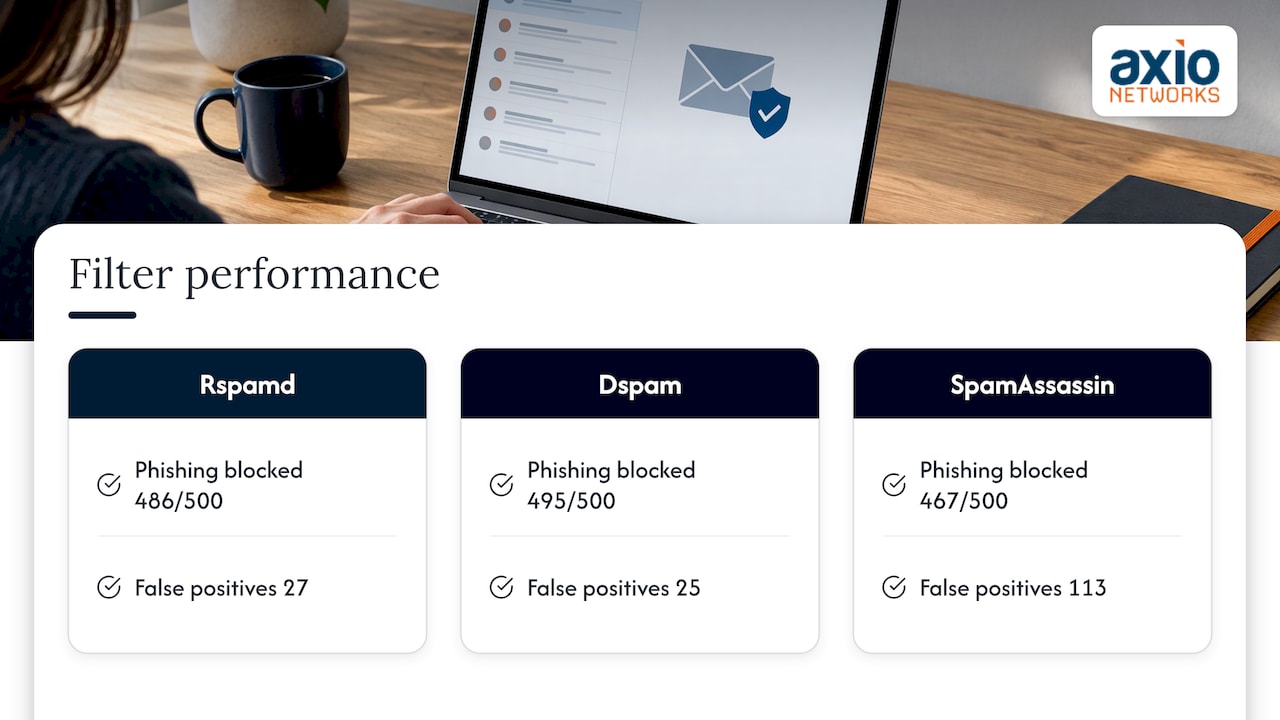
The authors’ conclusion is the practical takeaway: no single filter has an absolute advantage, and the strongest detection can come with more false positives that need constant tuning. A balanced configuration that stays stable day to day often serves a business better than the most aggressive one. In other words, the work is in the tuning, not only in the tool.
Practice 5: Make reporting easy for employees
Filters improve when people tell them what they got wrong. CISA’s Reducing Spam guidance recommends reporting messages as spam to train the filter, and occasionally checking the junk folder for legitimate messages that were misclassified. It also advises never clicking links or an unsubscribe option in spam, since that confirms your address is live.
In Microsoft 365, employees can use the built-in Report button in supported Outlook versions, and administrators can submit false positives and false negatives from the Submissions page in the Defender portal, including messages users reported. Admins can also report quarantined messages, and users can too where that is configured.
Speed and simplicity decide whether staff report anything. Cornell’s IT security office describes a reporting button that takes three clicks: select the message, click the icon, confirm. It forwards the full message, headers and attachments so IT can trace its path. That is a good model for a small business: one button, no explanation required, and a quick response so employees see that reporting is worth it.
What employees should look for
NIST lists the red flags worth teaching:
- A sense of urgency.
- A suspicious sender address, such as a bank writing from a free webmail domain.
- A request to download an attachment or click a link.
- A request for sensitive information such as bank account details or Social Security numbers.
NIST also recommends enabling multi-factor authentication, ideally the phishing-resistant kind, so a stolen password alone does not open the mailbox. Our guides on spotting a phishing email and on email security steps are written for non-technical staff and can be shared as they are.
Practice 6: Review the filter on a schedule
A filter that nobody checks drifts. New vendors start sending, staff change roles, attackers change tactics. A monthly review of about an hour keeps it honest:
- Quarantine: scan it for legitimate messages, and release and report them as not spam so the filter learns.
- User reports: read what staff flagged. Patterns (the same fake vendor, the same lure) show what the filter is missing.
- Authentication reports: confirm that legitimate senders still pass SPF, DKIM and DMARC, especially after adding any new software that sends email on your behalf.
- Allowlist: remove entries that are no longer needed.
- High-risk users: confirm the stricter policy still covers the right people.
Track two numbers over time: legitimate messages wrongly filtered (false positives) and malicious messages that reached an inbox (false negatives). The Microsoft Submissions page gives administrators a place to report both. If either number climbs, adjust policies before the problem becomes a missed customer email or a compromised account.
Where a managed provider fits
Every step above is doable, and every step is ongoing. DNS records have to be changed without breaking mail. Policies need owners. Quarantine needs a human reading it, and someone has to react when a report shows a live campaign. For a business without an internal IT team, that is the part that slips.
Axio Networks runs email security as part of its cybersecurity services, alongside Managed Microsoft 365, endpoint security and EDR, SOC monitoring and MDR, and security awareness training. Our approach is security-first, so protection is built into each service rather than bolted on, and pricing is a flat monthly rate so you can budget for it. Our team is local to the Phoenix metro area, and our average response time is under 30 minutes. If you want your filtering, authentication and reporting handled together, see our email security services or review how the layers fit under managed IT services.
For a deeper look at how the layers add up for Microsoft 365 users, our authentication checklist for Microsoft 365 email security is a good next read.
Perspective
Most of the spam problems we get called about are not filter problems. They are ownership problems. The filter exists, the defaults are on, and then nobody owns the DMARC record, nobody reads quarantine, and nobody tells the finance team that the impersonation policy was never switched on.
That is why we design security into every service we run instead of selling it as a separate project. Email is where your staff, your vendors and your customers meet, so email protection touches authentication, Microsoft 365 configuration, endpoint protection, monitoring and training all at once. When one team manages those together, a user report becomes a policy change within the same conversation.
We also think small businesses deserve to budget for this. A flat monthly rate means the monthly review, the tuning and the response when something slips through are part of the plan, not a surprise invoice. Local matters too: we work with Phoenix-area businesses every day and understand the pace of a growing company that cannot afford to lose a day of email.
Jim O’Connell
FAQ
Should I turn spam filtering to its most aggressive setting?
Not as a starting point. The 2026 filter study showed that the strongest detection can come with more false positives that need constant tuning. Start with the platform defaults, apply stricter policies to high-risk users such as finance and executives, and adjust from what your monthly review of quarantine shows.
Is the built-in filter in Microsoft 365 or Google Workspace enough?
It is a strong foundation, and spam filtering is always on in Microsoft 365. Targeted phishing, spoofing and malicious attachments are better handled with the advanced protections each platform offers, plus authentication, multi-factor authentication and staff training. Layering these controls is what NIST’s small-business guidance recommends.
Why are legitimate emails going to junk?
The most common cause is missing or misconfigured SPF, DKIM or DMARC on the sender’s domain, which can send legitimate mail to junk or quarantine even with good policies. Check authentication first, then review the policy that applies to the recipient. Release and report the message as not spam so the filter learns.
Should employees unsubscribe from spam they receive?
No. CISA advises against clicking links or unsubscribe options in spam because doing so confirms the address is valid. Report the message with the Report button and delete it. Unsubscribe only from newsletters you recognize and signed up for.
How often should we review spam filter settings?
A short monthly check of quarantine, user reports and authentication results works well, with a fuller review of allowlists and policies every quarter. Review sooner after adding new software that sends email in your name or after staff changes in finance or leadership.
Sources
- Anti-spam protection, Microsoft Defender for Office 365
- Exchange Online Protection feature details
- Recommendations for Microsoft 365 security settings
- Phishing, NIST Small Business Cybersecurity
- NIST SP 800-177 Rev. 1 draft, Trustworthy Email
- NIST SP 800-177 draft, Trustworthy Email
- Configure spam filter policies, Microsoft Learn
- Content filtering procedures, Microsoft Learn
- Advanced phishing and malware protection, Google Workspace
- Filter junk email and spam in Outlook, Microsoft Support
- Analysis and testing of systems countering phishing, International Journal of Information Security
- Reducing Spam, CISA
- Report spam, non-spam, phishing and suspicious emails, Microsoft Learn
- Report Suspicious Email with PhishAlarm, IT@Cornell
- Ecommerce fraud prevention: a layered playbook