For most small and mid-sized businesses, the answer is: scan internet-facing systems at least weekly, scan internal servers every one to two weeks, scan laptops and desktops at least monthly, and run an extra scan whenever something changes or a serious new flaw is announced. Quarterly scanning is a compliance floor, not a security plan. The more of this that runs automatically and gets reviewed by someone who fixes what it finds, the less exposure you carry between scans.
This guide explains where those numbers come from, how to adjust them for your own network, and what a scan is worth if nobody acts on the results.
TL;DR
- Scan internet-facing systems at least weekly, internal servers weekly or every two weeks, and endpoints at least monthly.
- Add a scan after any network change: new devices, new software, major updates, or an office move or expansion.
- Quarterly scans (the PCI DSS minimum) satisfy an auditor but leave up to three months of blind spots.
- A scan only reduces risk when findings are ranked, fixed, and confirmed with a rescan.
- Frequency is set by how critical the asset is, how exposed it is, and which rules you must follow.
Table of Contents
- What a vulnerability scan does, and why timing matters
- A practical scan schedule by asset type
- Compliance sets a floor, not a target
- Events that should trigger an extra scan
- Scanning is only half the work: prioritize, fix, confirm
- How to set your own cadence
- Perspective: why we pair scanning with monitoring
- Getting scanning off your plate
- FAQ
- Sources
What a vulnerability scan does, and why timing matters
A vulnerability scan is an automated check that compares your computers, servers, firewalls, cloud services and other devices against a list of known security flaws. It reports what is missing a patch, misconfigured, or running software that attackers already know how to abuse. It does not break in the way a penetration test does. It is closer to a regular inspection.
Timing matters because the list of known flaws grows every day, and your own environment changes every week. A scan is a snapshot. A clean report on the first of the month says nothing about the flaw published on the ninth or the laptop plugged in on the twelfth. The shorter the gap between snapshots, the shorter the window in which an unknown weakness sits open.
Tenable’s vulnerability management principles describe automated continuous scanning as best practice. Where that is not possible, they advise scanning at least monthly and more often based on acceptable risk, and again after changes such as new devices or significant system and software updates.
A practical scan schedule by asset type
One number for the whole company is the wrong way to think about it. Different assets carry different exposure. The table below combines the baseline in Tenable’s network scanner best-practices guide with the way public-sector standards split internet-facing and internal systems.
| Asset type | Suggested minimum | Why |
|---|---|---|
| Internet-facing systems (firewalls, VPN, web servers, remote access) | Weekly, continuous where possible | Reachable by anyone, constantly probed |
| Internal production servers | Weekly or every two weeks, with credentials | Hold your data and run core applications |
| Laptops, desktops, mobile devices | Monthly or with each patch cycle | Large number, change often, leave the building |
| Cloud workloads and containers | Moving toward continuous | They appear and disappear quickly |
| Network gear (switches, routers, printers) | Monthly | Rarely patched, easily forgotten |
| Systems covered by compliance rules | The rule’s schedule, or your own if stricter | Auditors check the interval |
Two terms in that table are worth defining. An internet-facing asset is anything an outsider can reach from the public internet. An authenticated (or credentialed) scan logs in to the device with an account, so it sees missing patches and settings that a scan from the outside cannot.
Internet-facing systems: weekly at minimum
Washington State’s technology agency requires weekly scans of internet-facing computing and networking assets and monthly scans of internal-facing assets, with a further scan after new devices are introduced. Tenable’s guide recommends at least weekly for internet-facing systems too.
The reasoning is simple. These systems are the front door. A newly published flaw in a firewall or remote access tool can be exploited within days, so a monthly check can miss the entire window.
Internal servers: weekly to biweekly
The same Tenable guide suggests authenticated scans of internal production servers weekly or every two weeks. Federal agencies run on similar rhythms. The IRS requires vulnerability enumeration across all discovered assets every 14 calendar days using privileged credentials, and the Department of Commerce sets vulnerability enumeration at least every 14 calendar days as well.
You are not a federal agency, but their numbers are a useful reference for “serious.” Every two weeks is a defensible target for the servers that hold your accounting, client files and email.
Endpoints: monthly, tied to patching
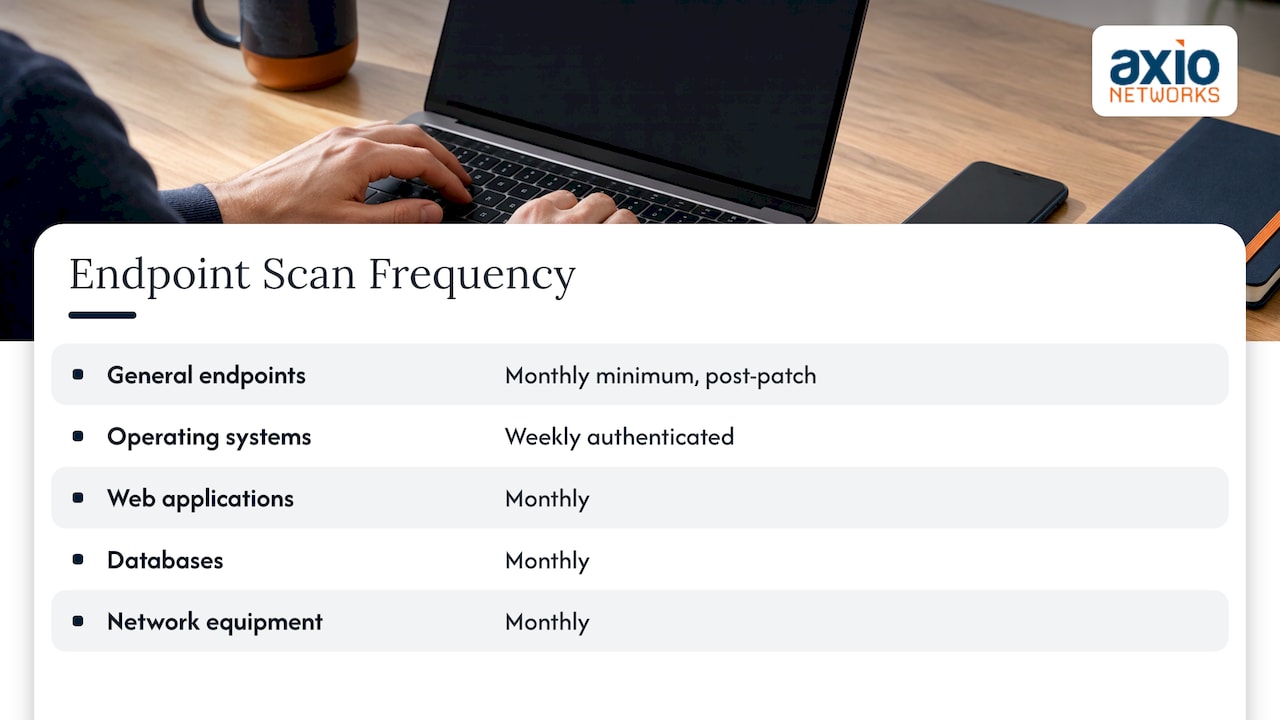
Laptops and desktops are numerous and change constantly, so the sensible rhythm follows your patch cycle. Scan monthly at minimum, shortly after patches go out, so the report confirms the updates actually landed. The U.S. Department of Education’s 2025 standard goes further for operating systems: weekly authenticated scans of operating systems, and monthly for web applications, databases and network equipment.
Remote and hybrid staff matter here. A laptop that is rarely on the office network can slip past a scan that only looks at the office. Agent-based or cloud-delivered scanning, and good endpoint protection with EDR, keep those devices visible wherever they are.
Websites and web applications
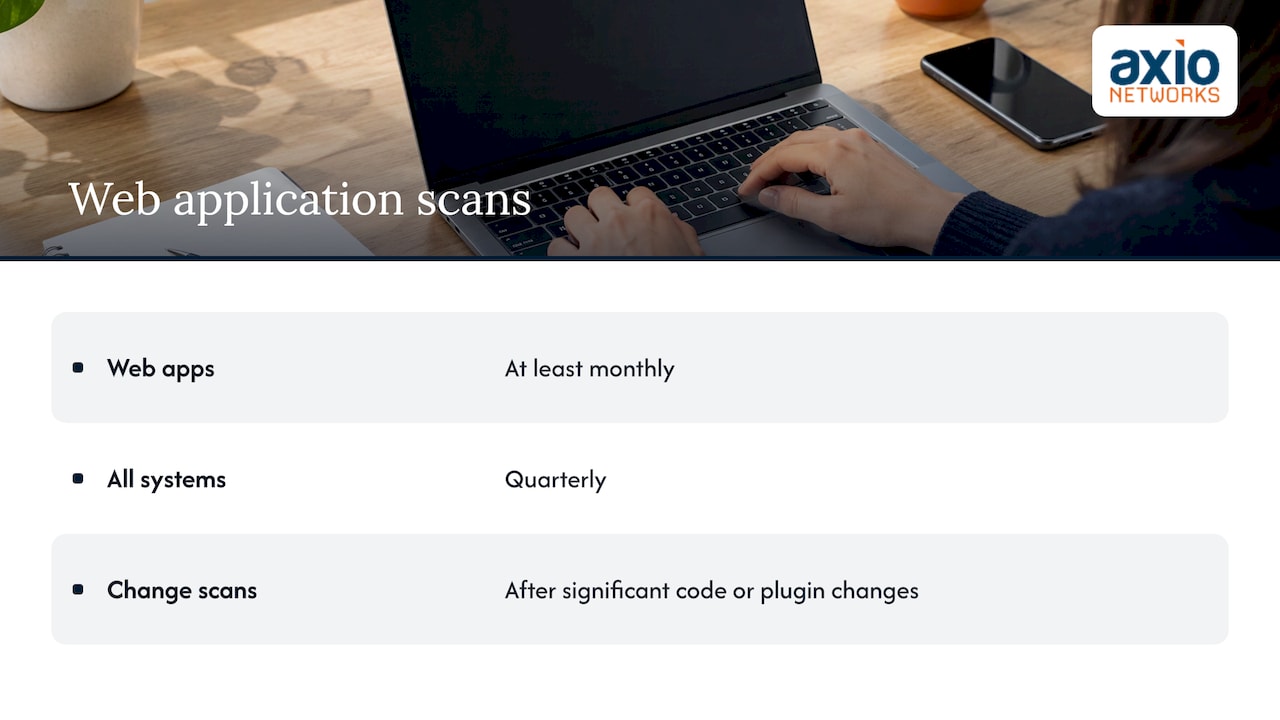
If your business runs a customer portal, online store or booking system, treat it as its own asset. The University System of New Hampshire’s standard requires web applications to be scanned at least monthly alongside quarterly scans of all systems. Scan after every significant code or plugin change as well. For background on why this protects customer trust, see these website security basics.
Compliance sets a floor, not a target
If you take card payments, PCI DSS applies. Its recurring requirement is that external scans by an approved scanning vendor happen at least every three months, and internal scans follow the same minimum interval, with extra scans after significant changes. The University System of New Hampshire’s standard uses the same quarterly baseline for internal and external scans.
Quarterly passes an audit. It does not match how fast attackers move. Public-sector standards that actually manage risk daily look very different from a four-scans-a-year schedule:
- The IRS requires automated asset discovery of the entire inventory every 7 days plus continuous network vulnerability scanning.
- The Department of Commerce requires asset discovery at least every 7 days, recommends every 72 hours, and calls 24 hours optimal.
- The Department of Education’s continuous diagnostics program scans in-scope assets every 72 hours at minimum, per its 2025 standard.
If you handle health records, financial data, or contracts that carry security clauses, check what your contract or regulator specifies and treat it as the minimum. Your attorney or compliance adviser can confirm which rules apply to your business.
Events that should trigger an extra scan
A calendar schedule covers the routine. These events call for a scan outside it:
- A network change. New devices, a new office, a new firewall, added Wi-Fi, or a cloud migration. Tenable’s guidance lists expansion, new devices and significant updates as reasons to scan again.
- A major software or infrastructure update. Updates can reopen settings you had locked down.
- A critical flaw is announced. The Department of Commerce requires on-demand scans within 72 hours of learning about a vulnerability that is listed in CISA’s Known Exploited Vulnerabilities catalog, rated Critical or High by the vendor, or scored CVSS 9.0 or higher. CVSS is a 0 to 10 severity score; the Known Exploited list names flaws attackers are already using.
- A security incident or suspected breach. Scan to find how far the problem reaches.
- After remediation. A fix is not finished until a rescan confirms it.
The 72-hour benchmark is a good one for a small business. When a flaw on the known-exploited list affects software you run, you want to know within three days whether you are exposed.
Scanning is only half the work: prioritize, fix, confirm
A report with 400 findings is not progress. Washington’s standard lays out a sensible order: rank assets by business criticality, triage anything on the CISA Known Exploited list first, and use the highest criticality or the CVSS score for the rest. It also expects a confirmation scan after patching, and compensating controls or hardening when no patch exists.
In practice that means:
- Verify the findings. Scanners produce false positives. Confirm a flaw is real before spending time on it.
- Fix what is exploited and exposed first. An internet-facing server with a known-exploited flaw outranks a printer with a medium score.
- Rescan. The same standard asks agencies to verify successful patch application with a confirmation scan.
- Mitigate when you cannot patch. Segment the device, restrict access, or switch off the vulnerable feature until a fix exists.
- Keep a record. Dates, findings, fixes and exceptions are what an auditor or cyber insurer will ask to see.
This is where most small businesses stall. The scanner runs, the report lands in someone’s inbox, and the person who received it also runs payroll. Frequency without follow-through gives you a more detailed list of problems, not fewer problems.
How to set your own cadence
Start with three questions:
- How critical is the asset? The server holding your client files deserves tighter scanning than a conference-room display.
- How exposed is it? Anything reachable from the internet moves to the top of the list.
- What do your obligations require? Card payments, health data, financial regulations and customer contracts can all set minimums.
Tenable’s guidance frames frequency as a function of asset criticality, risk tolerance and compliance requirements rather than one fixed number. For a typical 25-person office with a firewall, two servers, Microsoft 365 and a website, a workable plan looks like this:
- Firewall, VPN and website: weekly external scans.
- Two servers: authenticated scans every two weeks.
- 25 laptops: monthly, right after patch release.
- Network gear: monthly.
- Any new device, software rollout, or office change: scan within days.
- Any critical known-exploited flaw affecting software you run: scan within 72 hours.
That is roughly 40 to 60 scan runs a year across your environment instead of four, and nearly all of it can run automatically. The effort is in reading and acting on the results, not in launching them.
Perspective: why we pair scanning with monitoring
Most of the businesses we meet around Phoenix and Scottsdale do not have a scanning problem. They have a follow-through problem. A tool gets switched on, a report is generated, and nobody owns the next step.
That is why we build security into every managed and project service instead of selling it as a separate bolt-on. Risk and vulnerability management sits alongside our help desk, our SOC monitoring and our endpoint protection, so a finding becomes a ticket, a fix and a confirmed result rather than a PDF in a folder.
Our flat-rate model matters here too. When scanning, patching and monitoring are part of one predictable monthly fee, nobody hesitates to run the extra scan after a change because it might add to the bill. That is how a quarterly habit becomes a weekly one.
If you are deciding how often to scan, decide who will read the results, who will fix them and who will confirm the fix. The number follows from that.
Jim O’Connell
Getting scanning off your plate
If you do not have in-house IT staff, the practical question is who runs the schedule above and acts on it. Axio Networks provides risk and vulnerability management as part of its cybersecurity services for small and mid-sized businesses in the Phoenix metro area, with SOC monitoring and MDR watching for threats between scans. Our help desk averages a response time under 30 minutes, and our pricing is flat-rate, so the cost of keeping your systems current stays predictable.
To see what a scan schedule would look like for your office, start with our managed IT services or read what cybersecurity services cost small businesses.
FAQ
Is quarterly vulnerability scanning enough?
It satisfies the PCI DSS minimum and the baseline in some university and agency standards, but it leaves up to three months between snapshots. For internet-facing systems, weekly is the more common recommendation, and monthly is a sensible floor for everything else. Add scans after changes and after critical announcements.
How often should I scan if I have no compliance requirements?
Use the risk-based schedule: weekly for anything reachable from the internet, every one to two weeks for internal servers, and monthly for laptops and network gear. Compliance simply raises the floor. A business without a rule to follow still faces the same attackers.
Does every new device or software install need a scan?
Significant ones do. New servers, firewalls, access points, and major software rollouts should be scanned soon after they join the network, as both Washington’s standard and Tenable’s guidance advise. A routine patch to an already-scanned laptop can wait for the monthly cycle.
What is the difference between a vulnerability scan and a penetration test?
A scan is automated and checks for known flaws on a regular schedule. A penetration test is a manual exercise in which a specialist tries to exploit weaknesses to show how far an attacker could get. Scans suit frequent, ongoing checks, while penetration tests are typically periodic.
Can I scan more often than the minimum?
Yes, and most security teams do. Continuous scanning is described as best practice for internet-facing systems and cloud workloads. The practical limit is your capacity to review and fix results, which is why many businesses hand the routine to a managed provider.
Sources
- Vulnerability management principles, Tenable
- Network scanner best practices, Tenable (January 2026)
- Vulnerability Management Standard, WaTech (Washington State)
- Scanning, compliance and vulnerability requirements, IRS
- Information Technology Risk Assessment Standard, U.S. Department of Education (2025)
- Vulnerability Management Standard v1.1, U.S. Department of Commerce
- Vulnerability and Patch Management Standard, University System of New Hampshire