A WiFi site survey is a structured measurement of the radio environment inside your building, tied to a floor plan, so you know where signal is strong, where it is weak and what is getting in the way. Businesses run one before installing a new wireless network, after a layout change or equipment upgrade, and any time staff complain that the WiFi is slow or keeps dropping. This guide covers the three survey types, a practical checklist, how to read a heatmap and what moves the price.
TL;DR
- A site survey replaces guesswork with measured coverage, interference and capacity data, mapped to your actual floor plan.
- Predictive surveys are software simulations, passive surveys listen to everything in the air, and active surveys test real connections. Most business projects use more than one.
- A heatmap is only as useful as the report around it: it should lead to a specific decision about access point placement, channels or cabling.
- Cost depends on square footage, ceiling height, building materials, the applications you run and how fast you need the report. Ask for scope in writing.
- Treat surveys as periodic health checks, not a one-time event.
Table of Contents
- What a WiFi site survey actually is
- When your business needs one
- The three types of wireless site survey
- A WiFi site survey checklist
- The basic onsite cycle
- What a WiFi heatmap shows and how to read it
- Tools and measurements
- What a WiFi site survey costs
- Perspective: why we survey before we design
- How to choose someone to run your survey
- Where Axio Networks fits
- After the survey: keep it working
- FAQ
- Sources
What a WiFi site survey actually is
A wireless site survey analyzes the RF environment where WiFi is deployed. Businesses use it to plan a new network and again while the network operates, for example after layout changes, new equipment or new application demands, or to investigate performance problems.
It is not the same as opening a WiFi app on your phone. A basic scan lists nearby network names and a few signal bars. A survey records location-specific measurements as someone walks the space, then places them on a floor plan. That matters because signal quality depends on geometry, building materials, people, furnishings and where the access points sit. TechTarget makes this point when it explains why mapping beats a simple signal-bars reading.
The survey also has to be repeated. StateTech Magazine reports that experts recommend treating surveys as an ongoing, disciplined process, a periodic health check, especially as environments get more complex with Wi-Fi 6E and Wi-Fi 7.
When your business needs one
You do not need a survey every time the router hiccups. You do need one in these situations:
- A new office or build-out. Walls, ceilings and the plan for desks and conference rooms decide where access points belong. Getting it wrong means pulling cable twice.
- A move, remodel or reorganization. Moving a wall, adding a server closet or packing more people into a room changes both coverage and capacity.
- New demands on the network. Video calls, VoIP handsets, cloud applications, handheld scanners or guest WiFi all change what “good enough” means.
- Chronic complaints. If one conference room always drops calls or one wing is always slow, measurement finds the cause faster than swapping hardware. Our guide on why WiFi keeps dropping covers the simpler fixes to try first.
- Upgrading to newer standards. Wi-Fi 6E and Wi-Fi 7 use the 6 GHz band, which behaves differently through walls than 2.4 and 5 GHz. Huawei’s planning guidance says to test signal attenuation separately on the 2.4 GHz, 5 GHz and 6 GHz bands.
In the Phoenix area, add a few local realities: large open-plan warehouses and flex spaces, stucco and concrete tilt-up walls, metal roofs and, in many Scottsdale and Tempe office parks, several neighboring tenants all broadcasting on the same channels. All of these show up in survey data and are hard to predict from a floor plan alone.
The three types of wireless site survey
Cisco’s site survey guidelines for WLAN deployment describe the main types: predictive, passive and active. They differ in whether they simulate expected conditions or measure real-world performance.
| Survey type | What it does | When it fits | Limits |
|---|---|---|---|
| Predictive | Software places access points on a floor plan using coverage requirements and RF algorithms, typically without field measurements | Early planning, budgeting, bid comparison for a new space | Cannot see real interference or the true effect of your walls |
| Passive | A listen-only walk that captures all signals in the air, including neighbors’ networks | Validating coverage, finding interference and rogue devices | Does not prove a device can connect and move data well |
| Active | A survey device associates with an access point and tests real connectivity and throughput | Confirming user experience, troubleshooting slow or unstable WiFi | Slower, and it measures one network at a time |
One tool vendor’s guide explains the split in practice: a passive mode captures all RF data, while active mode associates with one access point to measure connectivity and throughput in detail. The same guide says a manual survey starts by importing a floor plan and calibrating its scale against a wall you have physically measured.
NetAlly draws a related line between predictive heatmaps and validation heatmaps. Predictive maps simulate walls and virtual access points before installation, while validation maps measure the real RF environment on site.
Which one do you need?
- Building a new network in a new space: start predictive to estimate access point count, then validate after installation with passive and active measurements.
- Fixing an existing network: skip prediction. Do a passive and active survey of what is actually there.
- Planning a refresh in an occupied office: run a validation survey of the current network first, so you know what you are replacing and why.
A WiFi site survey checklist
The checklist below follows Cisco’s guidance and the deliverables typically expected at the end.
Before the survey
- Write down the requirements. Cisco’s guidelines call for identifying RF application, facility and client-device requirements and obtaining digital floor plans. List the number of users, device types, voice or video use, guest access, and any specialty devices such as scanners or point-of-sale tablets.
- Get current floor plans. Use a scaled digital drawing. If the plan is outdated, update it first, because the heatmap is only as accurate as the plan underneath it.
- Note the construction. Walls, glass, elevators, kitchens, break rooms, server rooms, shelving and ceiling height all affect signal.
- Decide the bands. Confirm whether you need 2.4 GHz, 5 GHz and 6 GHz coverage, and which of your devices can use each.
- Plan access. Arrange after-hours entry, ladder or lift access for high ceilings, and a contact who can open locked rooms.
- Choose the tools. Cisco notes a survey can use digital floor plans, a spectrum-analysis tool and professional survey software, and can assess RSSI, SNR, noise floor and interference.
During the survey
- Inspect the facility before measuring, and mark likely access point locations and cable routes.
- Calibrate the map against a measured distance.
- Walk complete paths through every area where people will work, not just corridors. CBT Nuggets notes that continuous surveys sample while you walk steady straight paths, while stop-and-go surveys take stationary readings that are more precise but slower. Stop-and-go suits small or irregular spaces, and continuous suits large open areas.
- Set passive scanning correctly. Dwell time, the time an adapter spends on each channel, has to be configured properly so beacons are not missed in RF-heavy environments.
- Check coverage, overlap, SNR, noise and interference at each point.
After the survey
- Analyze and document. Cisco says post-validation documentation should address coverage, interference sources, equipment placement and rogue devices.
- Collect the deliverables. CBT Nuggets lists heatmap files, design notes or recommendations, a list of difficulties and punch-list items, and the survey report.
- Demand interpretation. Screenshots without explanation are not a report. The report should show clearly that your requirements were met, or what must change, without burying you in minutiae.
The basic onsite cycle
For a manual survey, NETGEAR’s white paper describes a simple loop. You place a test access point at a candidate final location and measure RF and network conditions. You then move away until readings cross your required threshold, map the boundary of acceptable coverage including adjacent rooms, and note dead spots. Then you repeat at other candidate locations until the site is mapped.
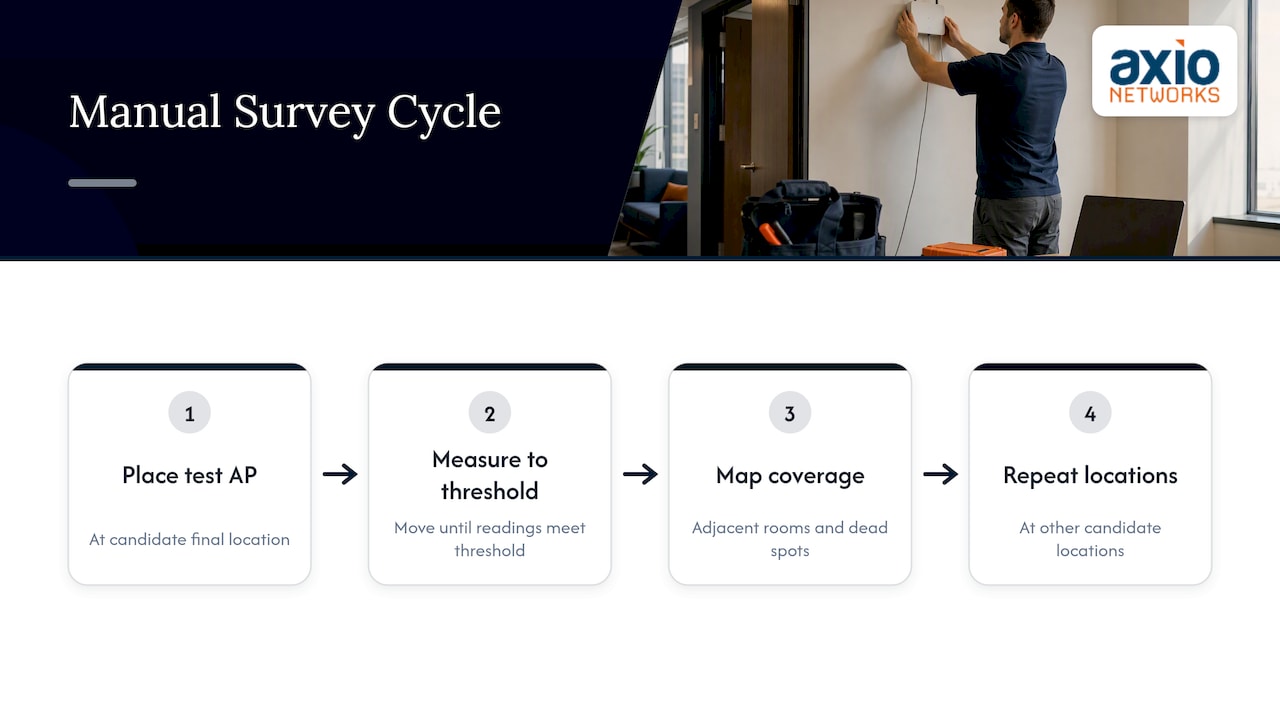
The goal is overlap: areas of acceptable signal that meet, so users can walk from the front desk to a conference room without losing connectivity or disrupting a voice or video call. That is why one strong signal in the lobby tells you very little.
What a WiFi heatmap shows and how to read it
A WiFi heatmap is a color-coded picture of a metric laid over your floor plan. Common metrics are signal strength (RSSI), signal-to-noise ratio (SNR) and interference levels. You create one by mapping survey measurements onto a digital floor plan and then looking for color shifts that mark areas needing adjustment.
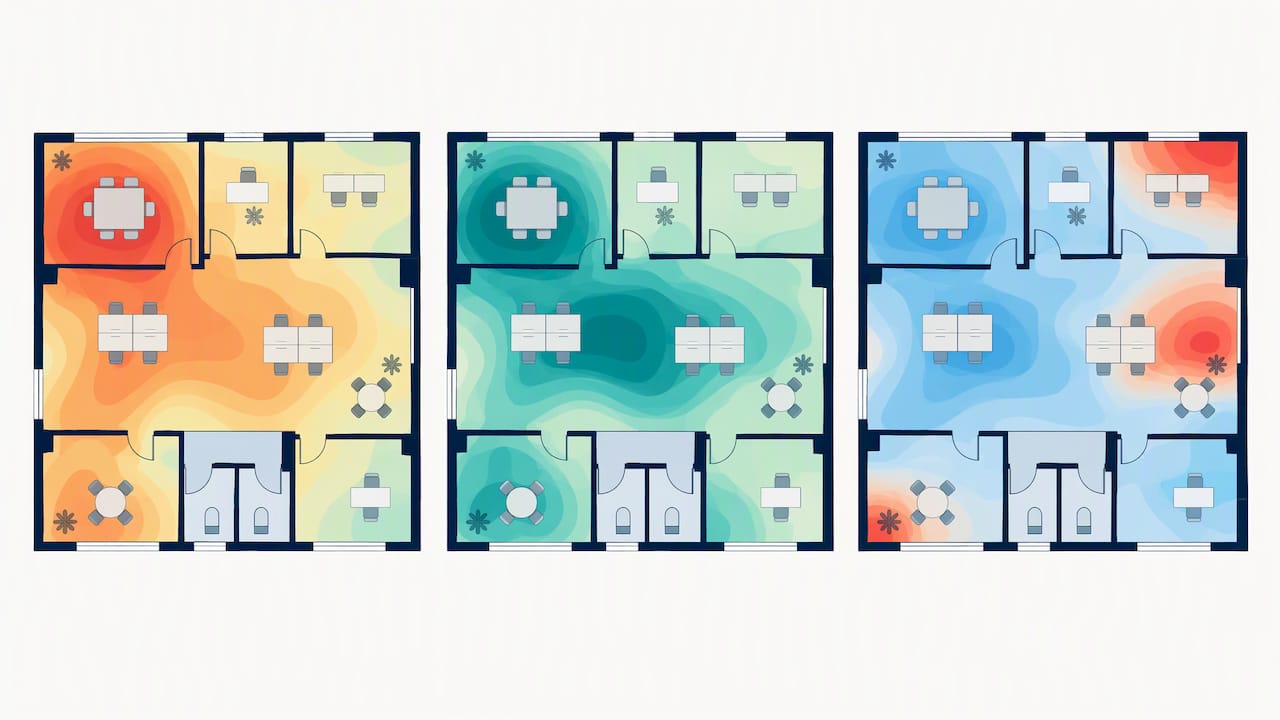
NetSpot, a survey tool vendor, describes its workflow as: create a project, load and calibrate the floor plan, walk the site taking measurements at map points, view the heatmaps, then analyze SNR, signal level, signal-to-interference ratio and band coverage before making improvements.
Reading the colors
- Signal strength map. Shows where the signal is strong or weak. Look for gaps in rooms where people actually sit, not hallways.
- SNR map. A strong signal can still perform badly when noise is high. SNR shows whether the signal stands clear of the noise floor.
- Interference or co-channel map. Shows where your own access points, or a neighbor’s, compete on the same channel.
- Roaming and overlap. Heatmaps help identify weak-signal zones, interference clusters and roaming gaps, the issues most likely to cause choppy calls as people move around.
Two cautions. First, a map showing green everywhere on one band says nothing about the others, so ask for each band separately. Second, a heatmap shows conditions on the day of the survey. A full conference room, a stocked warehouse rack or a new neighbor’s access point can change the picture, which is why periodic re-surveys matter.
Tools and measurements
Free and low-cost tools are fine for a small space or a first look. A phone app or laptop utility can show signal and channels, and some desktop survey products offer free tiers that build basic heatmaps. They have limits: consumer adapters see the air differently from the adapters in your staff’s laptops, and they rarely give you the spectrum view needed to find non-WiFi interference from things like microwaves, cordless equipment or wireless cameras.
Professional surveys combine survey software, a calibrated measurement adapter and a spectrum analyzer. The measurements that matter most are:
- RSSI: how strong the signal is where the client sits.
- SNR: how far the signal sits above the noise.
- Noise floor and interference: what else is in the channel.
- Overlap between access points: whether roaming will be smooth.
- Throughput and retries (active testing): whether the connection actually performs.
Requirements differ by use. Voice and video need tighter thresholds than email and web browsing, so define your target numbers with your provider before the walk, not after.
What a WiFi site survey costs
Pricing varies widely, because “site survey” covers everything from a free vendor simulation to a multi-day on-site engagement. Predictive surveys are often offered at no cost by equipment sellers, and that is usually reflected in lower accuracy. An active, on-site survey is billed for real labor.
These factors move the quote:
- Square footage and number of floors.
- Ceiling height and lift access. High warehouse ceilings take longer and may need equipment rental.
- Floor plans. If you do not have usable drawings, someone has to create them.
- Applications. Voice, video, scanners and high-density seating need more measurements than light office use.
- Bands tested. Adding 6 GHz adds work.
- Report depth and turnaround. Rush reports and after-hours work cost more.
- Location and travel.
Ask every provider for a written scope listing the survey type, the bands covered, what you receive (heatmap files, recommendations, punch list) and whether a follow-up validation after installation is included. Two quotes with the same label can describe very different work.
We do not publish a fixed price for surveys, because the scope depends on your building. We scope them as part of network design or a managed engagement.
Perspective: why we survey before we design
We have seen the same pattern in Phoenix-area offices for years. A business buys good access points, mounts them where the cable happened to be, and then spends months blaming the internet provider. The hardware was fine. The placement was a guess.
Our view is that a survey is the cheapest part of a wireless project and the most expensive part to skip. It tells you how many access points you need and where they belong, and it shows what is already interfering. It also gives you a baseline, so when someone says “the WiFi is slow” two years later, you can compare instead of argue.
We also treat wireless as a security question, not only a coverage question. A survey that identifies rogue access points and unexpected devices is doing security work, which is why we build security into every service we deliver. And we prefer a plain report to a pretty one: what we found, what we recommend and in what order.
— Jim O’Connell
How to choose someone to run your survey
You have three options: do it yourself, hire a survey-only specialist, or use your managed IT provider. A DIY survey makes sense for a single small room. For anything with several rooms, voice traffic or a build-out, a professional adds calibrated equipment and experience reading the results.
Whoever you choose, ask:
- Which survey types will you perform, and on which bands?
- Will you survey with the same kind of devices my staff use?
- What exactly will I receive, and will it include interpretation and a prioritized recommendation?
- Do you validate after installation?
- Who supports the network afterward?
That last question is where a survey-only vendor falls short: the report arrives and the relationship ends. If a provider already manages your network, the survey feeds directly into monitoring, changes and security.
Where Axio Networks fits
If you run a small or mid-sized business in the Phoenix metro area, we can design, install and support your wireless network under a flat monthly agreement, with security built in from the start. Our wireless networking work starts with how your people actually use the space, and our wireless network design guide explains how we think about access point placement and capacity. For ongoing care, see our managed network services.
Not sure whether WiFi is even your real problem? Start with a free IT assessment and we will tell you honestly what we see.
After the survey: keep it working
A survey pays off only if the findings are acted on. A practical sequence:
- Fix the cheap problems first: channel plans, power levels, and removing or relocating sources of interference.
- Move or add access points where the heatmap shows real gaps.
- Re-test after changes, in the same locations, so you can compare.
- Record the results as your baseline.
- Re-survey after any layout change, major equipment addition or new application, and as a periodic health check.
For more on day-to-day performance, see our article on WiFi performance and productivity and our guide to building a reliable business WiFi network.
FAQ
How much does a WiFi site survey cost?
It depends on survey type and scope. Predictive surveys are often free from equipment sellers, while active on-site surveys are priced on area, ceiling height, floor plans, bands tested, report depth and turnaround. Get a written scope from each provider so you compare like with like.
What is the difference between a wireless site survey and a WiFi heatmap?
The survey is the whole process of collecting and analyzing RF data. The heatmap is one output: a color-coded visualization of a metric, such as signal strength or SNR, on your floor plan. A good survey also includes recommendations and a list of issues.
What is the best free tool for surveying WiFi?
Free tools suit small spaces and first looks, and several desktop survey products offer free tiers that build basic heatmaps. They usually lack the calibrated adapters and spectrum analysis of a professional survey. For a multi-room office, voice traffic or a build-out, use a professional.
How often should a business repeat a site survey?
There is no single schedule, but experts recommend treating surveys as periodic health checks rather than one-time tasks. Re-survey after layout changes, new equipment, new applications such as voice or video, or when complaints start. Many businesses also check before adopting Wi-Fi 6E or Wi-Fi 7.
Sources
- 3 Types of Wireless Site Surveys and How to Conduct Them (TechTarget)
- Evaluate Wi-Fi mapping tools and best practices (TechTarget)
- Wireless Site Surveys Are Critical for Government (StateTech Magazine)
- Understand Site Survey Guidelines for WLAN Deployment (Cisco)
- Site Survey: WLAN Network Planning Guide (Huawei)
- Site Survey Guide (Oscium)
- What is a Wi-Fi Heatmap? (NetAlly)
- How to Conduct a Wireless Site Survey (CBT Nuggets)
- Site Survey Best Practices (white paper)
- Wireless Site Surveys: The Secret to Great WLAN Coverage (NETGEAR)
- How to Create WiFi Heatmaps With NetSpot
- What Is an Ekahau Wireless Survey? (IT Connect)
- Ekahau Wireless Site Survey: Plan and Validate Your Wi-Fi