To set up DMARC, you publish a single TXT record in your domain’s DNS that tells receiving mail servers what to do with messages that fail authentication, and where to send reports about them. The record takes two minutes to write. The work that matters happens before and after: making sure SPF and DKIM are working for every service that sends as you, then tightening the policy slowly so you never block your own invoices. This guide walks through that order, with a working example record.
TL;DR
- DMARC is one TXT record, but it only works if SPF and DKIM are already set up for every system that sends mail from your domain.
- Start with a monitoring-only record (
p=none) and a reporting address, then read the reports before you enforce anything. - Move to quarantine at a small percentage, raise it gradually, and finish at reject once legitimate mail passes consistently.
- Any business that sends email from its own domain needs DMARC, however small.
- If reports and DNS edits are not how you want to spend your week, hand it to your IT provider.
Table of Contents
- What DMARC does, and how SPF and DKIM fit in
- Do you need DMARC?
- Before you publish anything: the checklist
- Publish your first DMARC record
- The rollout: from monitoring to reject
- Reading DMARC reports
- Common mistakes to avoid
- Our perspective: who should own DMARC
- When to get help with DMARC
- FAQ
- Sources
What DMARC does, and how SPF and DKIM fit in
Three standards work together, and people often blur them.
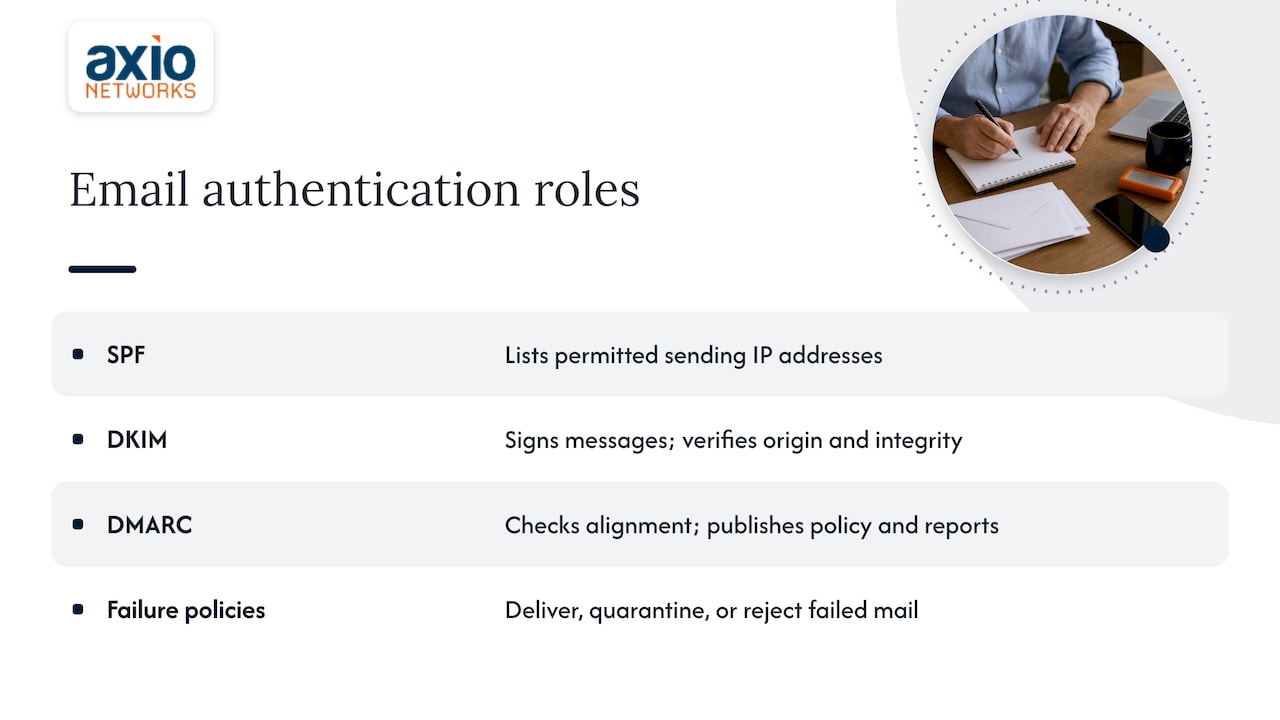
SPF lets you list the IP addresses that are allowed to send email using your domain, according to the FTC’s small-business email authentication guide. DKIM adds a digital signature to each message so the receiving server can verify it came from your server and was not altered in transit. DMARC sits on top: it checks whether the domain that SPF and DKIM verified matches the address your recipient actually sees in the From line, and it lets you tell receiving servers how to handle mail that fails, and to notify you when it happens.
NIST describes DMARC in two parts: a mechanism for publishing an authentication policy and a scalable feedback system showing how well SPF and DKIM are working. That feedback half is why DMARC is more than a block list. It shows you every system sending mail in your name, including the ones you forgot about.
The policy you publish has three possible outcomes. Google’s DMARC guide explains that policies tell receiving servers to deliver, quarantine, or reject messages that fail authentication.
What alignment means
Alignment is where most setups go wrong, so it is worth a minute. A message carries two “from” identities: the visible From address people see, and a behind-the-scenes envelope sender (the SMTP MAIL FROM domain). Microsoft explains that DMARC evaluates whether those line up with the From domain through SPF and DKIM.
A message passes DMARC when either aligned SPF or aligned DKIM passes. It fails only when both aligned checks fail. Two consequences follow:
- SPF can pass for a marketing platform’s own domain and still fail DMARC, because the domain that passed is not yours.
- Signing with DKIM using your own domain is usually the most dependable way to get a pass for third-party senders.
Do you need DMARC?
If your business sends email from its own domain, yes. New Jersey’s cybersecurity agency says DMARC is relevant to every organization, including small businesses, that sends mail from its own domain. Without it, nothing tells a receiving server what to do when someone forges your address to send fake invoices or password-reset requests to your customers.
Small companies are attractive targets for exactly this, because a familiar name on a payment request gets opened. We cover the wider problem in our post on stopping scammers from sending emails in your company’s name.
Before you publish anything: the checklist
Google’s guidance lists the preparation steps clearly, and they are worth following in order. According to Google’s setup guide, before you start you should:
- Authenticate mail from third-party senders.
- Check whether a DMARC record already exists for your domain.
- Make sure you have access to your domain host’s DNS settings.
- Set up a group or mailbox to receive reports.
- Configure SPF and DKIM first, because DMARC checks alignment with the From header.
Here is what each looks like in a typical 15-to-100-person company.
Inventory every system that sends as you
Write down everything that sends email using your domain. The usual list:
- Your main mailbox platform (Microsoft 365 or Google Workspace)
- A bulk or newsletter platform
- Your CRM and any sales-sequencing tool
- Billing and invoicing software
- Website contact forms and ecommerce notifications
- Help desk or ticketing software
- Scanners, copiers and line-of-business apps that email reports
Marketing platforms are the most common surprise. If your newsletters go out through an outside service, that service needs its own authentication set up for your domain, and it deserves the same care as your main mailbox. If you are weighing how to run those campaigns, solid email marketing management starts from a sending domain that is properly authenticated.
Check for an existing record
Someone may have published a DMARC record years ago and forgotten it. Look up the TXT record at _dmarc.yourdomain.com with any DNS lookup tool. If one exists, edit it rather than adding a second, because a domain should publish only one DMARC record.
Create a reporting mailbox
Don’t point reports at your own inbox. Microsoft recommends a dedicated shared mailbox for aggregate reports rather than an individual’s mailbox. Create something like [email protected] and give two people access. Reports arrive as automated XML attachments, and they pile up.
Get SPF and DKIM working
Turn on DKIM signing in your mail platform and publish the SPF record that covers your senders. Then send test messages from each system on your list and confirm the headers show a pass. The FTC cautions that these standards require careful configuration to avoid blocking legitimate email, and that businesses without the expertise should use an email provider that can configure them. That is sound advice. A mistake at this stage does not break DMARC, it breaks your real mail once you enforce.
If you run Microsoft 365, our three-step authentication checklist for Microsoft 365 email security covers the SPF, DKIM and DMARC pieces for that platform.
Publish your first DMARC record
A DMARC record is a TXT record published at the _dmarc host of your domain. Most DNS providers have the same form: choose TXT as the record type, enter _dmarc as the host (some providers want the full _dmarc.yourdomain.com), paste the value, and save.
Google’s rollout guidance gives this starting example:
v=DMARC1; p=none; rua=mailto:[email protected]
Google’s rollout guide says to replace the example address with an email address for your domain. Here is what each part does.
| Tag | What it does | Starter value |
|---|---|---|
v |
Identifies the record as DMARC; must come first | DMARC1 |
p |
The policy for mail that fails | none |
rua |
Where aggregate reports are sent | mailto: plus your reporting mailbox |
pct |
Percentage of failing mail the policy applies to | Only used with quarantine or reject |
The pct tag matters later. Google notes it applies to quarantine and reject only, so you leave it off while you are on p=none.
About the optional tags: Microsoft suggests starting with rua only and adding ruf, the forensic reports, later if you need them, because forensic reports can generate a high volume of mail. For a small business, rua alone is enough.
Subdomains and parked domains
Your policy applies to the domain where you publish it and, by default, to its subdomains. Domains you own but never send from (old names, typo domains) are worth protecting too. Microsoft’s documentation has a section on parked domains, since nothing legitimate should ever be sent from them.
The rollout: from monitoring to reject
Publishing p=none does not stop anything. It only starts the reports. The protection arrives when you move to enforcement, and Google’s recommended rollout does it in stages.

Stage 1: monitor with p=none
Google’s advice is to start with p=none for one week and review reports daily. Use this time to find senders that fail. A healthy report shows your known systems passing and a few unknown sources failing. Those unknown sources are either forgotten legitimate services you need to authenticate, or actual spoofing.
For most small businesses, a week is the minimum rather than the target. If you have seasonal senders (a quarterly billing run, an annual customer survey), they may not show up in a single week. Extend the monitoring period until you have seen every regular sender at least once.
Stage 2: quarantine a small percentage
If no issues appear, Google suggests moving to quarantine for a small percentage of mail, such as 10% for a small organization, and increasing gradually. Your record becomes:
v=DMARC1; p=quarantine; pct=10; rua=mailto:[email protected]
Watch for complaints. If a vendor says your quote went to spam, find which system sent it, fix its SPF or DKIM alignment, and stay at the current percentage until things are quiet. Then raise pct in steps.
Stage 3: reject
The end state is p=reject. Google’s guidance is to reject messages that fail DMARC rather than delivering them. That is what stops a forged invoice from reaching your customer’s inbox at all. Reaching it means every legitimate sender passes, so do not skip the earlier stages.
| Stage | Policy | Typical action |
|---|---|---|
| 1 | p=none |
Collect reports, fix failing legitimate senders |
| 2 | p=quarantine; pct=10, then higher |
Raise the percentage as reports stay clean |
| 3 | p=reject |
Failing mail is refused; keep reviewing reports |
Reading DMARC reports
Aggregate reports are how you learn what is happening. Google says they can identify legitimate and unauthorized sources sending mail for your domain and show authentication failures. The same guide is frank that the reports are hard for most people to read and interpret, and that matches experience: they are compressed XML files from many receiving providers.
In practice you have three options:
- Open the XML by hand. Workable for a domain with very few senders, tedious otherwise.
- Use a report-processing tool that turns the XML into a table of sending sources, with pass and fail counts.
- Have your IT provider monitor them for you.
Whichever you pick, ask the same three questions of each source in the report. Is this a system we use? Does it pass aligned SPF or aligned DKIM? If not, what has to change in its setup? Sources you do not recognize that fail are the ones DMARC exists to stop.
Common mistakes to avoid
- Jumping straight to reject. If one forgotten system is missing from your SPF or DKIM setup, its mail disappears.
- Publishing two DMARC records. Edit the existing one.
- Trusting SPF alone for third-party senders. Remember that alignment, not just a pass, is what DMARC checks.
- Sending reports to a personal inbox. It fills up, and the person leaves.
- Forgetting parked and unused domains. Attackers spoof them because nobody watches them.
- Treating it as finished. Every time you add a new platform that sends as your domain, it needs authentication before it goes live.
Our perspective: who should own DMARC
We set up email authentication for small and mid-sized businesses across the Phoenix metro area, and the pattern is consistent. The record is easy. The ownership is hard. DMARC needs someone who notices when marketing signs up for a new sending tool, when finance changes billing software, or when a vendor adds an integration, because each of those can quietly start failing alignment.
That is why we treat email authentication as part of how we run managed IT, not as a one-time project. Security is built into every service we deliver, so a DNS change that affects mail flow is reviewed by the same team that handles your help desk and your Microsoft 365 tenant. Nobody finds out about a broken sender from an angry customer.
Our advice to a business owner reading this: if you have an IT person or a provider, ask them three things. Is DMARC published for every domain we own? What policy is it on? Who reads the reports? If the answers are “not sure,” you have a gap worth closing this month.
— Jim O’Connell
When to get help with DMARC
The DIY route is realistic if you use one mail platform, have few outside senders, and are comfortable editing DNS. It gets risky when you have several sending systems, multiple domains, or no one who can read a mail header. The FTC’s guidance itself points businesses without the expertise toward providers that can configure authentication.
Axio Networks handles SPF, DKIM and DMARC as part of our email security services and our wider cybersecurity services, on a flat-rate agreement with no surprise bills. If you already use Microsoft 365, our managed Microsoft 365 service covers the tenant configuration alongside it. Our average response time is under 30 minutes, and our team is local to the Phoenix area.
If you want us to audit your current setup and walk you from monitoring to enforcement, talk to our team.
FAQ
Is DMARC mandatory?
No general law requires every small business to publish a DMARC record. But if you send email from your own domain, agencies such as New Jersey’s cybersecurity center describe DMARC as relevant to every organization that does. Your own customers, insurers or compliance frameworks may also expect it, so check what applies to you.
What is a good DMARC record example for a small business?
Start with v=DMARC1; p=none; rua=mailto:[email protected], using a real reporting mailbox on your domain. Once reports look clean, add p=quarantine with a small pct value, then work up to p=reject.
What do SPF, DKIM and DMARC each do?
SPF lists the servers allowed to send mail for your domain. DKIM signs each message so receivers can check it was not altered. DMARC checks that the SPF or DKIM result matches your visible From domain and tells receivers what to do when it does not.
How long does DMARC take to set up?
Publishing the record takes minutes. Getting to enforcement takes longer, because you need to review reports and fix every legitimate sender first. Google’s rollout starts with at least a week of monitoring, and many businesses need longer to catch infrequent senders.
Sources
- Cybersecurity for small business: Email authentication (FTC)
- Cybersecurity for Small Business: Email Authentication (FTC, PDF)
- Help prevent spoofing and spam with DMARC (Google)
- Recommended DMARC rollout (Google Workspace Admin Help)
- Set up DMARC to validate email in Microsoft 365 (Microsoft)
- Email Authentication Mechanisms: DMARC, SPF and DKIM (NIST)
- DMARC Guide (NJCCIC)
- Email marketing management (Origin Assets)