The core security awareness topics for a small or mid-sized business are phishing and social engineering, passwords and multi-factor authentication, malware and ransomware, safe remote and mobile work, physical security, data handling, and how to report an incident. Add AI-enabled impersonation and role-specific risks, such as wire fraud for finance staff. Teach them in short, repeated sessions rather than one annual slideshow.
This guide lists the topics worth your employees’ time, explains why each earns its place, and shows how to sequence them so people remember them.
TL;DR
- Start with phishing, social engineering, passwords and MFA. Together they cover the ways most attackers get in.
- Add malware and ransomware, remote and mobile work, physical security, data handling and incident reporting.
- Cover newer risks too: deepfakes, AI-written phishing, text-message scams and phone fraud.
- Give finance, IT and executives extra topics tied to their jobs.
- Teach in short sessions all year, and measure reports, not only clicks.
Table of Contents
- Why these topics, and why people come first
- The ten core topics
- Topics for specific roles
- How to schedule the topics
- Make it stick: framing and measurement
- Our perspective: topics are the easy part
- Let us run the program for you
- FAQ
- Sources
Why these topics, and why people come first
The 2024 Verizon Data Breach Investigations Report found that the human element was involved in 68% of breaches. Firewalls and endpoint tools matter, but the person reading the email is still the most common way in.
Speed is the second reason. The same report puts the median time for a user to fall for a phishing email at under 60 seconds from opening it to entering data. Nobody stops to run a technical analysis in that window. So good training builds instinct: a pause, a suspicious feeling, a habit of reporting.
For a baseline list, NIST SP 800-50 is the standard reference. It names phishing, password security, social engineering, malware, mobile security, physical security, removable media and remote work. The topics below start there and add what has changed since.
The ten core topics
1. Phishing, smishing and vishing
This is the first session for a reason. Cover how to spot a suspicious email: mismatched sender addresses, urgency, unexpected attachments, links that go somewhere other than where they claim. Then extend it beyond email. Text-message phishing (smishing) and phone-based fraud (vishing) reach people on devices your email filter never sees.
CISA, the NSA and the FBI recommend that organizations with limited resources put annual phishing awareness training with a check that employees retained it at the top of the list, alongside strong multi-factor authentication. CISA’s page on teaching employees to avoid phishing is a good free starting point for the content.
What to teach: how to recognize it, what to do with it (report, do not forward or delete), and what to do if you already clicked. That last point matters most. An employee who fears blame will hide a click for a day, and a day is plenty of time for an attacker.
2. Passwords and multi-factor authentication
Keep this practical. Teach people to use a password manager, to use long unique passphrases, and to never reuse a work password anywhere else. Then explain MFA in plain terms: even if a password leaks, the attacker still needs the second step.
Include one warning many programs skip. Attackers now send repeated approval prompts hoping someone taps “approve” out of annoyance. Tell staff that an MFA prompt they did not trigger is an alert, not an interruption. They should deny it and report it.
3. Social engineering
Phishing is one form of a wider idea: a stranger manipulates a person into doing something. Give employees the pattern rather than a list of scripts. Attackers lean on authority (“I’m the CEO”), urgency (“wire this today”), helpfulness (“I’m locked out, can you reset it?”) and secrecy (“keep this between us”).
A simple rule works well: any request involving money, credentials or sensitive data gets confirmed through a second channel you already trust, such as a known phone number, never the one in the message.
4. Malware and ransomware
Employees do not need to understand how ransomware encrypts files. They need to know how it usually arrives (attachments, fake software updates, infected downloads), what an infection looks like (slow machine, strange pop-ups, files that will not open), and the first step: disconnect from the network and call IT immediately.
This is also the place to explain why you do not let people install software on their own, and why updates are not optional. If your company has backups that are tested, say so. Staff are calmer and report faster when they know a bad click is recoverable.
5. Safe remote, hybrid and mobile work
Work now happens at kitchen tables, airports and coffee shops. Cover home Wi-Fi basics, why public networks call for care, screen privacy, locking devices, and keeping family members off company laptops. Practitioners also point to the value of a work-home connection: when people learn habits they can use in their personal lives too, they care more about them.
We have written more on this elsewhere. Start with our guide to cybersecurity for remote teams, our checklist for securing company laptops at home and our policy guidelines for working from coffee shops and coworking spaces.
6. Physical security and removable media
A tidy topic that gets forgotten. Cover tailgating (holding the door for someone you do not know), visitor handling, locking screens when leaving a desk, clean-desk habits and shredding. Include USB drives: a stick found in a parking lot or handed out at an event should never go into a company computer.
7. Data handling and privacy
People need to know what data your business holds and what rules apply to it. Customer records, payment data, health information, employee files and contracts are not all the same. Teach where each kind may be stored, who it may be shared with, and how to send it safely.
If you fall under a framework such as HIPAA, PCI DSS or a contract requirement from a client, this is where you explain what it means for daily work.
8. Safe browsing, cloud apps and shadow IT
Staff sign up for free tools to get a job done: file sharing, AI assistants, scheduling apps. Each one can become a place where company data lives without anyone watching it. Teach people how to ask for an approved tool instead of working around the rules, and make the answer quick.
9. Generative AI, deepfakes and impersonation
This topic is newer and fast-moving. Experts now stress that employees need to learn to identify AI-generated content, including deepfakes and AI-assisted impersonation. Phishing emails no longer arrive full of spelling mistakes, and a cloned voice can sound like your boss.
The practical defense is the same second-channel rule from social engineering: verify unusual requests through a known contact, whatever the voice or video appears to show. Also set a clear policy on what company data may be pasted into public AI tools. For a broader business view of how to prepare for these changes, see this piece on getting your business ready for AI.
10. Reporting and incident response
The last core topic ties the others together. Every employee should know three things: what to report, how (a button, an email address, a phone number), and that reporting quickly will be thanked, not punished.
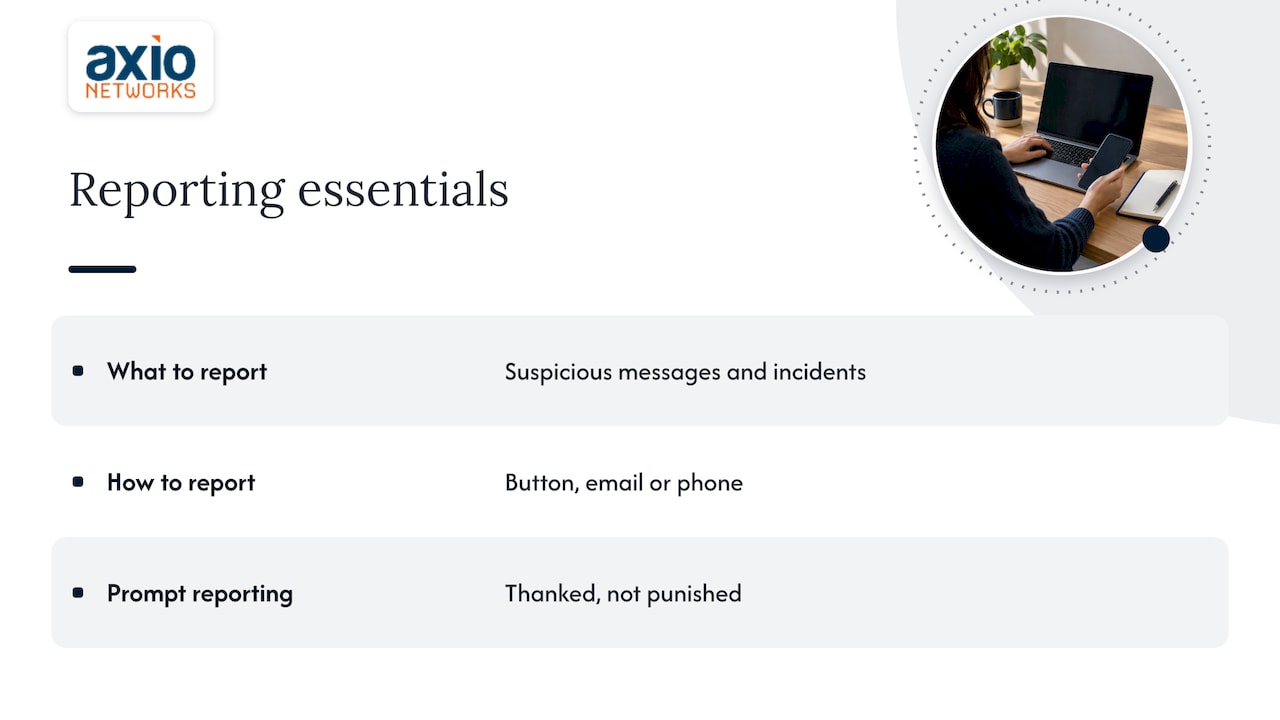
Make the path short. If reporting means filling out a form and finding a manager, people will not do it. This is also why we favor phishing simulations that track reports rather than clicks: a rising report rate tells you the culture is changing.
Topics for specific roles
Basic awareness should reach everyone, but the Canadian Centre for Cyber Security notes that specialized roles need targeted training on risks tied to their functions. For a small business, that usually means:
| Role | Add these topics |
|---|---|
| Finance and accounting | Wire and invoice fraud, vendor bank-detail changes, callback verification |
| Executives and assistants | Impersonation, targeted “whaling” emails, travel and social media exposure |
| HR | Fake job applicants, W-2 and payroll requests, protecting employee records |
| IT and administrators | Privileged account handling, patching, secure configuration |
| Customer-facing staff | Account takeover attempts, identity checks, social engineering by phone |
| New hires | A shorter version of all ten core topics in their first week |
Do not make everyone sit through everything. A receptionist does not need a session on privileged access, and an administrator does not need to hear about invoice fraud twice.
How to schedule the topics
One annual session is the pattern most small businesses fall into, and it fades fast. Practitioners at NIST’s training conference described security as a journey, not a destination, with a steady rhythm of newsletters, simulations and quick updates keeping it alive. The same source separates awareness (keeping security top of mind) from training (building measurable skills) and says you need both.
A workable calendar for a 40-person company:
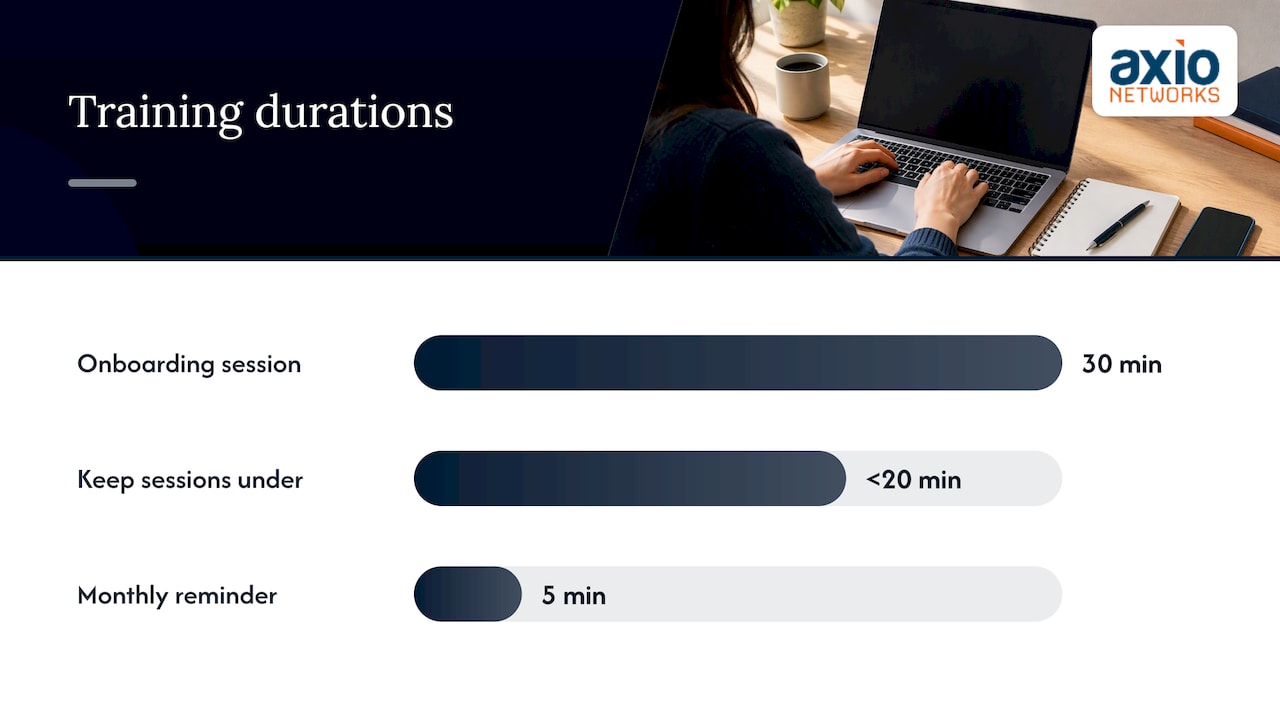
- Onboarding: a 30-minute session on phishing, passwords, MFA and reporting.
- Quarter 1: phishing and social engineering, with a simulation.
- Quarter 2: remote and mobile work, physical security.
- Quarter 3: data handling, shadow IT, generative AI and deepfakes.
- Quarter 4: ransomware response and a short quiz that checks retention.
- Monthly: a five-minute reminder, a real-world example, or a one-question poll.
Keep sessions under 20 minutes where you can. Use examples from your own industry. A dental office, a law firm and a landscaping company face different lures.
Make it stick: framing and measurement
Employees tune out when security feels like an obstacle to their real work. Research on moving beyond check-the-box compliance recommends framing security as something that protects the mission, revenue and their own privacy, not a list of prohibitions. Say it that way: you are protecting their paychecks and their customers.
Measure what changes behavior:
- Report rate: how many suspicious messages staff flag.
- Time to report: minutes between a simulated phish and the first report.
- Repeat clickers: a small group often needs a conversation, not a lecture.
- Retention checks: short quizzes weeks after a session, not minutes.
The click rate alone can mislead. If it drops because simulations got easier, you learned nothing. For a step-by-step build, read our guide to creating a cybersecurity awareness program for employees, and our case for making awareness a company-wide priority.
Our perspective: topics are the easy part
Most small businesses we meet in the Phoenix area already know what to teach. The topic list is on every vendor page. What fails is delivery: the owner buys a course, everyone clicks through it once, and nothing changes in how the office behaves on a Tuesday afternoon.
We treat awareness as one layer of a security-first design, not a separate product. Training is stronger when the tools behind it do their part: email filtering that catches most bad messages before anyone sees them, endpoint protection that contains the mistakes that slip through, and monitoring that notices odd activity at night. Then the human layer is asked to do what only humans can do, which is to pause and report.
We also push clients to pick fewer topics and repeat them. Three habits that every person actually practices (verify money requests, use MFA, report fast) will beat a 14-topic course nobody remembers. Add the rest in small doses as the year goes on, and tie each one to a real incident or a near miss from your own inbox.
Finally, we make reporting painless and blame-free. The moment an employee is embarrassed for clicking, you lose the early warning that matters most.
— Jim O’Connell
Let us run the program for you
If you do not have an in-house IT or security team, building a training calendar, running simulations and tracking results is a lot to add to someone’s job. Our security awareness training covers the topics above and is part of our cybersecurity services for small and mid-sized businesses in the Phoenix metro area. It sits alongside endpoint security and SOC monitoring, under flat-rate pricing, so you can plan the cost.
FAQ
How many security awareness topics should a small business cover?
Start with the ten core topics in this guide, but not all at once. Teach phishing, passwords and MFA, and reporting first, then spread the rest across the year. Add role-specific topics only for the staff who need them.
How often should employees be trained?
At least annually, with shorter touchpoints in between. CISA, the NSA and the FBI recommend annual phishing training with a check on retention as a minimum for resource-limited organizations. Monthly reminders and quarterly simulations keep the lessons fresh.
What is the difference between security awareness and security training?
Awareness keeps security in people’s minds through posters, newsletters and quick quizzes. Training builds specific, measurable skills, such as spotting and reporting a phishing email. A good program uses both, because relying on only one leaves gaps.
Which topic matters most for a business with no IT staff?
Phishing and social engineering, paired with MFA. Most attacks begin with a message that tricks a person, and MFA limits the damage when a password is stolen. Add a clear reporting path so problems reach whoever handles your IT quickly.
Sources
- 2024 DBIR Executive Summary, Verizon
- Building an Information Technology Security Awareness and Training Program, NIST
- Phishing Guidance: Stopping the Attack Cycle at Phase One, CISA
- Teach Employees to Avoid Phishing, CISA
- Security Awareness Training for the Workforce: Moving Beyond Check-the-Box Compliance, PMC
- Top Cyber Security Awareness Training Topics 2025, Wizer
- Offer tailored cyber security training to your employees, Canadian Centre for Cyber Security
- Building an IT Security Awareness and Training Program, FISSEA presentation, NIST