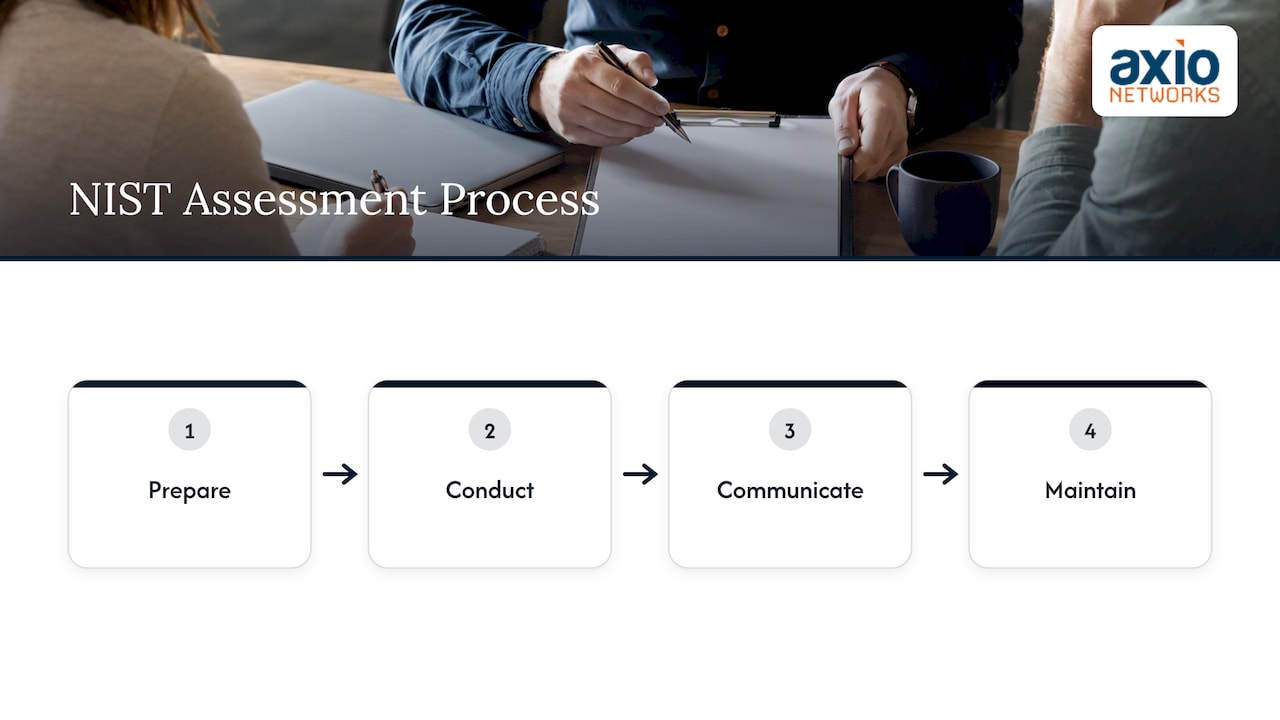
An IT risk assessment comes down to seven steps: set the scope and scoring rules, inventory your assets, identify threats and vulnerabilities, test your existing controls, score the risks, decide what to do about each one, and get leadership to sign off and keep the assessment current. NIST’s formal method has four stages (prepare, conduct, communicate, maintain). The seven steps below break those stages into work a 20-person or 200-person company can actually do.
This guide is written for owners and office managers who do not have an in-house security team. You can run most of it with a spreadsheet and a few honest conversations.
TL;DR
- Decide your scoring scales and risk appetite before you score anything, or the numbers will be arbitrary.
- Inventory everything that holds or touches business data, including cloud apps, vendors and personal devices.
- Test controls instead of trusting policies: restore a backup, check a former employee’s access, confirm MFA coverage.
- For every risk, pick one response (treat, tolerate, transfer or terminate), name an owner and set a date.
- Re-run the assessment at least yearly and after any major change. A stale assessment is a false comfort.
Table of Contents
- What an IT risk assessment is, and the framework behind it
- The seven steps at a glance
- Step 1: Set the scope and the scoring rules
- Step 2: Inventory your assets
- Step 3: Identify threats and vulnerabilities
- Step 4: Test the controls you already have
- Step 5: Score the risks
- Step 6: Decide how to treat each risk
- Step 7: Get sign-off and keep it alive
- A short IT risk assessment checklist
- Mistakes we see most often
- Our perspective: the assessment is the start of the work
- When to bring in a specialist
- FAQ
- Sources
What an IT risk assessment is, and the framework behind it
A risk assessment answers three questions: what could go wrong, how likely is it, and how badly would it hurt. The most widely used US method is NIST Special Publication 800-30 Revision 1. NIST summarizes the process as four steps: preparing for the assessment, conducting it, communicating the results, and maintaining it over time.
You do not have to be a federal agency to use it. The NIST Cybersecurity Framework 2.0 Small Business Quick-Start Guide describes the framework as voluntary and not one-size-fits-all, meant to help organizations of any size understand, assess, prioritize and communicate their cybersecurity efforts. CSF 2.0 organizes its work into six functions: Govern, Identify, Protect, Detect, Respond and Recover. If you want a plain-English walkthrough, we wrote one on what changed in NIST CSF 2.0.
CISA publishes a similar guide to getting started with a cybersecurity risk assessment, with reference tables for documenting the people and resources involved in each step. It is written for public safety communications, but the structure transfers to any small organization.
The seven steps at a glance
| Step | What you do | What you end up with |
|---|---|---|
| 1. Set scope and scoring rules | Define what is in, who decides, and what 1 to 5 means | A one-page method |
| 2. Inventory assets | List systems, data, apps, vendors, devices | An asset register |
| 3. Identify threats and vulnerabilities | Match what could hit you to where you are weak | A risk list |
| 4. Test existing controls | Verify what actually works | Evidence per control |
| 5. Score the risks | Likelihood times impact | A ranked register |
| 6. Decide the treatment | Treat, tolerate, transfer or terminate | An action plan with owners |
| 7. Sign off and maintain | Leadership accepts residual risk; review on a schedule | A living document |
Step 1: Set the scope and the scoring rules
This is the step most people skip, and it breaks everything after it. Decide first what the assessment covers: the whole company, one location, or one system such as your accounting platform. Name who owns the exercise and who has the authority to accept risk. In NIST’s terms, this is the preparation stage, which establishes context, scope and methodology.
Then define your scales. A common checklist approach warns that scoring before you define criteria and risk appetite makes results arbitrary and hard to explain to decision-makers. A simple version looks like this:
- Likelihood, 1 to 5: 1 means it is unlikely to happen in the next three years; 5 means it is happening or expected within the year.
- Impact, 1 to 5: 1 means an inconvenience fixed in an hour; 3 means a day of lost work or a client notification; 5 means you cannot operate for a week or you face legal exposure.
- Risk appetite: write down the score you will tolerate without action. Many small businesses pick anything under 6 and require action on anything 15 or above.
The exact numbers are yours to choose. What matters is that they are written down before the scoring begins.
Step 2: Inventory your assets
You cannot assess what you have not listed. Build a register covering:
- Hardware: laptops, servers, phones, firewalls, switches, wireless access points, printers.
- Software and SaaS: Microsoft 365, your accounting package, line-of-business apps, and every app employees signed up for with a company email.
- Data: customer records, payment data, employee files, contracts, and where each lives.
- People and access: who has admin rights, who has access to what, and which accounts are shared.
- Vendors: your IT provider, payroll processor, cloud hosts, and anyone with a connection into your network.
That last item matters more than most owners expect. CISA’s resource handbook on small and medium-sized business supply chains treats supplier risk as its own discipline, because a weak vendor becomes your weakness.
For each asset, note an owner and a rough value: what would it cost you if it were unavailable, altered or exposed? Rank by value so that your most important systems get the most attention. If this inventory is already out of date, that is your first finding.
Step 3: Identify threats and vulnerabilities
A threat is something that could cause harm. A vulnerability is a weakness it could use. Pair them against your most valuable assets.
Common small business threats include phishing and business email compromise, ransomware, stolen credentials, lost or stolen devices, failed hardware, insider mistakes, and outages at a vendor you depend on. Arizona businesses are not exempt. FBI Phoenix has reported that business email compromise was the top scam by money lost in Arizona across five years, based on the 2021 IC3 report. Those figures are dated, so check the latest IC3 report for current numbers, but the pattern is a useful reminder that email is where many small-business losses begin.
Typical vulnerabilities to look for:
- Unpatched operating systems, firewalls or line-of-business software
- Accounts without multi-factor authentication
- Flat networks where one infected laptop can reach the file server
- Backups that nobody has ever restored
- Former employees whose accounts are still active
- Staff who have never had security awareness training
A vulnerability scan finds the technical items automatically. It will not find the unlocked server closet or the shared password on a sticky note. We explain the difference in vulnerability assessment vs. pen testing for SMBs. Human habits belong on this list too, and they are often the biggest security risk.
Step 4: Test the controls you already have
A control is anything that reduces risk: MFA, endpoint protection, backups, email filtering, a written offboarding procedure. The trap is assuming a control works because a policy says it should. Checklist guidance makes the point that documentation without validation gives a false sense of security, and recommends spot checks such as a recent leaver’s access, a backup restore and MFA coverage.
Try these tests this month:
- Restore a backup. Pick a file and a folder at random and restore them to a test location. Time it. Whatever the backup report says, this is the real test.
- Check the last three people who left. Are their email, VPN, cloud app and remote-access accounts disabled?
- Count MFA coverage. Export the list of users and see who is not enrolled. Pay particular attention to administrators and anyone with email access to finances.
- Send a phishing test or review how many staff completed training.
- Check patch status on a sample of laptops and your firewall firmware.
If you want a view of the kinds of protections to look for, this overview of cybersecurity tools every business needs is a helpful reference when you compare your controls against a typical baseline.
Step 5: Score the risks
Now combine the likelihood and impact scales from Step 1. Multiply the two numbers for each threat-and-asset pair.
| Risk | Likelihood | Impact | Score | Action level |
|---|---|---|---|---|
| Phishing leads to a compromised email account | 4 | 4 | 16 | Act now |
| Ransomware encrypts the file server | 3 | 5 | 15 | Act now |
| Backup fails when needed | 3 | 5 | 15 | Act now |
| Laptop stolen with unencrypted data | 3 | 3 | 9 | Plan |
| Office internet outage for a day | 3 | 2 | 6 | Tolerate or plan |
These scores are an illustration of the method, not a prediction for your business. Yours will depend on your own evidence from Step 4. Do the scoring with two or three people, including someone from operations, not just whoever manages IT. Disagreements are useful: they show where your assumptions differ.
A word on multiplication. A 5 by 1 and a 1 by 5 both score 5, but a rare catastrophe may deserve more attention than the number suggests. Flag anything with an impact of 5 for discussion regardless of its score.
Step 6: Decide how to treat each risk
For each risk above your appetite line, choose one of four responses:
- Treat: add or improve a control, such as enabling MFA or deploying endpoint detection.
- Tolerate: accept it knowingly, because the cost of fixing it exceeds the likely harm.
- Transfer: shift the financial exposure, for example through cyber insurance or by contracting a specialist provider. Insurance does not remove the risk, and insurers may ask about the controls you have in place.
- Terminate: stop the activity, such as retiring an old system nobody needs.
Write each decision in the register with an owner, a due date and the expected score after the fix. This is where assessments succeed or fail. NIST’s own guidance stresses that tracking treatment plans to completion is what reduces risk, not finishing the document.
Sequence the work. A realistic order for a small business is usually identity first (MFA, admin accounts), then backups you have proven you can restore, then email and endpoint protection, then training and monitoring. Our 30/90/180 day small business cybersecurity checklist lays out one way to stage that.
Step 7: Get sign-off and keep it alive
The last step has two parts.
Sign-off. Whatever risk remains after treatment, the residual risk, should be formally accepted by someone with the authority to accept it, usually an owner or executive. NIST describes the risk assessment as an essential input for senior leaders who must decide whether to accept or mitigate risk. Put a one-page summary in front of them: top five risks, what you propose, what it costs, what remains.
Maintenance. The same NIST bulletin notes that an assessment’s value is bounded in time, because threats and business conditions keep changing. Schedule a full review annually, and trigger an early one when:
- You migrate to a new cloud platform or add a major application
- You open a new office or add remote staff
- You change IT providers
- You have an incident or a near miss
- A new contract or regulator imposes security requirements
Between reviews, continuous monitoring keeps the evidence fresh, so the next assessment starts from real data.
A short IT risk assessment checklist
Use this as a working list:
- [ ] Scope, owner and approver written down
- [ ] Likelihood and impact scales defined, risk appetite set
- [ ] Asset register complete, including SaaS and vendors
- [ ] Threats and vulnerabilities listed per critical asset
- [ ] Backup restore tested and timed
- [ ] Leaver accounts checked
- [ ] MFA coverage measured
- [ ] Risks scored and ranked
- [ ] Treatment chosen, owner and date assigned for every risk above appetite
- [ ] Residual risk signed off by leadership
- [ ] Next review date and trigger events set
Mistakes we see most often
- Scoring first, defining later. The numbers stop meaning anything.
- Assets limited to hardware. The riskiest items are often SaaS accounts and data copies in places nobody tracks.
- Trusting the policy. If you have not tested it, you do not know.
- No owner, no date. A finding without a name next to it does not get fixed.
- One and done. The assessment is filed and never opened again.
Our perspective: the assessment is the start of the work
We work with small and mid-sized businesses across the Phoenix metro, and the pattern is consistent. Owners rarely lack awareness of risk. What they lack is time, and a way to turn a long list of findings into a short list of decisions.
That is why we build security into every service we deliver rather than selling it as an add-on. An assessment that ends in a PDF changes nothing. One that ends in a prioritized plan, with someone responsible for each item and monitoring to confirm the fixes held, changes how the business runs.
Our advice is to do Steps 1 and 2 yourself, because they force your team to talk about what matters. Bring in outside help for the testing in Step 4 and for the technical scanning, where an independent view catches what familiarity hides. And do not let the exercise grow so ambitious that it never finishes: a rough assessment completed this quarter beats a perfect one planned for next year.
— Jim O’Connell
When to bring in a specialist
NIST and CISA both point small businesses that are not comfortable with a complex assessment toward using CSF 2.0 or CISA’s CSET tool as discussion starters with a managed security provider, giving both sides a common language. Consider it if you handle regulated data, you have no one who can test controls, or your last assessment is more than a year old.
Axio Networks runs cybersecurity assessments and audits and IT assessments for businesses in Phoenix and Scottsdale, then helps you act on them through our cybersecurity services and managed IT, under flat-rate pricing so remediation does not arrive as a surprise bill. Contact us through our website to talk about scope.
FAQ
What are the 5 main steps of a risk assessment?
Many sources compress the process into five: identify assets, identify threats and vulnerabilities, analyze existing controls, score the risk, and decide on treatment and documentation. The seven steps above are the same work with scoping and sign-off split out, because those are the places small businesses most often stall.
What is the NIST 800-30 risk assessment?
NIST SP 800-30 Revision 1 is the federal guide for conducting risk assessments. It organizes the work into preparing, conducting, communicating and maintaining the assessment. It is free, and small businesses can borrow its structure without adopting every formal requirement.
How often should we do an IT risk assessment?
At least once a year, plus after major changes such as a cloud migration, a new office, a change of IT provider or a security incident. NIST stresses that an assessment loses value as conditions change, so treat the date as a minimum, not a target.
Can we do it ourselves, or do we need a provider?
You can do scoping, inventory and scoring internally with a spreadsheet. Testing controls and technical scanning are where an outside party adds the most, since they bring independence and tooling. Businesses with compliance obligations should lean toward outside help.
Sources
- NIST ITL Bulletin, October 2012: risk assessment summary
- NIST SP 800-30 Revision 1, Guide for Conducting Risk Assessments
- NIST Cybersecurity Framework 2.0: Small Business Quick-Start Guide
- CISA: Guide to Getting Started with a Cybersecurity Risk Assessment
- CISA: Securing Small and Medium-Sized Business Supply Chains
- CheckFlow: IT Risk Assessment Checklist Template
- FBI Phoenix: BEC scams and the IC3 annual report